We Built One of These Tools. We're Still Going to Be Honest.
Yes, we make StoryBirdie. Yes, we want you to use it. But you're reading this because you're evaluating tools, and the fastest way to lose your trust is to pretend our competitors don't exist or don't have strengths.
So here's a genuine comparison — where each tool wins, where each falls short, and which one fits your specific workflow. We'll tell you when Boords or Katalist is the better choice for your situation.
The Quick Summary
| Feature | StoryBirdie | Boords | Katalist |
|---|---|---|---|
| Starting point | Screenplay file | Individual shot descriptions | Individual shot descriptions |
| AI script analysis | Yes (continuity, issues) | No | No |
| AI shot list generation | Yes (from screenplay) | No | No |
| AI storyboard frames | Yes | Yes (paid add-on) | Yes |
| Manual drawing tools | No | Yes | No |
| Collaboration features | No (MLP) | Yes (comments, sharing) | Yes (comments) |
| Style options | One (realistic pre-viz) | Multiple (sketch, color) | Multiple (realistic, sketch, anime) |
| Export | PDF, DOCX, GIF, video | PDF, video | |
| Free tier | 50 credits (1 full scene) | No (14-day trial) | Limited trial |
| Paid pricing | From $19/mo | From $36/mo | From $25/mo |
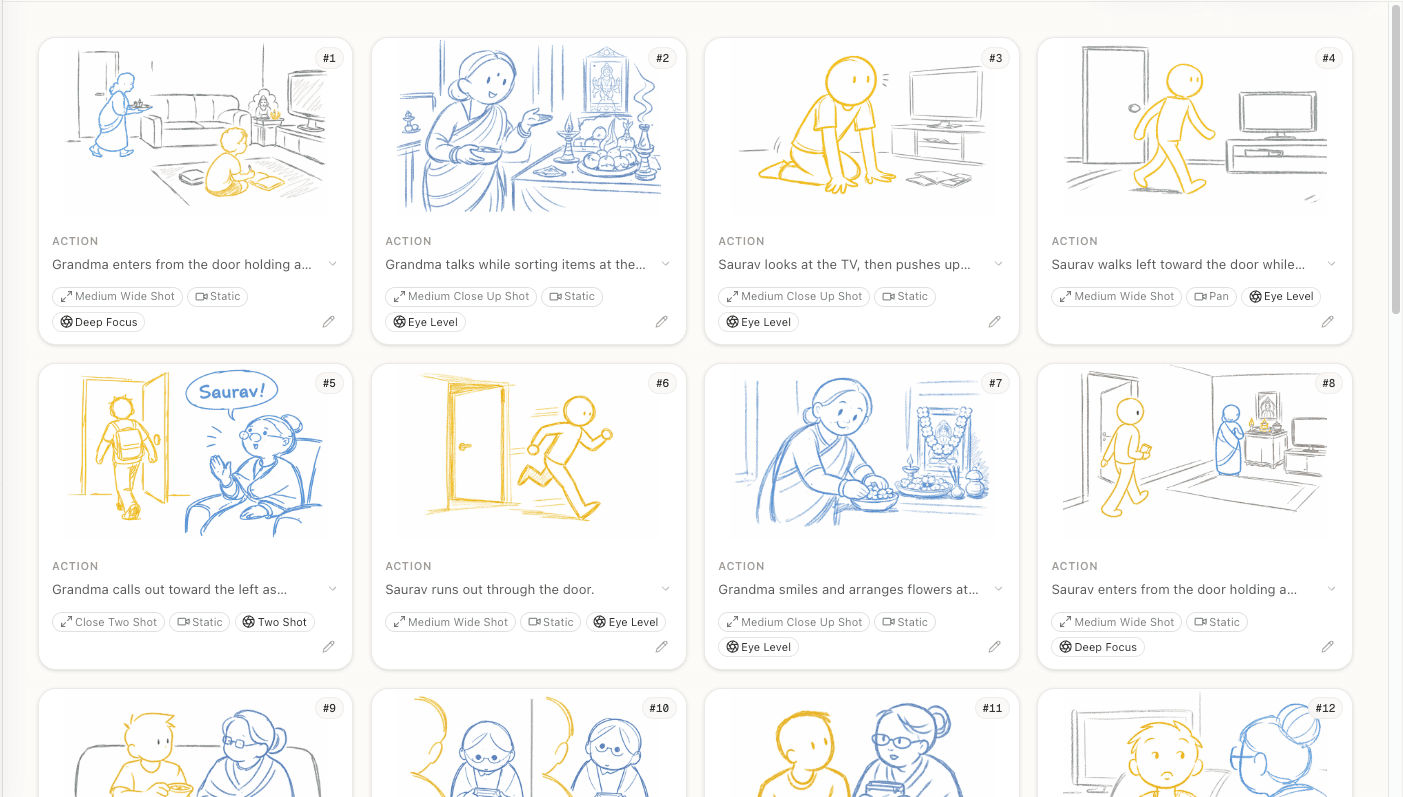
StoryBirdie: The Full Pipeline Tool
What it does differently: StoryBirdie is the only tool that starts from your screenplay file and handles the entire pre-production pipeline: upload → AI analysis → shot list → storyboard frames → export. You don't describe individual shots — the AI reads your script and generates the breakdown.
AI script analysis sets it apart. Before any shots are generated, StoryBirdie analyzes your screenplay for continuity issues, spatial inconsistencies, and missing elements. No other storyboarding tool does this — it's a script supervisor function baked into the storyboarding workflow.
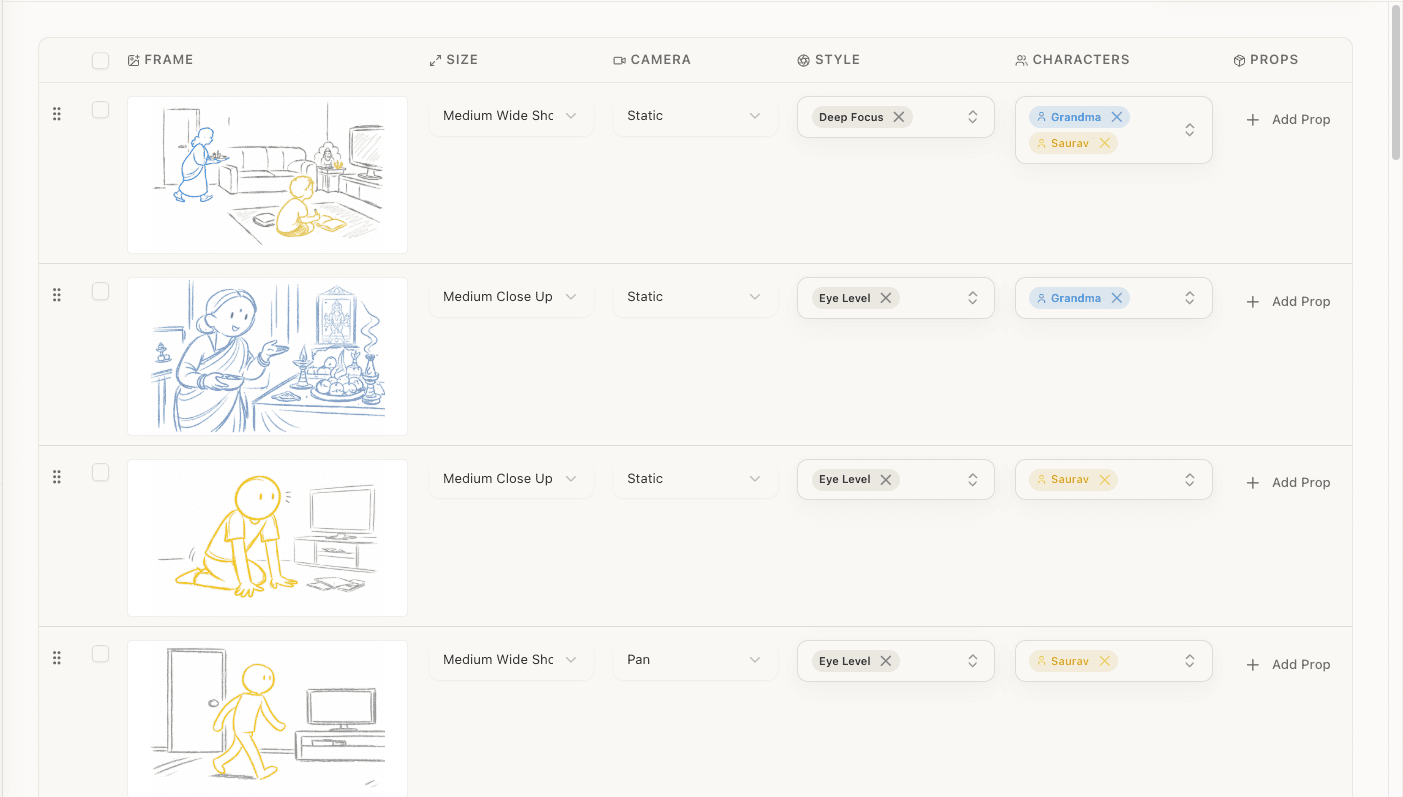
Where it wins:
- Speed. Screenplay to complete storyboard in under 10 minutes.
- Screenplay-native. The AI understands screenplay format — scene headings, action lines, dialogue — and generates shots contextually. You don't have to re-describe your scene shot by shot.
- Cost. Free tier gives you 50 credits (enough for one complete scene). Paid starts at $19/mo for 1,000 credits.
- Script analysis. Catches continuity and blocking issues before you storyboard.
Where it falls short:
- No manual drawing tools. If you want to sketch your own frames and use the tool as a canvas, StoryBirdie isn't built for that.
- No collaboration features yet. Single-user tool. Can't share projects with team members for comments (this is coming).
- One visual style. Realistic pre-visualization. No sketch, anime, or stylized options.
- MLP stage. Newer product with fewer features than mature competitors.
Best for: Indie directors who have a screenplay and want the fastest path to a visual storyboard. Especially good for directors who can't draw and don't want to describe every shot manually.
Boords: The Established Studio Tool
What it does differently: Boords is the most mature dedicated storyboarding tool. It started as a frame-by-frame editor and added AI image generation as an optional feature. Its core strength is the editing workflow — arranging frames, adding annotations, collaborating with teams.
Where it wins:
- Drawing and editing tools. Full frame editor with layers, shapes, text, and import. If you want to draw your own frames or import reference images, Boords handles it.
- Collaboration. Comments, sharing, version history, team workspaces. Built for agencies and production companies where multiple people touch the storyboard.
- Export options. PDF, DOCX, animatic GIF/video, and customizable layouts.
- Maturity. Years of polish. Fewer bugs, more edge cases handled.
Where it falls short:
- No screenplay parsing. You start from scratch — adding scenes and shots manually, describing each one individually. There's no "upload my script and go."
- AI is an add-on. The core tool is manual. AI image generation is an extra cost on top of the base subscription.
- Price. Starts at $36/mo for the Storyboarder plan, $60/mo for the Workspace plan with collaboration. AI generation adds more.
- No script analysis. Doesn't read or analyze screenplays.
Best for: Agencies, production companies, and directors who need team collaboration and want full control over frame editing. If your workflow involves a storyboard artist who draws frames and a director who reviews them, Boords is built for that.
Katalist: The AI Style Explorer
What it does differently: Katalist focuses on AI-generated storyboard frames with multiple visual styles. You describe a shot in text, choose a style (realistic, sketch, anime, etc.), and get a generated frame. It emphasizes visual variety and style consistency.
Where it wins:
- Style options. Multiple visual styles let you explore different looks for your storyboard. Useful if you're presenting to clients who want to see different aesthetic directions.
- Character consistency. Katalist puts effort into maintaining character appearance across frames — same clothing, build, and features.
- Visual quality. Frames tend to be polished and presentable.
Where it falls short:
- No screenplay input. Like Boords, you describe each shot individually. No script upload, no AI analysis, no automated shot list.
- Per-shot workflow. For a 30-shot scene, you're writing 30 text descriptions. That's slow compared to screenplay-based generation.
- No script analysis or shot list features. It's purely a frame generation tool.
- Less transparent pricing. Trial limitations vary.
Best for: Directors and creatives who want high-quality visual frames in specific styles and are comfortable describing each shot manually. Good for commercial storyboards where visual presentation quality matters for client approval.
The Real Deciding Factor
The comparison above covers features. But the real deciding factor is simpler: where does your workflow start?
If you start with a screenplay and want to get to a storyboard with minimal manual work, StoryBirdie is built for that workflow. Upload the script, let AI handle the breakdown, refine the output.
If you start with individual shot concepts and want to describe or draw each frame with maximum control, Boords gives you the richest editing environment.
If you start with visual style and want to explore how different aesthetic treatments look for your project, Katalist lets you iterate on style quickly.
Most indie directors working on narrative projects start with a screenplay. That's where StoryBirdie fits — it's built for the screenplay-first workflow that defines most indie filmmaking pre-production.
Pricing Reality Check
Let's do the math on what a typical short film storyboard actually costs with each tool.
Scenario: A 5-scene short film, ~15 shots per scene, 75 total shots.
| Tool | Cost | What You Get |
|---|---|---|
| StoryBirdie (free tier) | $0 | One complete scene (analysis + shot list + ~16 frames) |
| StoryBirdie (Starter) | $19/mo | 1,000 credits = ~55 storyboard frames + analysis + shot lists for all 5 scenes |
| Boords (Storyboarder) | $36/mo | Unlimited frames (manual), AI generation extra |
| Boords (Workspace) | $60/mo | Team features + unlimited frames |
| Katalist (paid) | ~$25/mo | AI-generated frames, style options |
StoryBirdie's free tier lets you storyboard one complete scene to evaluate the tool. No credit card, no trial expiration. If the output works for you, the Starter plan covers a full short film's storyboarding needs.
The Bottom Line
There's no "best" tool — there's the best tool for your workflow.
We built StoryBirdie because we wanted the tool that didn't exist: one that reads a screenplay and produces a complete storyboard without making the director describe every shot manually or learn to draw. If that matches how you work, give it a try.
If it doesn't match your workflow, Boords and Katalist are both good tools built by people who care about filmmakers. Use whatever makes your pre-production better.
Frequently Asked Questions
Ready to speed up your pre-production?
StoryBirdie turns your screenplay into a professional storyboard in minutes. See pricing or jump straight in.
About the author
Amit is co-founder and engineering lead at StoryBirdie. He owns the screenplay analysis pipeline, AI shot-list generator, and storyboard image stack — frontend, backend, AI, and DevOps. Alongside StoryBirdie he leads product, research, and engineering at Noumenal AI (AI research lab) and previously built Blintic AI solo and worked as ML Engineer and team lead at Docsumo. A 21-year-old engineer based in Kathmandu, Nepal — he met Aayush at an AI conference, became gym buddies, and shipped the first version of StoryBirdie in two weeks. Writes about ML and engineering at selftaughtamit.medium.com.
Keep reading
- Top 5 Alternatives to Boords in 2026Looking for Boords alternatives? Five tools for directors who need AI-first workflows, screenplay integration, or a different pricing model.·11 min read
- Free Storyboard Generator: No Drawing RequiredCreate professional storyboards from your screenplay without drawing skills. Compare free storyboard generators and learn which one fits your workflow.·9 min read
- Top 5 Alternatives to Storyboarder.ai in 2026Five Storyboarder.ai alternatives for directors who need better collaboration, continuity checking, or a different pricing model.·11 min read
- Best Storyboard Software in 2026: Honest ComparisonHonest comparison of the best storyboard software in 2026. Pricing, features, and which tool fits your directing workflow.·13 min read