The $3,000 Continuity Error That a Computer Would Have Caught
A director I know shot a 3-day short film. On day 2, they realized a character was wearing a watch in scene 4 that they weren't wearing in scene 3. The watch was plot-relevant — it comes up in dialogue later. They had to reshoot scene 3 with the watch, burning half a day of schedule and $3,000 of budget.
The screenplay clearly described the watch in scene 4's action lines. But scene 3 didn't mention it. A human reader skimmed past the inconsistency. A computer wouldn't have.
AI screenplay analysis exists specifically to catch these problems — continuity errors, blocking impossibilities, spatial inconsistencies, and missing production elements — before they become expensive on-set surprises.
What AI Screenplay Analysis Actually Does
Traditional screenplay analysis is manual. A script supervisor, line producer, or the director themselves reads the screenplay multiple times, building a mental model of every element: which characters are where, what they're wearing, what props they have, where the sun should be based on time-of-day markers.
This process is thorough when done well. It's also slow, error-prone, and subject to human fatigue. Page 47 gets less attention than page 7. The prop mentioned once in scene 12 is forgotten by scene 40.
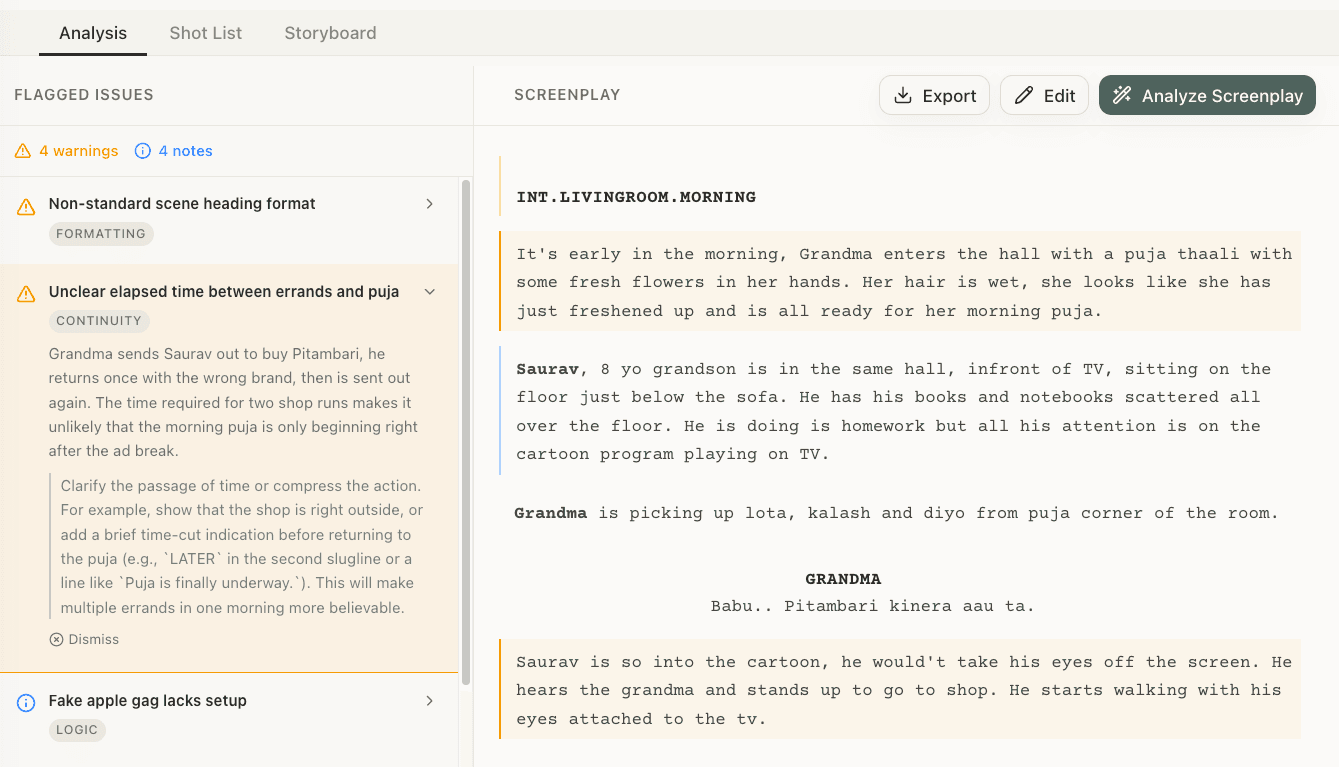
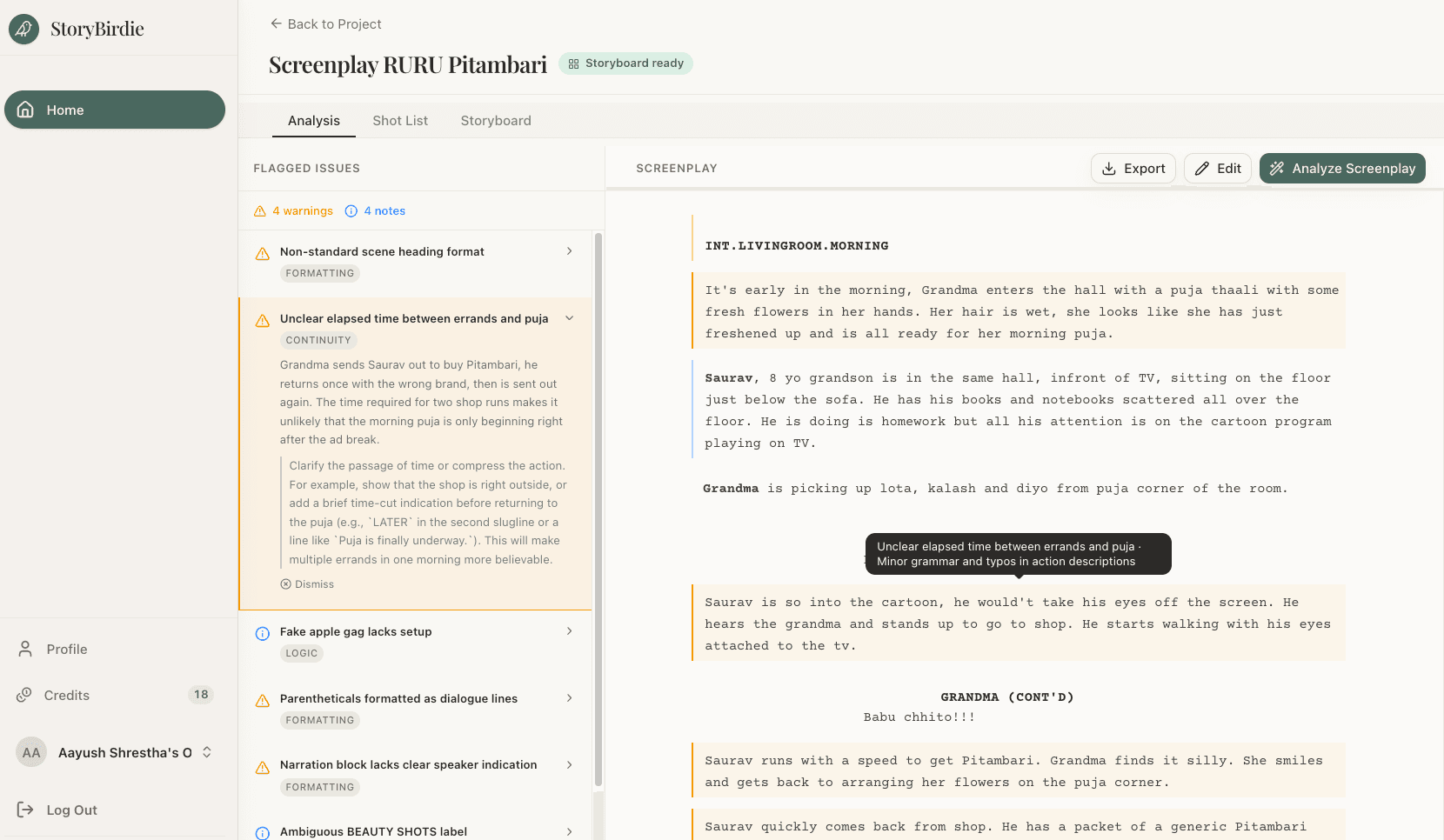
AI analysis reads every line with equal attention. It builds a database of elements as it parses:
| Element | What AI Tracks |
|---|---|
| Characters | Who's present in each scene, their emotional states, when they enter/exit |
| Props | Every object mentioned, when it appears, when it's used, when it disappears |
| Wardrobe | Clothing described in action lines, changes between scenes |
| Locations | Where each scene takes place, spatial descriptions, environmental details |
| Time | Time-of-day markers, temporal progression, elapsed time between scenes |
| Blocking | Character positions implied by action lines, movement described |
| Vehicles | Transportation mentioned, arrival/departure logic |
| Weather | Conditions mentioned or implied, consistency across linked scenes |
Then it cross-references. If a character is "sitting at the desk" in one action line and "walks to the door" in the next without standing up, that's a blocking gap. If it's "late afternoon" in scene 5 and "morning" in scene 6 with no time transition, that's a temporal inconsistency.
The Five Types of Script Errors AI Catches
1. Prop Continuity
A character picks up a cup of coffee in scene 2. In scene 3 (continuous time), they have no coffee. In scene 4, the coffee is back. This is the most common type of continuity error, and it's nearly invisible on a readthrough because humans track story, not objects.
Prop continuity errors are among the most common issues in produced short films — and they almost always originate in the screenplay. The errors that make it to screen are typically introduced in the script and carried through production because nobody catches them in pre-production.
AI catches these by tracking every prop mention across every scene and flagging inconsistencies. (For a deeper dive into catching these errors, see how to catch script continuity errors.): "COFFEE CUP appears in scenes 2 and 4 but not mentioned in scene 3 (continuous time)."
2. Spatial Impossibilities
"Character A sits behind the desk. Character B enters from behind the desk." Wait — how did B get behind the desk without walking past A? The blocking implies two entrances behind the desk, or a teleporting character.
Spatial errors are the hardest for human readers to catch because we don't naturally build 3D mental models from text. AI systems that track character positions can identify physically impossible blocking sequences.
3. Temporal Inconsistencies
Scene 10 is "NIGHT." Scene 11 is "DAY." Scene 12 is "NIGHT" again. If scenes 10-12 are continuous (no time transitions), something is wrong. If they're separate time periods, the screenplay should make that clear — otherwise the editor and colorist will be guessing.
AI checks temporal markers (INT/EXT, DAY/NIGHT, time-of-day references in dialogue) against scene sequence and flags inconsistencies.
4. Character Tracking Errors
A character who's established as being in Hospital Room A in scene 15 appears in the Office in scene 16 with no transition. If these are meant to be parallel timelines, that's fine — but the screenplay should establish the parallel structure explicitly.
AI tracks character locations scene by scene and flags appearances that don't logically follow from the previous scene.
5. Missing Production Elements
The screenplay's dialogue mentions "the photo on the mantel" but no action line ever describes the photo being placed there. The art department won't know what photo to prep, what frame, or where exactly on the mantel it goes.
AI identifies elements referenced in dialogue that lack corresponding action line descriptions — props, locations, wardrobe, and environmental details that the crew will need but the screenplay doesn't specify.
AI Analysis vs. Human Script Supervisor
AI analysis doesn't replace a human script supervisor. It handles different work:
| Task | AI Analysis | Human Script Supervisor |
|---|---|---|
| Prop tracking across 120 pages | Instant, complete | Slow, error-prone after page 50 |
| Blocking consistency | Good for described blocking | Better for implied blocking |
| Temporal logic | Excellent | Good |
| Subtext and intent | Cannot do this | Essential |
| Creative judgment | Cannot do this | Essential |
| Budget impact assessment | Cannot do this | Experienced sups can estimate |
| Speed | 30-60 seconds | 4-8 hours |
The ideal workflow: AI analysis first (catches the mechanical errors in seconds), then human review (catches the creative and subjective issues). The AI handles the inventory work. The human handles the judgment work.
How to Use AI Script Analysis in Your Workflow
Step 1: Upload Before You Storyboard
Run AI analysis on your screenplay before creating shot lists or storyboards. Fixing a continuity error in the storyboard phase means re-boarding one frame. Fixing it after shooting means a reshoot.
Step 2: Review Every Flag
AI analysis flags potential issues — it doesn't determine whether they're actual errors or intentional creative choices. A character who "teleports" between locations might be a jump cut you planned. A prop inconsistency might be a deliberate narrative choice.
Review each flag. Dismiss the intentional ones. Fix the real errors.
Step 3: Share the Analysis Report
Send the AI analysis to:
- Your script supervisor (gives them a head start on their own analysis)
- Your AD (production elements they need to prep — see screenplay breakdown for the full process)
- Your art department (props and set dressing mentioned in the script)
- Your wardrobe department (costume elements and changes)
The analysis report becomes a production prep document — not just an error list.
The ROI of AI Script Analysis
Cost of AI analysis: 1 credit (~$0.02) or free on free tier.
Cost of a continuity error that reaches set: $500-5,000 depending on reshoot requirements.
Cost of a continuity error that reaches the final cut: Audience notices, breaks immersion, appears on continuity-error lists, becomes a trivia question instead of a storytelling moment.
The math doesn't require a spreadsheet. AI script analysis is the most lopsided ROI in pre-production.
Frequently Asked Questions
Ready to speed up your pre-production?
StoryBirdie turns your screenplay into a professional storyboard in minutes. See pricing or jump straight in.
About the author
Amit is co-founder and engineering lead at StoryBirdie. He owns the screenplay analysis pipeline, AI shot-list generator, and storyboard image stack — frontend, backend, AI, and DevOps. Alongside StoryBirdie he leads product, research, and engineering at Noumenal AI (AI research lab) and previously built Blintic AI solo and worked as ML Engineer and team lead at Docsumo. A 21-year-old engineer based in Kathmandu, Nepal — he met Aayush at an AI conference, became gym buddies, and shipped the first version of StoryBirdie in two weeks. Writes about ML and engineering at selftaughtamit.medium.com.
Keep reading
- Screenplay to Storyboard: A Director's WorkflowA director's guide to turning a screenplay into a storyboard. Covers script analysis, shot lists, frame planning, and AI tools.·14 min read
- How Directors Use AI in Pre-ProductionA practical look at how indie directors are using AI tools in pre-production — from script analysis to storyboarding — and where AI falls short.·8 min read
- Storyboard Software for Directors Who Can't DrawYou don't need drawing skills to storyboard your film. Here's how directors are using AI and template tools to create production-ready storyboards.·6 min read
- Screenplay Breakdown: How to Analyze a ScriptStep-by-step guide to screenplay breakdown. Learn scene analysis, element tagging, and how to turn a script into a shooting-ready plan.·8 min read