The shot list might be the most underappreciated document in filmmaking. It's not glamorous. Nobody talks about it in interviews. But the difference between a smooth shooting day and total chaos on set often comes down to whether someone sat down and did this work.
What Is a Shot List?
A shot list is a document that describes every camera setup in your film. For each shot, it specifies the shot type, camera angle, camera movement, subject, action, and purpose. It's the definitive list of what the camera needs to capture.
If the screenplay tells the story in words and the storyboard shows it in pictures, the shot list describes it in specifications. It's the technical bridge between your creative vision and the practical reality of a shooting day.
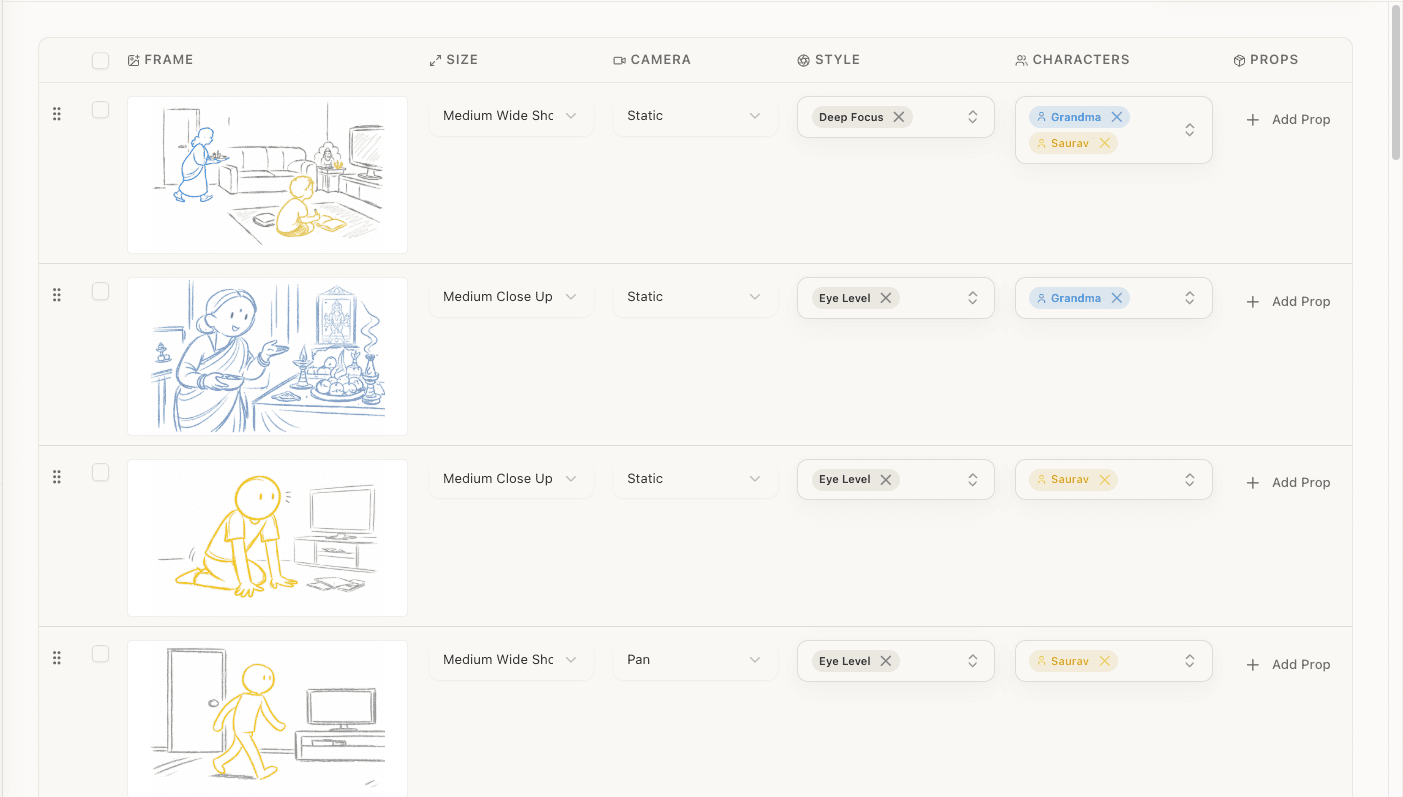
If you would rather start from a draft than a blank page, our free AI shot list generator reads your screenplay and lays down the first pass as an editable table. The rest of this guide is how to judge and fix what it gives you, which is the part that actually matters.
A shot list serves three audiences:
- The director, as a reference for what you've decided and why
- The DP, as a blueprint for camera placement, lenses, and lighting
- The AD, as a production tool for scheduling setups and estimating time
Without a shot list, you're improvising on set. Sometimes that works. Usually it doesn't. You run out of time, miss critical coverage, and leave the editor without the pieces they need.
Shot List Anatomy
Every shot on your list should specify:
| Field | Description | Example |
|---|---|---|
| Scene # | Which scene this shot belongs to | 14 |
| Shot # | Sequential number within the scene | 14-3 |
| Shot type | Size of the subject in frame | CU (close-up) |
| Camera angle | Height and position relative to subject | Low angle |
| Camera movement | How the camera moves (if at all) | Dolly in |
| Subject | Who or what the camera is focused on | SARAH |
| Action/Description | What happens during the shot | Sarah reveals the truth |
| Lens | Focal length (optional, for DP) | 85mm |
| Notes | Special requirements, emotional purpose | Key emotional beat |
Some directors add more columns (equipment needs, estimated duration, VFX notes). Some keep it minimal. The right format is whatever works for your team, but the core fields above should always be present.
Shot Types: The Language of the Camera
Every director needs to speak this vocabulary fluently. Shot types are defined by how much of the subject fills the frame.

Establishing Shots
Extreme Wide Shot (EWS): The subject is tiny in the frame, or not visible at all. Used to show landscape, cityscape, or environment. Communicates scale and context.
Wide Shot (WS): The full location is visible. Characters are present but small relative to the environment. Establishes geography and spatial relationships.
Character Shots
Full Shot (FS): A single character is visible from head to toe. Shows body language and costume while maintaining environmental context.
Medium Wide Shot / Cowboy Shot (MWS): Character visible from roughly the knees up. Named because it shows the gun holster in westerns. Balances character and environment.
Medium Shot (MS): Character visible from the waist up. The workhorse shot for dialogue, close enough to read expressions, wide enough to show gesture and blocking.
Medium Close-Up (MCU): Character visible from the chest up. Slightly more intimate than a medium shot. Common in TV dialogue.
Close-Up (CU): The character's face fills the frame. Maximizes emotional connection. Shows every micro-expression. The most powerful shot for dialogue beats where emotion matters more than action.
Extreme Close-Up (ECU): A specific detail fills the frame: an eye, a hand, a ring, a trigger. Demands the audience's attention on one specific thing.
Multi-Character Shots
Two-Shot: Two characters in frame simultaneously. Communicates their spatial relationship and allows both reactions to be visible.
Over-the-Shoulder (OTS): Shot past one character's shoulder at the other character. Creates depth and implies conversation. The standard dialogue coverage setup alongside singles.
Group Shot: Three or more characters in frame. Establishes group dynamics and spatial arrangements.
Specialty Shots
POV (Point of View): The camera shows what a character sees. Requires careful eye-line matching with the preceding and following shots.
Insert: A close-up of an object or detail: a letter being read, a clock, a phone screen. Draws attention to a specific piece of visual information.
Cutaway: A shot of something outside the main action: a bystander watching, a bird flying overhead, a clock on the wall. Used for pacing, transitions, and to give the editor escape routes.
Reaction Shot: A shot focused on a character who's listening or observing, not speaking or acting. Often the most important shot in a scene. The audience reads the story through reactions.
Camera Angles
Angle describes where the camera is positioned relative to the subject, both vertically and horizontally.
Vertical Angles
Eye Level: Camera at the subject's eye height. Neutral. Doesn't impart psychological weight. The default for most shots.
High Angle: Camera above the subject, looking down. Makes the subject appear smaller, weaker, or more vulnerable. Can also create an objective, observational feeling.
Low Angle: Camera below the subject, looking up. Makes the subject appear larger, more powerful, or more threatening. Common for hero moments and villain introductions.
Overhead / Bird's Eye: Camera directly above the subject. Dehumanizing or god-like perspective. Creates striking compositions but can feel disconnected from the characters.
Dutch Angle / Canted Angle: Camera tilted on its axis so the horizon is diagonal. Communicates unease, disorientation, or instability. Use sparingly; overuse becomes distracting.
Worm's Eye: Camera at ground level, looking up. Extreme version of low angle. Creates dramatic distortion and unusual perspectives.
Horizontal Angles
Front-On: Camera faces the subject directly. Confrontational, direct. Think Wes Anderson's centered compositions.
Three-Quarter: Camera offset roughly 45 degrees from the subject. The most common and natural-feeling angle for character shots.
Profile: Camera perpendicular to the subject (90 degrees). Silhouette-friendly. Creates a flat, graphic composition.
Rear: Camera behind the subject. Creates mystery (we can't see their face), alignment (we see what they see), or vulnerability (exposed back to the camera).
Camera Movement
Movement describes how the camera physically moves during a shot.
| Movement | What It Does | Emotional Effect |
|---|---|---|
| Static | Camera doesn't move | Stability, observation, formality |
| Pan | Camera rotates horizontally (L↔R) on a fixed point | Reveals space, follows action |
| Tilt | Camera rotates vertically (up↔down) on a fixed point | Reveals height, scans a subject |
| Dolly | Camera moves forward/back on a track or wheels | Creates intimacy (in) or distance (out) |
| Truck | Camera moves laterally (left↔right) on a track | Follows action parallel to movement |
| Crane/Jib | Camera moves up or down vertically | Establishes or transitions, reveals scale |
| Handheld | Camera operator carries the camera | Urgency, realism, instability |
| Steadicam | Stabilized operator-carried camera | Smooth following shots, long takes |
| Zoom | Lens changes focal length (camera stays put) | Draws attention (in), reveals context (out) |
| Push-in | Slow dolly toward subject | Building tension, increasing focus |
| Pull-back | Slow dolly away from subject | Revelation, isolation, ending |
Building Your Shot List: Step by Step
Start with Your Screenplay Breakdown
Your screenplay breakdown tells you what's in each scene: characters, props, locations, time of day. This is the raw material for your shot list. You can't determine what shots you need until you know what the scene contains. I've seen directors skip this step and jump straight into shot planning. They always end up going back.
Identify Beats in Each Scene
A "beat" is a moment where something changes: an entrance, an exit, an emotional shift, new information, a physical action. Each beat typically needs at least one shot to cover it. A simple dialogue scene with 6 beats needs minimum 6 shots, likely more with master and coverage. This is where you start to see why even a short scene generates a surprisingly long shot list.
Determine Coverage for Each Beat
For each beat, decide what shots you need: master shot (your safety net), character coverage (each speaking/reacting character), reaction shots (often more important than the speaker), inserts (props and details), and transitional shots (entering and exiting the scene).
Choose Shot Specifications
For each shot, specify type, angle, and movement. Ask: What does this shot communicate? (Emotion → CU, geography → WS). What should the audience feel? (Power → low angle, vulnerability → high). Is there motion? (Following → dolly, tension → push-in). Every specification should have a reason. If you can't articulate why a shot is a low angle, it probably shouldn't be one.
Order the Shots
List shots in story order (not shooting order). Add a "setup" column to help the AD group shots by camera position, since shots from the same camera position share a setup, saving time on set.
Review for Coverage and Efficiency
Coverage check: Can the editor build the scene? Efficiency check: How many setups? Can shots share camera positions? Budget check: Plan for 15–25 shots per day for a standard narrative shoot. This is the step that separates a wish list from a real production plan.
Shot List for a Sample Scene
A complete shot list for this scene:
INT. DETECTIVE'S OFFICE - NIGHT

Rivera sits at her desk, reviewing case files.
A knock at the door. Chen enters.

                    CHEN
          Got the lab results back.

Rivera looks up, takes the folder, reads.

                    RIVERA
          This changes everything.
| Shot | Type | Angle | Movement | Subject | Action | Notes |
|---|---|---|---|---|---|---|
| 22-1 | WS | Eye | Static | Office | Rivera at desk, full room visible | Master/establish |
| 22-2 | MS | Eye | Static | RIVERA | Working at desk, absorbed in files | Show dedication |
| 22-3 | MS | Eye | Static | Door | Knock; Chen enters with folder | Setup: same as 22-1 |
| 22-4 | CU | Eye | Static | RIVERA | Looks up at Chen | Interrupted focus |
| 22-5 | MS | Eye | Static | CHEN | "Got the lab results back" | Delivering news |
| 22-6 | Insert | High | Static | Folder | Rivera opens folder, key detail visible | Audience sees evidence |
| 22-7 | CU | Eye | Slow push-in | RIVERA | "This changes everything" | Key moment; push-in builds weight |

Seven shots, but only 4 setups:
- Setup A (wide): shots 22-1, 22-3
- Setup B (Rivera's desk): shots 22-2, 22-4, 22-7
- Setup C (Chen at door): shot 22-5
- Setup D (insert): shot 22-6
Common Shot List Mistakes
Not including a master shot. The master is your safety net. Even if you plan to cut between tight shots, the master gives the editor an escape route when the coverage doesn't work as planned. And it will happen. Always shoot a master.
Forgetting reaction shots. New directors instinctively shoot the person talking. But the story often lives in the person listening. Watch any scene you admire closely and count how much time is spent on the listener's face. Plan reaction shots for every significant moment.
Inconsistent terminology. If you call the same shot a "close-up" in one scene and a "tight shot" in another, your DP has to guess whether you mean the same framing. Pick your terms and stick with them.
Too many shots for the schedule. Ambition on paper is cheap. But 50 shots in a half-day scene means you're either rushing (compromising quality) or running overtime (compromising the budget). I find it helpful to be honest about pace: most crews average 15-25 setups per day.
Not connecting to the storyboard. Your shot list and storyboard should be two views of the same plan. Every shot on the list should have a corresponding storyboard frame. If they diverge, something's been lost in translation.
From Shot List to Production
The shot list feeds three critical downstream documents:
Storyboard
Each shot becomes one or more storyboard frames. The shot descriptions guide the visual composition of each frame. This is the screenplay-to-storyboard pipeline in action.
Shooting Schedule
The AD takes your shot list and groups shots by location and setup to create the most efficient shooting order. Shots from the same camera position are grouped together, regardless of their story order.
Equipment List
Your DP reviews the shot list and determines equipment needs: which lenses for which scenes, whether you need dolly track or a Steadicam rig, how many lighting setups each scene requires.
Revising a Shot List Without Starting Over
Here's what the step-by-step above leaves out: your first shot list is always wrong. Not badly wrong, just first-draft wrong. You shoot scene one, realize the coverage you planned for scene four no longer matches how you're actually directing the actors, and now forty rows need to change. On a hand-built list, that revision is the tax most directors quietly skip, which is how shot lists drift out of sync with the film you're actually making.
The revisions that matter most:
- Collapse redundant coverage. You planned three over-the-shoulders where one master and a single will cut. Merge them: fewer setups, same story.
- Split a beat that grew. A shot you wrote as one moment turns out to hold two, the reaction and the decision. Split it so each gets its own frame and its own attention on set.
- Reorder for the edit. Story order on paper, setup order on set. Keep both views and let the AD group by camera position.
- Re-run a scene after a rewrite. Change the script and the old coverage is stale. Regenerate that scene's coverage and merge the diff instead of hand-patching around the change.
A shot list you can't cheaply revise is one you'll stop updating by day three of prep. Whatever you build it in, make the second draft as fast as the first.
AI and Shot Lists
Building a shot list by hand for a full screenplay is weeks of work, but the systematic parts (reading each scene, identifying beats, laying down standard coverage with type, angle, and movement) are exactly what a tool can do in minutes. AI shot list generation produces the competent first pass; the director's job is everything the machine can't do, the coverage decisions, the revisions above, the taste.
What separates a useful tool from a novelty is whether it supports that revision loop, not just the first generation. StoryBirdie's shot list generator reads your uploaded screenplay, lays down coverage per scene as an editable table, and gives you the operations you'd otherwise do by hand: merge shots, split a beat, reorder, and regenerate a single scene, each steered by a plain-language note like "handheld throughout" or "wide masters only." Every row links back to the screenplay line it came from, so you can always trace why a shot exists. From a refined list, AI storyboard generators turn the shots into visual frames.
Summary
A shot list is the technical specification document for your film's visual plan. It bridges the gap between the screenplay's words and the storyboard's images.
To build one:
- Start with your screenplay breakdown
- Identify beats in each scene
- Determine coverage for each beat
- Choose shot type, angle, and movement for each shot
- Order shots by story sequence
- Review for coverage, efficiency, and schedule feasibility
Ready to speed up your pre-production?
StoryBirdie turns your screenplay into a professional storyboard in minutes. See pricing or jump straight in.
About the author
Aayush is co-founder and director at StoryBirdie. He's a screenwriter, director, stand-up comedian, and full-stack developer — co-founder of Kathmandu's Comedy Tuk Tuk, with directing and writing credits on shorts, music videos, and comedy projects. He builds StoryBirdie on the conviction that storyboarding is expensive, time-consuming, and important — and that a tool for it should serve the filmmaker's vision, not replace it. StoryBirdie is currently in use on a Nepali feature, a Sri Lankan TV commercial, and at one of Nepal's largest production houses. Based in Kathmandu, Nepal.
Keep reading
- VFX Storyboarding: A Director's GuideHow to storyboard VFX-heavy scenes. Covers pre-viz requirements, green screen planning, and communicating with your VFX team.·9 min read
- Storyboard vs Shot List: Which Comes First?Should you create a shot list or storyboard first? The answer depends on your project. Here's a practical framework for deciding.·7 min read
- Camera Angles Explained: A Director's Visual GuideEvery camera angle explained with when and why to use it. Practical guidance for directors making shot decisions in pre-production.·8 min read
- How to Storyboard a Film: The Complete GuideLearn how to storyboard a film from start to finish. Covers frame composition, shot notation, formats, and modern workflows.·15 min read