Storyboarding Is Thinking, Not Drawing
Storyboarding intimidated me until I realized it's not about drawing. It's about thinking in images. Once that clicked, everything else followed.
A storyboard is a plan. A very useful, very visual plan.
So What Actually Is a Storyboard?
A storyboard is a sequence of illustrations or images arranged in order to pre-visualize a film, animation, commercial, or any other motion-picture project. Each image represents a single shot, showing what the camera will see: the framing, composition, character positions, and key action.
Think of it as a comic strip for your film. But unlike a comic strip that's meant to be read, a storyboard is meant to be shot. Every frame is a blueprint for a specific camera setup.
The term comes from Walt Disney's studio in the 1930s, where artists pinned story sketches to boards in sequence, literally "story boards." The practice spread throughout Hollywood and remains a core pre-production tool nearly a century later. If it's lasted that long, it's probably useful.
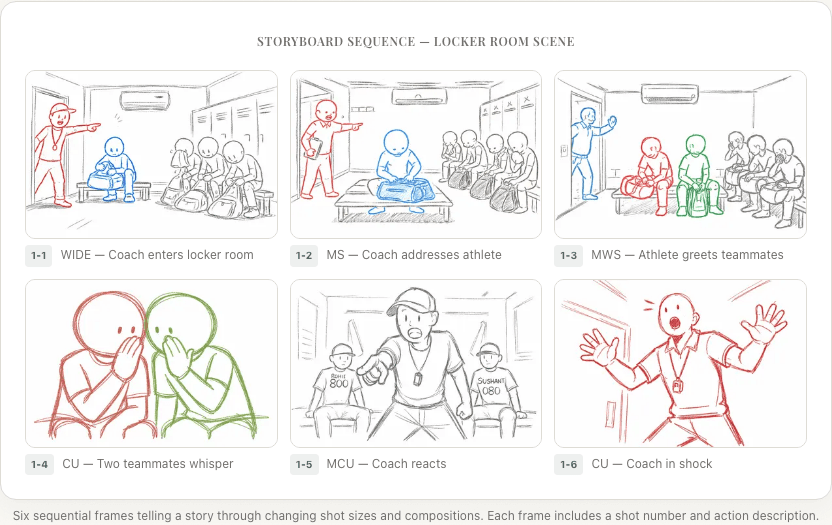
What Goes Into a Storyboard Frame
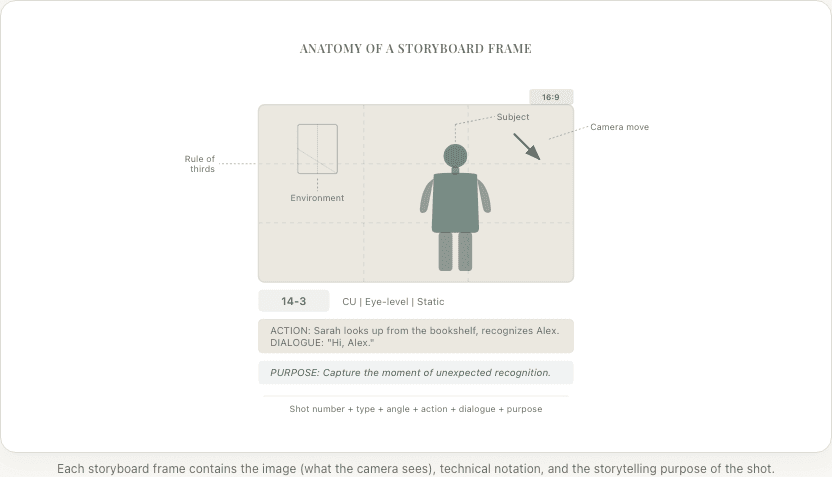
Don't let the detail below overwhelm you; you'll build up to this naturally. But here's what a complete storyboard frame typically includes:
The image itself:
- What the camera sees from its intended position and angle
- Character positions and body language
- Important props, set dressing, and environmental details
- Lighting direction (indicated through shading or notation)
- Depth: foreground, midground, and background elements
Written annotations:
- Scene and shot number
- Shot type (wide shot, medium shot, close-up, etc.)
- Camera angle and movement
- Key dialogue or action description
- Duration estimate
- Transition notes (cut to, dissolve to, match cut, etc.)
Movement indicators:
- Arrows showing camera movement direction
- Dashed arrows showing character movement
- Multiple frames showing the start and end of a camera move
A complete storyboard for a feature film might contain a few hundred to several thousand frames, depending on how thoroughly the director storyboards. But you don't need to storyboard everything. More on that later.
Why Storyboards Matter (Even If You Think You Don't Need One)
A DP who reads "CU on Sarah, eye-level, static" will interpret that composition differently than the director who wrote it. Without a storyboard, those misalignments burn time on set, sometimes 45 minutes or more per shot. A single storyboard frame resolves the ambiguity in seconds.
Pre-Production Planning
The storyboard is created during pre-production, after the screenplay is finalized and the shot list is built. It serves as the visual plan that guides every department:
- Cinematographer (DP): Plans lighting setups, lens choices, and camera positions based on the storyboard compositions
- Production designer: Understands which parts of a set will be on camera and how they need to look
- VFX supervisor: Identifies which shots require visual effects and what those effects need to accomplish
- Editor: Understands the intended cutting rhythm and shot structure before a single frame is captured
- Producer/AD: Estimates shooting time based on the number and complexity of setups
On-Set Reference
During shooting, the storyboard hangs near the monitor or sits on tablets for the crew. Between setups, the director and DP reference it to ensure the current shot matches the intended composition, the next setup is ready to go, and coverage is complete before moving to the next scene.
Post-Production Guide
In the edit suite, the storyboard helps the editor understand your intended sequence: which shots were designed to cut together, what rhythm you envisioned, and where specific visual moments were planned.
What a Storyboard Is NOT
These distinctions matter:
It's not a shot list. A shot list is a text-based document that describes each shot. A storyboard is the visual representation of those shots. (For a detailed comparison, see storyboard vs. shot list.) The shot list says "CU on Sarah, eye-level, static." The storyboard shows what that close-up looks like.
It's not a screenplay. The screenplay describes the story in words. The storyboard translates that story into visual frames. Many critical visual decisions (camera angles, composition, cutting rhythm) aren't in the screenplay at all.
It's not an animatic. An animatic takes storyboard frames and adds timing and sound to create a rough, timed preview of the film. The storyboard is static; the animatic is timed.
It's not final art. Storyboards range from rough stick-figure sketches to detailed illustrations, but they're always working documents. Their purpose is communication, not beauty.
Types of Storyboards
Traditional Hand-Drawn
The classic approach: an artist (or the director) draws each frame by hand, usually with pencil or pen. These range from quick thumbnails (small, rough sketches for personal reference) to detailed presentation boards (large, polished drawings for client or crew communication).
Strengths: Expressive, personal, no technology needed. Limitations: Slow to create and revise, requires drawing ability (or a storyboard artist on the team).
Photo-Based
Using photographs from location scouts, staged reference photos, or stock images as the basis for storyboard frames. The director photographs actors (or stand-ins) in approximate positions.
Strengths: Realistic, grounded in actual locations, no drawing needed. Limitations: Time-consuming to stage, limited to available locations, hard to show VFX-heavy shots.
3D Pre-Visualization
Using 3D software to create virtual environments and position virtual cameras. Common in VFX-heavy productions (Marvel, Star Wars, etc.).
Strengths: Precise camera positions, easy to adjust, can be turned directly into animatics. Limitations: Requires 3D software expertise, time-intensive to set up, overkill for simple scenes.
AI-Generated
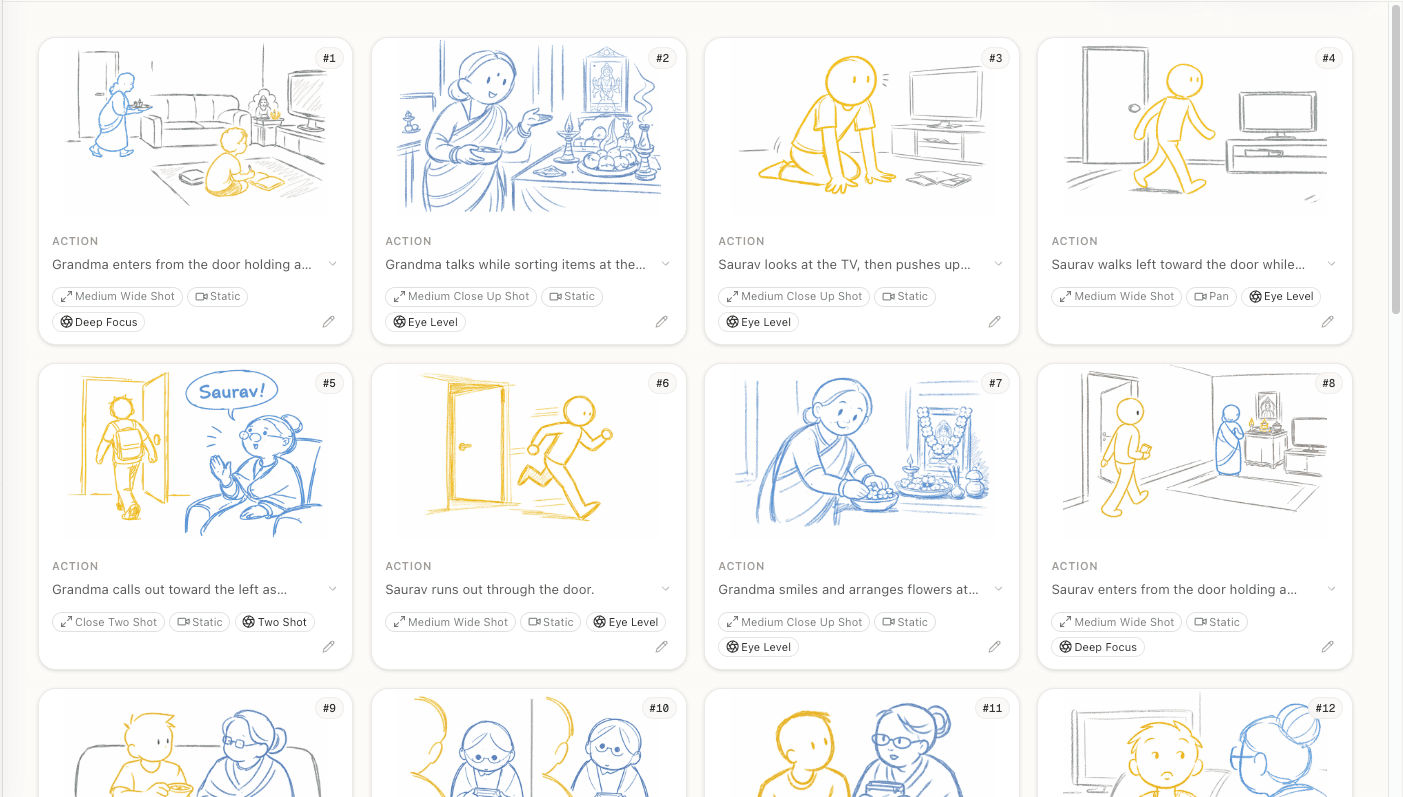
The newest approach. Describe each shot in text and AI generates a storyboard frame. Write a prompt describing the composition, characters, camera angle, and mood, and get a visual back.
Strengths: Fast, no drawing skills needed, easy to iterate, consistent visual quality. Limitations: Less precise control than hand-drawing, may need multiple attempts for specific compositions.
When Do You Need a Storyboard?
Not everything needs one. Here's a practical breakdown:
Always storyboard:
- Action sequences. Complex choreography, stunts, and chases need frame-by-frame planning for safety, continuity, and visual clarity.
- VFX sequences. Every visual effects shot needs a storyboard to communicate to the VFX team what the final image should look like.
- Complex camera moves. Crane shots, Steadicam sequences, and oners need careful pre-visualization to work on set.
- Scenes with precise timing. If a moment depends on exact timing (a character turns at the right moment, an explosion happens as someone walks through a door), storyboard it.
Usually storyboard:
- Establishing shots and transitions. The opening shot of each sequence sets the visual tone. Worth planning.
- Emotionally critical scenes. The climax, the revelation, the ending. These deserve the extra thought that storyboarding forces you to do.
- Scenes with many characters. Group scenes are hard to block and cover. Storyboarding helps you figure out who's in frame when.
Optional to storyboard:
- Simple dialogue scenes. Two people talking in a room can often be covered with a standard shot list. Unless you have a specific visual approach, the shot list may be enough.
- Documentary-style scenes. If you're shooting vérité with improvisational blocking, rigid storyboards may work against the spontaneity you want.
The Storyboard's Place in the Pipeline
Storyboarding doesn't happen in isolation. It's one step in a pipeline, and skipping the earlier steps makes your storyboard worse.
- Screenplay: The story in words
- Screenplay breakdown: Analysis of every element in every scene
- Visual strategy: Your plan for how each scene looks and feels
- Shot list: Specific camera setups for each scene
- Storyboard: Visual frames for each shot
- Animatic: Timed storyboard with sound (optional but valuable)
Each step builds on the previous one. The storyboard is better because of the shot list. The shot list is better because of the breakdown. Skip steps and you feel it.
Storyboard Examples Across Genres
Different genres use storyboards differently. Understanding this helps you figure out what to emphasize in your own boards.
Drama
Drama storyboards emphasize composition and emotional framing over action:
- Careful use of negative space to convey isolation or tension
- Shot size changes that track emotional intensity (wide for detachment, close-up for intimacy)
- Minimal camera movement; frames tend to be static and composed
- Attention to what's excluded from the frame
Action
Action storyboards prioritize spatial clarity and kinetic energy:
- Wide shots establish geography before tight shots create energy
- Sequential frames show progression of physical movement
- Impact moments get dedicated frames
- Camera movement is more dynamic (tracking, handheld, crash zooms)
Comedy
Comedy storyboards focus on timing and reaction:
- Reaction shots are planned carefully, because comedy lives in the reaction, not the action
- Wide shots let physical comedy play out in full view
- Cutaway inserts are storyboarded for comedic timing
- Holds (keeping the camera on something longer than expected) are noted with duration
As a comedian, I think about this one a lot. The difference between a joke landing and falling flat is often just where the camera is looking when the punchline hits. That's a storyboarding decision.
Horror
Horror storyboards leverage frame control and restricted information:
- What's not shown is as important as what is
- Negative space creates dread (dark areas, empty corridors)
- POV shots need careful storyboarding to maintain spatial logic
- Sound cues are heavily annotated alongside visual frames
Getting Started: Your First Storyboard
If you've never storyboarded before, here's how to start without overthinking it:
Pick One Scene
Choose a scene from your screenplay that's visually interesting but not the most complex. Something with 2-3 characters and clear action.
Build Your Shot List First
Create a shot list for that scene. 5-10 shots is plenty. Each shot should have a type, angle, and purpose. If you don't have a shot list, you're guessing what to draw. Don't guess.
Draw One Frame Per Shot
Stick figures are completely fine. Focus on what's in the frame and what's excluded, not art quality. The composition is what matters, not the rendering.
Add Annotations
Label each frame with shot number, type, angle, and movement. Add brief dialogue or action notes. This is what turns an illustration into a storyboard.
Read It Back as a Sequence
Flip through your frames in order. Does the visual story make sense? Do the shots cut together logically? Are there gaps? If something feels off, that's your instincts telling you something useful.
Once you're comfortable, expand to more complex scenes. Add start/end frames for camera moves. Try an animatic. Experiment with AI-generated frames if drawing isn't your strength.
The goal isn't perfection. The goal is visual thinking, and that starts the moment you put your first frame on paper (or screen).

For a deeper dive into the technical process, read our complete guide on how to storyboard a film.
Ready to speed up your pre-production?
StoryBirdie turns your screenplay into a professional storyboard in minutes. See pricing or jump straight in.
About the author
Aayush is co-founder and director at StoryBirdie. He's a screenwriter, director, stand-up comedian, and full-stack developer — co-founder of Kathmandu's Comedy Tuk Tuk, with directing and writing credits on shorts, music videos, and comedy projects. He builds StoryBirdie on the conviction that storyboarding is expensive, time-consuming, and important — and that a tool for it should serve the filmmaker's vision, not replace it. StoryBirdie is currently in use on a Nepali feature, a Sri Lankan TV commercial, and at one of Nepal's largest production houses. Based in Kathmandu, Nepal.
Keep reading
- Storyboard vs Animatic: What's the Difference?Storyboards and animatics serve different purposes in pre-production. Learn when to use each and how they work together.·10 min read
- How Many Storyboard Panels Per Scene?A practical formula for deciding how many storyboard frames your scene needs. Covers dialogue, action, and VFX scenes with real numbers.·6 min read
- Storyboard Software for Directors Who Can't DrawYou don't need drawing skills to storyboard your film. Here's how directors are using AI and template tools to create production-ready storyboards.·6 min read
- Storyboard vs Shot List: Which Comes First?Should you create a shot list or storyboard first? The answer depends on your project. Here's a practical framework for deciding.·7 min read