The biggest barrier to storyboarding has never been creative vision. It's been drawing ability. Plenty of directors can describe exactly what they want the camera to see but can't put it on paper in a way that communicates to a crew. AI storyboard generators have removed that barrier entirely.
These tools create visual storyboard frames from text descriptions. You describe what the camera should see ("medium shot of a detective examining evidence in a dimly lit room, overhead fluorescent light") and the AI produces an image. No sketching required. No storyboard artist required (though they still add enormous value on complex projects). You need to be able to describe your shots, which, as a director, you should already be doing.
The technology has matured fast. In 2024, AI-generated storyboard frames were rough and inconsistent. In 2026, they're production-ready for pre-visualization, detailed enough to communicate composition, lighting, and mood to your crew.
But not all AI storyboard generators are built the same. Understanding how they work helps you choose the right tool and use it effectively.
How AI Storyboard Generation Works
The Basic Pipeline
At a high level, AI storyboard generators follow this process:
Input
You provide a text description of the shot: shot type, angle, subject, action, lighting, and mood.
Processing
The AI model interprets the description and generates a visual based on its training on millions of images and cinematic conventions.
Output
You receive an image matching (approximately) your description, typically within seconds.
Iteration
You refine the description and regenerate until the output matches your vision. Usually 1–3 iterations per frame.
The AI models behind these tools are image generation models, the same technology family as DALL-E, Midjourney, and Stable Diffusion, fine-tuned or prompted to produce images that look like storyboard frames rather than final photography.
What the AI Understands
Modern AI image generators handle most cinematographic concepts well:
Shot types: "Close-up," "wide shot," "medium shot," "over-the-shoulder." The AI maps these to appropriate framing and subject scale.
Camera angles: "Low angle," "high angle," "eye-level," "overhead." The AI generates images from the specified perspective.
Lighting: "Harsh fluorescent overhead," "warm golden hour," "silhouette against a window," "single practical lamp." Lighting descriptions produce appropriate visual results.
Mood and tone: "Tense," "peaceful," "noir," "clinical," "chaotic." These abstract descriptors influence the AI's color palette, contrast, and composition choices.
Character action: "A woman running down a corridor," "two men arguing across a table," "a child looking up at something off-screen." The AI renders human figures in described poses and actions.
What the AI Struggles With
Precise spatial relationships. "Character A stands exactly three feet to the left of Character B, with a lamp between them at chest height." The AI will approximate this, but getting exact spatial configurations requires iteration.
Consistent characters across frames. If your storyboard has 50 frames of the same character, the AI may generate slightly different versions of that character each time. Character consistency tools are improving but not perfect. Some tools let you upload reference images or define character profiles to maintain consistency.
Complex blocking with many characters. A frame with six characters arranged in specific positions around a conference table is harder for AI than a two-person dialogue close-up.
Camera movement visualization. A storyboard frame is static. Showing a dolly move or crane shot requires multiple frames (start, middle, end) with arrows. The AI generates individual frames well, but the movement notation is still a human annotation task.
Hands and props. AI image generation still occasionally produces awkward hand positions or unclear prop interactions. If a character needs to be clearly holding a specific object in a specific way, this may require multiple generation attempts.
Types of AI Storyboard Generators
The tools available fall into three broad categories, each with a different philosophy about where AI fits in your workflow.
Standalone Image Generators (General-Purpose)
Tools like Midjourney, DALL-E, and Stable Diffusion aren't built specifically for storyboarding, but directors use them for storyboard frames by crafting appropriate prompts.
How it works: You write a prompt describing the shot in detail, including aspect ratio, style, and technical specifications. The AI generates images. You select and refine.
Pros:
- Maximum creative flexibility
- Latest AI image quality
- Large community sharing techniques and prompt templates
Cons:
- No filmmaking workflow: you're generating images one at a time, disconnected from your screenplay and shot list
- No automatic shot notation, numbering, or annotation
- Character consistency requires manual effort (seed values, reference images, custom models)
- No connection to upstream pre-production documents
Best for: Directors who want maximum control over individual frame aesthetics and are comfortable with prompt engineering.
Dedicated Storyboarding Platforms with AI
Then there are tools purpose-built for storyboarding that integrate AI generation as a feature. These typically include:
- A project structure (organize by scene/sequence)
- Shot numbering and annotation
- Frame templates with correct aspect ratios
- Export options (PDF, presentation, animatic)
- AI generation for individual frames
Pros:
- Workflow-aware (scenes, shots, sequences)
- Built-in annotation and export tools
- Frame management (reorder, duplicate, delete)
- Designed for the storyboarding use case specifically
Cons:
- AI quality may lag behind cutting-edge general-purpose generators
- Often still disconnected from upstream screenplay/shot list
Best for: Directors who want a structured storyboarding workflow with AI as one tool in the toolkit.
Screenplay-to-Storyboard Pipelines
The newest category starts from the screenplay itself and generates storyboards as part of an integrated workflow: screenplay upload → analysis → shot list → storyboard frames.
How it works: Upload your screenplay. The AI analyzes scenes, characters, and action. It generates a shot list. You review and refine. Then it generates storyboard frames for each shot, using the context of the entire screenplay to inform the visuals.
Pros:
- Fully integrated workflow: the storyboard is connected to the screenplay and shot list
- AI has scene context (what's happening in the story, who's present, what the emotional stakes are)
- Changes to the shot list propagate to the storyboard
- Character and location context carries across scenes
Cons:
- Less fine-grained control over individual frame aesthetics (optimized for workflow, not art direction)
- Newer category, so fewer options available
Best for: Directors who want efficiency and integration, especially on projects where time and budget are tight.
Evaluating AI Storyboard Generators
When choosing a tool, assess these dimensions:
Image Quality
Does the output look like a storyboard frame? Key qualities:
- Compositional clarity. Is it clear what the camera is looking at and from where?
- Character readability. Can you tell who's who and what they're doing?
- Mood conveyance. Does the lighting and tone match your description?
- Consistency. Does the same character look the same across frames?
Workflow Integration
How does the tool fit into your pre-production pipeline?
- Can you import your screenplay?
- Does it connect to your shot list?
- Can you organize frames by scene/sequence?
- Can you annotate frames (shot numbers, movement arrows, notes)?
- Can you reorder and arrange frames?
Export Options
How do you share the output with your crew?
- PDF export (the standard storyboard format for on-set use)
- Presentation export (for pitches and client reviews)
- Individual frame export (for compositing and reference)
- Animatic creation (timed sequence with audio)
Speed and Iteration
How fast can you generate and refine?
- Time per frame generation
- Ease of making adjustments (can you tweak a description and regenerate without starting over?)
- Batch generation (can you generate all frames for a scene at once?)
Cost
Pricing models vary:
- Per-frame generation (pay per image)
- Subscription with generation limits
- Subscription with unlimited generation
- Free tier with premium features
For a feature film with 500+ storyboard frames, per-frame pricing adds up fast. Subscription models are usually more economical for serious projects.
How Directors Actually Use AI Storyboards
I've watched a lot of directors interact with these tools over the past year, and the patterns are consistent. Almost nobody uses them the way the marketing pages suggest.
The "React and Refine" Workflow
Instead of starting from a blank page (or blank prompt), the director:
- Builds a shot list (manually or with AI assistance)
- Generates initial storyboard frames from the shot descriptions
- Reviews each frame: "This is close but the character should be on the right" or "The lighting should be harsher"
- Adjusts the description and regenerates
- After 1–3 iterations, the frame communicates the intended shot
The "Key Frames Only" Approach
Some directors use AI to generate frames only for key shots, the most visually important or complex moments. Simple coverage shots (a standard medium shot of a character talking) get a brief text description in the shot list but no storyboard frame. This saves time and focuses visual planning effort where it matters most.
The "Animatic Pipeline"
Directors generating AI storyboard frames specifically to create an animatic, a timed, scored preview of the film. The frames don't need to be beautiful; they need to communicate the shot clearly enough to test pacing and sequence. AI generation is ideal for this because speed matters more than polish.
The "DP Communication" Approach
The director generates AI frames specifically to share with their cinematographer. "Here's roughly what I'm seeing for this scene," not as a rigid blueprint, but as a conversation starter. The DP responds with practical suggestions, and together they refine the visual plan. The AI frames serve as a shared reference point.
Storyboarding Before You Generate AI Video
A separate use has grown around AI storyboards over the last year, and it has nothing to do with a camera. People generating footage with Sora, Veo, Kling or Runway increasingly board the film first, then generate from the board. The questions below come up constantly, so here are direct answers.
What is a storyboard-first AI filmmaking workflow?
A storyboard-first AI filmmaking workflow means deciding your shots and locking your visual references before you generate any video. You break the script into shots, fix each shot's size, angle and movement, settle what each character looks like, and only then hand each shot to a video model. The alternative, prompting shots one at a time and hoping they cut together, is what most people try first and abandon.
The order matters because generation costs money per attempt. A shot you decide not to use after generating it is wasted spend. A shot you cut at the list stage costs nothing.
Should you storyboard every shot before generating AI video?
No. Board the shots where the framing or the geography is genuinely unclear, and where a character has to look the same as they did in a previous shot. Skip the ones that are obvious from the script. Boarding all of it is a good way to spend a week producing drawings you will not consult.
The exception is any sequence with a recurring character. There, a reference frame per shot is what keeps the face and the wardrobe stable, so the boarding work pays for itself immediately.
What is a storyboard lock, and do you need one for AI video?
A storyboard lock is the point at which you stop changing the boards and treat them as the plan of record. In traditional production it exists so departments can budget and schedule against something stable. In AI video it does more work than that: once the board is locked, every reference image is fixed, so shot twelve can still match shot one.
Without a lock you get character drift. The models generate each clip from scratch with no memory of what they produced before, so the same description yields a different face each time. Locking the board, and the character references with it, is the cheapest fix available.
Do you need a treatment before generating AI video, or is a storyboard enough?
For a short piece, a storyboard and a shot list are enough. A treatment earns its place when other people need to approve the idea before anyone spends money, which usually means a client or a commissioner. If you are making the thing yourself, the shot list is the document that changes what you do next; the treatment mostly is not.
When should you skip the storyboard in AI video production?
When the piece is a single shot, when you are experimenting rather than making something specific, or when the look matters more than the continuity. A one-shot mood piece does not need a board. A three-minute narrative with two recurring characters does, and the people who skip it usually rediscover that around shot eight.
What this means in practice
The workflow that holds up is boring: break the script into shots, decide coverage, fix your character references, then generate. Our free AI shot list generator does the first half from a screenplay, and the boards give you a reference frame per shot, which is the input the video models actually want. Sora and Kling take reference images directly; Veo takes images alongside clips.
Which tool does that first half for you depends mostly on where your project starts — an idea, an image, or a finished script. We compared the main options on exactly that axis in planning a shoot with AI video tools.
Frequently Asked Questions
Frequently Asked Questions
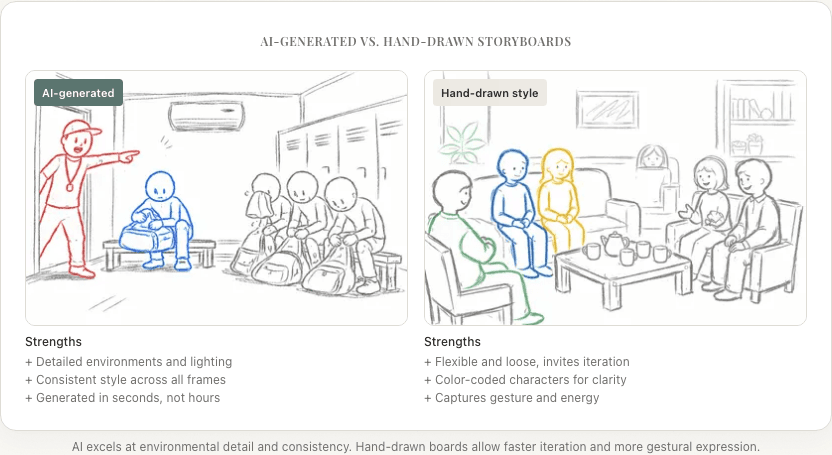
AI Storyboards vs. Traditional Storyboard Artists
This is the question every director with a limited budget eventually asks: do I hire a storyboard artist, use AI, or some combination? If you're still learning the basics, start with our guide on what a storyboard is and why it matters.
AI doesn't replace storyboard artists. The two serve different functions, and the honest answer is that the right choice depends on your project and your budget.
What a human storyboard artist brings:
- Creative interpretation. A great storyboard artist doesn't just draw what you describe. They elevate it. They suggest compositions you hadn't considered, bring cinematic knowledge to the framing, and make creative contributions. I've seen storyboard artists reframe a shot in a way that completely changed how a scene played.
- Character acting. Skilled storyboard artists draw characters with specific expressions and body language that capture the emotional nuance of a performance. AI approximates this but with less specificity.
- Collaboration. Working with a storyboard artist is a creative conversation. You describe, they draw, you react, they adjust. The back-and-forth produces ideas neither of you would have reached alone.
- Style consistency. A single artist maintains a consistent visual style across hundreds of frames. AI can drift.
What AI storyboard generation brings:
- Accessibility. No budget for a storyboard artist? AI gives you visual frames anyway. For indie filmmakers and students, this is the difference between storyboarding and not storyboarding.
- Speed. Generating 50 frames in an hour vs. a storyboard artist drawing 50 frames in a week.
- Iteration without guilt. Asking an artist to redraw a frame six times feels expensive because it is. Regenerating an AI frame six times costs almost nothing.
- Scale. AI can generate frames for an entire feature film's shot list. Hiring a storyboard artist for 2,000+ frames is a serious budget line item.
The best approach for many productions combines both: use AI for initial frames and standard coverage, then bring in a storyboard artist for key sequences that need the human creative touch: action, VFX, and emotionally critical scenes.
Common Mistakes with AI Storyboard Generators
Writing prompts like a novelist instead of a cinematographer. "Sarah feels a deep sense of melancholy as the autumn leaves fall around her" tells the AI about feelings. It doesn't tell it where to put the camera. "Medium shot, eye-level, woman sitting on a park bench facing camera-left, surrounded by falling autumn leaves, overcast natural light, muted warm colors" does. Write shot descriptions, not emotional summaries.
Skipping the shot list. Jumping straight from screenplay to storyboard frames, without building a shot list in between, leads to inconsistent coverage and missed shots. You wouldn't shoot a scene without a shot list. Don't storyboard one without a shot list either. (Not sure about the difference between a storyboard and a shot list? They serve different purposes.)
Expecting perfection on the first try. Your first generated frame won't be exactly right. That's normal and expected. Refine the description, regenerate, iterate. Two or three passes usually gets you to a frame that communicates the shot clearly.
Treating AI frames as final art. These are working documents, communication tools for your crew. They don't need to be photorealistic or aesthetically perfect. They need to clearly show what the camera sees. If your DP can read the frame and understand your intent, it's done its job.
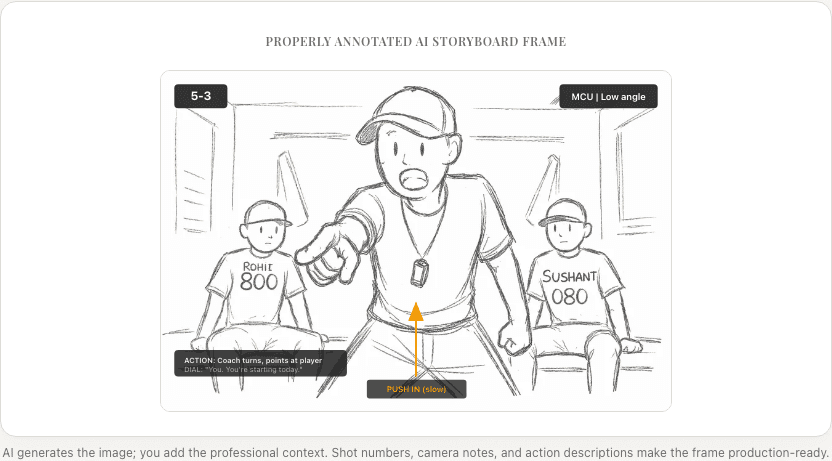
Not annotating the output. AI generates the image, but you still need to add shot numbers, movement arrows, dialogue excerpts, and technical notes. An unannotated AI frame is an illustration, not a storyboard frame.
Where AI Storyboarding Is Headed
The trajectory is clear: AI storyboard tools are becoming more integrated, more context-aware, and more controllable.
Near-term improvements:
- Better character consistency across frames (same character looks the same in every shot)
- Tighter integration with screenwriting software (Fountain, Final Draft, Highland)
- Automatic annotation (shot numbers, movement arrows) generated alongside the image
- Style transfer: feed in reference frames from existing films and the AI matches the visual style
Medium-term developments:
- Automatic animatic generation (frames + timing + scratch audio in one pass)
- Real-time collaboration (director and DP co-editing AI frames live)
- Camera movement visualization (short video clips instead of static frames)
- Budget-aware generation (the AI adjusts its suggestions based on your production constraints)
The endgame isn't AI replacing the director's vision. It's AI making the director's vision tangible faster, so more time is spent on creative decisions and less time on the mechanical process of getting ideas out of your head and into a form others can see.
Summary
AI storyboard generators fall into three categories:
- General-purpose image generators. Maximum flexibility, minimum workflow integration.
- Dedicated storyboarding platforms. Structured workflow with AI as a feature.
- Screenplay-to-storyboard pipelines. Fully integrated from script to frame.
When evaluating tools, assess: image quality, workflow integration, export options, iteration speed, and cost.
The best way to use AI storyboard generators:
- Start with a screenplay breakdown and shot list
- Generate frames from your shot descriptions
- Iterate until each frame communicates the shot clearly
- Annotate with shot numbers, movement arrows, and notes
- Share with your crew as a visual pre-production reference
AI storyboarding isn't about replacing creativity. It never was. It's about removing the barrier between having a vision and showing it to your team.
Ready to speed up your pre-production?
StoryBirdie turns your screenplay into a professional storyboard in minutes. See pricing or jump straight in.
About the author
Aayush is co-founder and director at StoryBirdie. He's a screenwriter, director, stand-up comedian, and full-stack developer — co-founder of Kathmandu's Comedy Tuk Tuk, with directing and writing credits on shorts, music videos, and comedy projects. He builds StoryBirdie on the conviction that storyboarding is expensive, time-consuming, and important — and that a tool for it should serve the filmmaker's vision, not replace it. StoryBirdie is currently in use on a Nepali feature, a Sri Lankan TV commercial, and at one of Nepal's largest production houses. Based in Kathmandu, Nepal.
Keep reading
- Free Storyboard Generator: No Drawing RequiredCreate professional storyboards from your screenplay without drawing skills. Compare free storyboard generators and learn which one fits your workflow.·9 min read
- Storyboard Software for Directors Who Can't DrawYou don't need drawing skills to storyboard your film. Here's how directors are using AI and template tools to create production-ready storyboards.·6 min read
- Best Storyboard Software in 2026: Honest ComparisonHonest comparison of the best storyboard software in 2026. Pricing, features, and which tool fits your directing workflow.·13 min read
- Storyboard vs Animatic: What's the Difference?Storyboards and animatics serve different purposes in pre-production. Learn when to use each and how they work together.·10 min read