The Most Time-Consuming Part of Pre-Production
Shot list creation is the most time-consuming part of pre-production. For a feature, it can take weeks of cataloguing every camera setup across 50+ scenes. AI changes that equation.
The creative part, deciding how to shoot each scene, is exciting. The mechanical part, cataloguing every single shot with its type, angle, movement, subject, and purpose, is where the time goes. By page 80, your attention is slipping and scene 47 gets half the thought that scene 3 got.
AI doesn't take creative control away. It gives you more time for the creative decisions that actually matter.
What If Your Shot List Built Itself?
That's the premise of AI shot list generation. Instead of starting from a blank spreadsheet, you start from your screenplay, and the AI generates an initial shot list based on scene analysis, character dynamics, dialogue patterns, and cinematic conventions.
You're not handing creative control to a machine. You're getting a detailed first draft that you refine with your directorial vision. The mechanical work gets automated. The creative decisions stay yours.
The math is simple: spend three weeks building a shot list from zero, or spend three days refining one that's already 70% there.
How AI Shot List Generation Actually Works
The process follows the same logic you'd use as a director, but faster and more systematic.
Screenplay Parsing
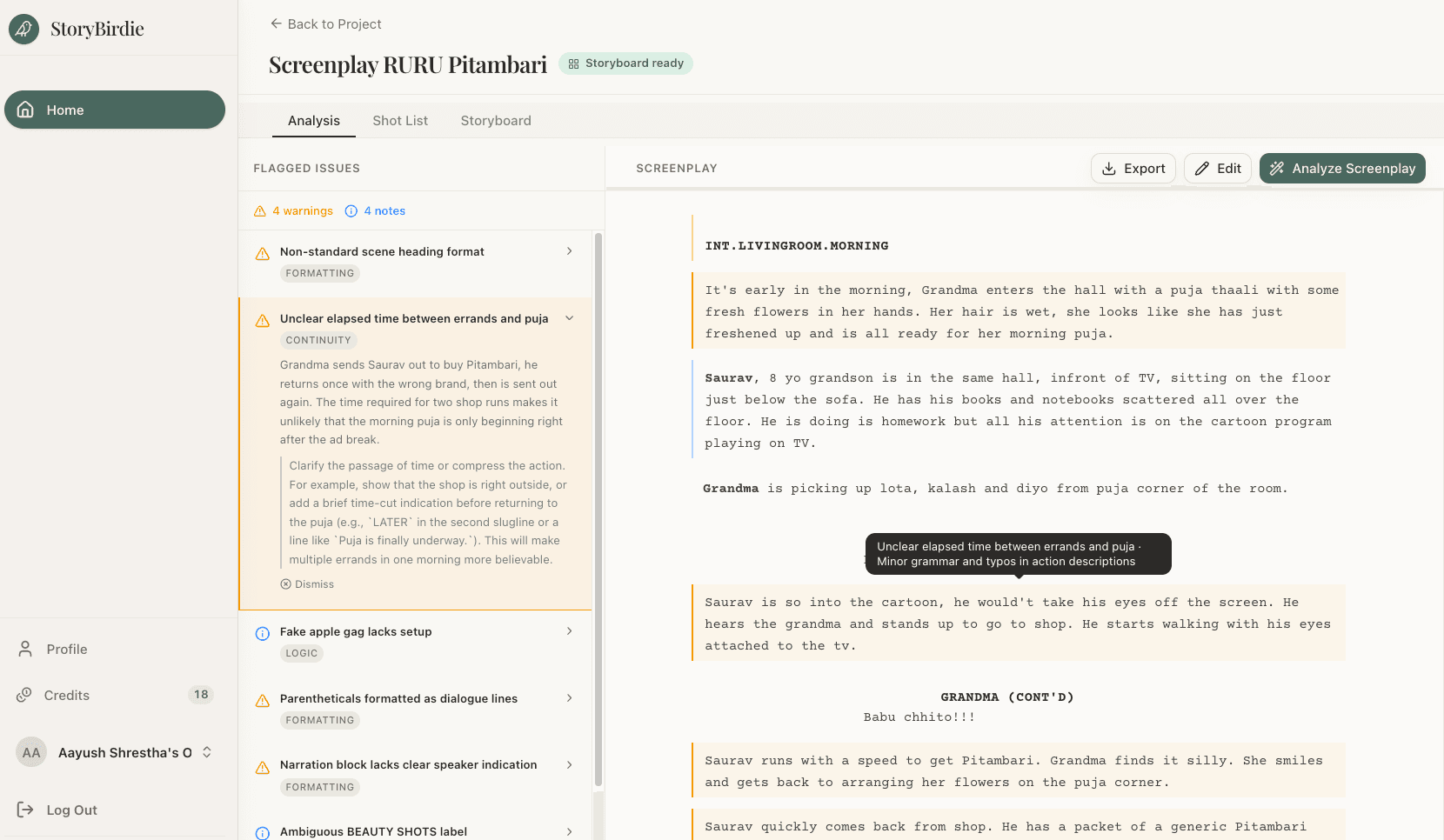
The AI reads your screenplay and breaks it into structured data: scene boundaries from slug lines, characters from dialogue headers, action descriptions parsed for movement and blocking, dialogue analyzed for emotional beats, and props/environment from scene descriptions. This is essentially an automated screenplay breakdown, done in seconds rather than hours.
Scene Classification
Each scene is classified by type (dialogue, action, montage, establishing, etc.), which informs the default shooting approach. These are starting points, not rules. The AI uses them to generate a baseline that you then adjust.
That classification looks like this in practice:
| Scene Type | Default Coverage Approach |
|---|---|
| Dialogue (two-person) | Master + singles + OTS |
| Dialogue (group) | Master + coverage of each speaker + reactions |
| Action | Wide establishing + medium action + inserts |
| Montage | Individual shots per beat |
| Establishing | Wide exterior + key details |
| Emotional/intimate | Close-ups + meaningful inserts |
| Transition | Brief coverage, often single shot |
Beat Analysis: This Is Where It Gets Smart
Within each scene, the AI identifies narrative beats, moments where something changes:
- A new character enters
- An emotional shift occurs
- New information is revealed
- A physical action happens
- The power dynamic shifts
- A decision is made
Each beat typically needs at least one shot. Complex beats might need a reaction shot, an insert, a wide to show impact. The AI maps these automatically.
Shot Generation
For each beat, the AI generates specific shot specifications:
Scene 14, Beat 3: Sarah reveals the truth
────────────────────────────────────────────
Shot 14-7:  CU on SARAH
            Static, eye-level
            Sarah delivers the line.
            Purpose: Capture vulnerability in the moment of honesty.

Shot 14-8:  CU on JAMES (reaction)
            Static, eye-level
            James processes what Sarah said.
            Purpose: Show the emotional impact of the revelation.

Shot 14-9:  WIDE two-shot
            Static, slightly high angle
            Both characters in frame, the physical distance between
            them now charged with new meaning.
            Purpose: Recontextualize their spatial relationship.
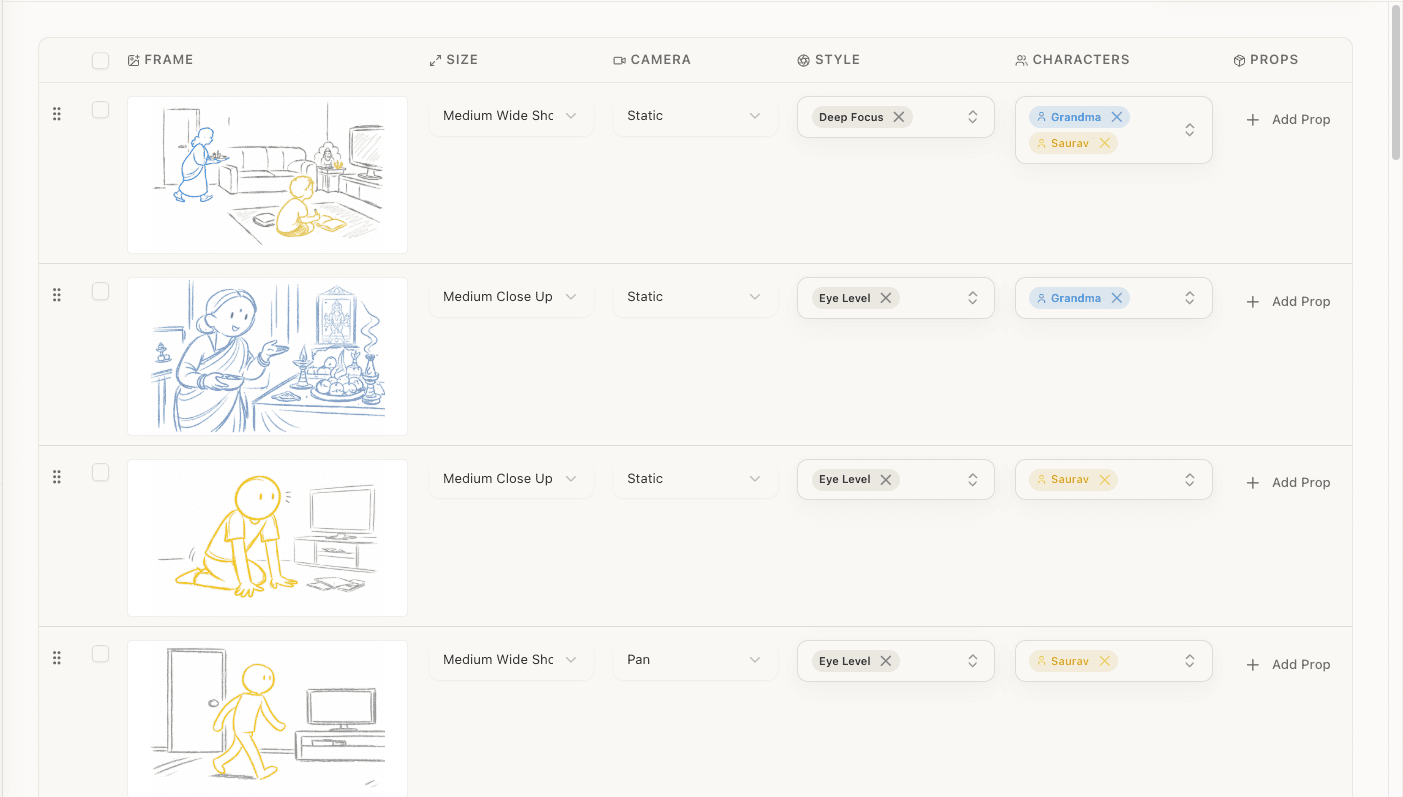
Each shot includes shot number, type, angle, movement, subject, action description, and purpose. Everything you'd put in a manual shot list, generated in minutes instead of weeks.
Coverage Validation
After generating shots, the AI checks that each scene has adequate coverage:
- Master shot present?
- Every speaking character covered for key dialogue?
- Reaction shots for important moments?
- Inserts for plot-relevant props and details?
- Transitions between shots flow logically?
Gaps get flagged so you can decide whether to add shots or intentionally leave them out. Sometimes a deliberate lack of coverage is the right creative choice, but it should be your choice, not an accident.
Why This Is Different from Doing It Manually
Consistent rigor from scene 1 to scene 95
When building a shot list for a 120-page screenplay, the work on page 100 is rarely as thorough as page 10. Mental fatigue is real. AI doesn't fatigue. Scene 95 gets the same analytical rigor as scene 5.
You save weeks, literal weeks
A manual shot list for a feature typically takes 2-4 weeks of focused prep. AI generation produces a complete first draft in minutes. That time saving doesn't mean you work less. It means you spend more time on the creative refinement, the part that actually makes your film yours.
Patterns across your whole screenplay become visible
AI can identify things a human might miss across 120 pages:
- A recurring visual motif (a character always near windows) that could be emphasized through consistent framing
- A gradual shift in scene pacing (scenes getting shorter as tension builds) that should be reflected in shot count
- Character relationships that evolve across the script and warrant evolving camera treatment
But it's a starting point, not the finished product
How to Use AI-Generated Shot Lists
The review process works in four passes, from AI output to shooting-ready document:
Pass 1: Check Coverage
Scan the shot list scene by scene. Is each scene adequately covered? The AI captures the essential beats. If it missed something important, add it. If it over-covered a simple scene, trim it.
This pass takes about an hour for a feature. Compared to the weeks it would take to build from scratch, that alone is worth it.
Pass 2: Add Your Vision
This is where the shot list becomes yours. For each scene:
- Does the shot selection match the visual strategy? If the scene was envisioned as a single continuous take but the AI generated 12 shots, collapse them into one with blocking notes.
- Are there moments that need a specific treatment? Maybe the AI generated a standard eye-level medium, but a low-angle looking up would convey power better. Override it.
- Does the rhythm feel right? A sequence of rapid close-ups followed by a lingering wide creates a specific emotional effect. Rearrange shots to create the rhythm the scene needs.
- What creative additions go beyond coverage? An insert of a clock ticking. A POV through a rain-streaked window. A dutch angle that signals disorientation. These are the director's job.
Pass 3: Check Practicality
With my DP and AD:
- Can these shots be achieved with our equipment and budget?
- How many setups per scene? (Each camera position is a setup, and setups take time.)
- Is the shooting day achievable? If it's 80 shots in a 12-hour day, something's gotta give. Better to cut now than on set.
Pass 4: Connect to Storyboards
The final shot list feeds directly into storyboarding. Each shot becomes one or more storyboard frames. The descriptions I've refined become the brief for each frame's composition.
This is where the screenplay-to-storyboard pipeline comes together: screenplay → analysis → shot list → storyboard frames. Each step builds on the last.
AI Shot Lists for Different Scene Types
Dialogue Scenes
AI handles dialogue well because the conventions are established:
Standard two-person coverage: wide master, medium on A, medium on B, CU on A, CU on B, OTS both directions.
The AI generates this standard coverage. Then you decide: Do I want all of this? Should the whole scene play in the master? Should I skip the master entirely and create claustrophobia with only close-ups?
The AI gives you the competent version. You make it interesting.
Action Sequences
Action is harder because physical choreography requires spatial understanding. The AI generates wide shots for geography, mediums for key physical moments, close-ups for impacts and reactions, inserts for important details.
But the specific sequencing (the tension build through escalating shot sizes, strategic slow motion, spatial coherence of a fight) needs heavy directorial input. This is where Pass 2 earns its time.
Montage Sequences
Montages are actually well-suited to AI. They're essentially lists of discrete visual moments. The AI identifies each moment and assigns an appropriate shot type. Your job is rhythm: the order, duration, and visual variety.
Single-Take Scenes
If the AI detects a scene that might work as a oner (continuous action, moving characters, sustained intensity), it flags the option. You decide whether to pursue it or break it into coverage.
"Won't Every Movie Look the Same?"
This is a common concern. The answer: no. For the same reason that every painting made with the same brushes doesn't look the same.
AI generates the baseline. You provide the vision. Two directors given the same AI-generated shot list will produce completely different final versions because:
- One prefers long takes, the other rapid cutting
- One shoots handheld, the other locked-off on sticks
- One favors close-ups, the other lives in wide shots
- One uses the camera as a neutral observer, the other makes it a participant
The AI's job is to ensure you don't miss anything. Your job is to make it yours.
How StoryBirdie Does This

StoryBirdie's approach is different from just prompting ChatGPT to "give me a shot list." The shot list generation is integrated into a complete screenplay-to-storyboard pipeline:
- Upload your screenplay (PDF, DOCX, or Fountain)
- AI analyzes the screenplay, extracting scenes, characters, props, and flagging continuity issues
- Review the analysis. Accept, modify, or discard AI suggestions
- Generate the shot list. AI creates shot specs for every scene based on the analyzed screenplay
- Refine in a tabular editor. Edit types, angles, movements, descriptions in a spreadsheet-like interface
- Generate storyboard frames. Turn your refined shots into visual storyboard images
- Export. PDF storyboard, shot list spreadsheet, or annotated screenplay
The key: the director reviews and edits at every stage. The AI never makes a final decision. It proposes, you dispose.
The context matters too. Because StoryBirdie has already analyzed your screenplay (it knows your characters, their emotional states, the props in play, the continuity requirements), the shot list it generates is informed by the full story. It's not just matching scene types to standard coverage. It's reading your screenplay and making shot suggestions that account for the actual narrative.
When to Use AI Shot Lists (And When to Go Manual)
AI shot lists shine when:
- You're a first-time director who needs a starting framework. The AI provides industry-standard coverage so you don't miss anything critical while you develop your visual instincts.
- Pre-production is tight. Two weeks instead of two months? AI saves the time you'd spend on mechanical work.
- The script is long and complex. A 50-scene shoot is a mountain of manual shot-listing. AI handles volume while you focus creative energy on key scenes.
- Budget is tight. When you can't afford a large prep team, AI fills some of those gaps.
- The script keeps changing. (And it always does.) Regenerating a shot list from an updated screenplay takes minutes instead of days.
Go manual when:
- The project is highly stylized and standard coverage is irrelevant. Experimental films with no conventional structure won't benefit from AI baselines.
- It's a short film where you have time to craft every shot by hand and the scope is manageable.
- Discovery is your process. Some directors find their vision through the manual act of building shots scene by scene. If that's you, honor it.
The Future Gets Better
AI shot list generation is still early. Today's tools produce solid conventional coverage. Tomorrow's will get better at:
- Style matching. Feed reference films and the AI adjusts suggestions to match that visual style.
- Budget awareness. Input schedule constraints and the AI optimizes shot count to fit your reality.
- Camera continuity. Automatically checking 180-degree rules, eye-line matching, and screen direction.
- Learning from your edits. As you refine suggestions, the system learns your preferences (more close-ups, fewer masters, a tendency toward handheld) and adjusts future generations.
The mechanical parts get automated. The creative parts stay human.
Ready to speed up your pre-production?
StoryBirdie turns your screenplay into a professional storyboard in minutes. See pricing or jump straight in.
About the author
Aayush is co-founder and director at StoryBirdie. He's a screenwriter, director, stand-up comedian, and full-stack developer — co-founder of Kathmandu's Comedy Tuk Tuk, with directing and writing credits on shorts, music videos, and comedy projects. He builds StoryBirdie on the conviction that storyboarding is expensive, time-consuming, and important — and that a tool for it should serve the filmmaker's vision, not replace it. StoryBirdie is currently in use on a Nepali feature, a Sri Lankan TV commercial, and at one of Nepal's largest production houses. Based in Kathmandu, Nepal.
Keep reading
- AI Shot List Generator: From Screenplay to Shot List in SecondsHow AI shot list generators work, what they produce, and how to use them to speed up your pre-production workflow without sacrificing creative control.·7 min read
- AI Screenplay Analysis: Catch Script Problems Before They Cost YouHow AI screenplay analysis tools catch continuity errors, blocking issues, and production problems that human reads miss. Save reshoot days.·8 min read
- What Is a Shot List? Everything Directors Need to KnowA complete guide to shot lists for directors. What they include, how to create one, and why every shoot needs one.·9 min read
- Storyboard vs Shot List: Which Comes First?Should you create a shot list or storyboard first? The answer depends on your project. Here's a practical framework for deciding.·7 min read