The Gap Between Script and Screen
Every film starts as words on a page. But words don't tell your cinematographer where to put the camera, your actors where to stand, or your editor how a sequence should cut together.
That gap between script and screen is where directing actually happens. And the storyboard is how you close it.
The screenplay-to-storyboard workflow isn't just about drawing pictures. It's a structured process of analysis, decision-making, and visual translation that determines how your film will actually look and feel. Every shot choice, every camera angle, every composition decision happens in this space between script and board.
This guide walks through the complete workflow, stage by stage.
Why the Workflow Matters More Than the Output
Many directors (especially newer ones) jump straight to storyboarding. They read a scene, imagine the coolest shot they can think of, and start drawing or generating frames.
The result? Storyboards that look impressive in isolation but don't serve the story. Shots that don't cut together. Coverage gaps that become problems on set. Visual ideas that are impossible to execute on budget.
A disciplined workflow prevents all of this. It ensures that every storyboard frame exists for a reason, because it emerged from a systematic analysis of what the scene needs, not just what looks cool.

The Five-Stage Workflow
Stage 1: Screenplay Analysis
Before you draw a single frame, you need to deeply understand what the screenplay is telling you, and what it's not telling you.
Read for story first. Your initial read should be emotional, not technical. What does the scene make you feel? Where does tension build? Where does it release? These emotional beats will drive your visual choices later.
Read for subtext second. What's happening beneath the dialogue? If two characters are having a polite conversation but one is lying, that subtext should inform your shot choices. Maybe you hold on the liar's face during the other person's lines, looking for micro-expressions.
Read for practical requirements third. This is your screenplay breakdown, identifying every element needed for production:
- Characters present (and their emotional states)
- Location specifics (size, layout, key features)
- Time of day and lighting conditions
- Props and wardrobe
- Movement and blocking implied by the action lines
- Sound design elements mentioned or implied
Flag issues early. Continuity problems, logistical impossibilities, and unclear blocking are all cheaper to fix now than on set. If scene 12 has the character at a restaurant and scene 13 has them at home with no time transition, that's either a deliberate jump cut or a script error, and you need to know which before you storyboard it.
Stage 2: Scene-by-Scene Visual Strategy
With your analysis complete, the next stage is deciding how each scene should look and feel, before you commit to specific shots.
This is the most overlooked stage in the workflow, and I think it's the most important one. Directors often skip from "I've read the script" to "here are my shots." But without a visual strategy layer, your shot choices lack coherence.
Define the visual language for each scene. Ask yourself:
- What's the dominant emotion? A scene of grief might use wide shots that emphasize emptiness. A scene of paranoia might use tight close-ups and canted angles.
- What's the camera's relationship to the characters? Are we intimate observers (close, handheld) or distant watchers (wide, static)? Does this change during the scene?
- What's the rhythm? A fast-paced argument might need rapid cutting between tight shots. A slow revelation might play out in a single take.
- How does this scene connect to what comes before and after? If the previous scene was chaotic and this one is meant to feel calm, how does your visual approach create that contrast?
Create a scene map. For each scene, write a brief paragraph describing your visual approach. Something like:
Scene 14, The Confrontation: Start wide and static as the characters enter the room. False calm. As the argument builds, camera pushes in slowly, shifting to handheld. By the climax, we're in extreme close-ups, cutting rapidly. When the truth comes out, pull back to a wide shot. The air goes out of the room.
This map becomes your creative brief for the shot list.
Stage 3: Shot List Creation
The shot list is where visual strategy becomes concrete. Each shot gets a specific camera angle, shot type, movement, and purpose.
Work through each scene's emotional beats. For every beat you identified in your scene map, determine:
| Decision | Question |
|---|---|
| Shot type | Wide, medium, close-up, extreme close-up? |
| Camera angle | Eye-level, high angle, low angle, overhead? |
| Camera movement | Static, pan, tilt, dolly, handheld, Steadicam? |
| Subject | Who or what is the camera focused on? |
| Purpose | Why does this shot exist? What does it tell the audience? |
| Duration | Roughly how long does this shot hold? |
Follow the master scene technique (then break it). The standard approach:
- Start with a master shot (wide) that establishes geography
- Get coverage of each character (medium shots, close-ups)
- Get inserts of important props or details
- Add specialty shots (POVs, reaction shots, over-the-shoulder)
This gives you a complete, editable scene. But the best directors know when to deviate: when a scene is better served by a oner, or when you should only shoot close-ups to create claustrophobia.
Number your shots. Use a consistent system. A common approach:
Scene 14, Shot 1  → 14-1 (Wide master)
Scene 14, Shot 2  → 14-2 (Medium on SARAH)
Scene 14, Shot 3  → 14-3 (CU on JAMES)
Scene 14, Shot 4  → 14-4 (Insert: phone on table)
Estimate shot count per scene. As a rough guide:
- Simple dialogue scene: 5–10 shots
- Complex action sequence: 15–30+ shots
- Single-take scene: 1 shot (but with extensive blocking notes)
A typical feature film has 1,000–3,000 shots total. Your shot list should account for every one of them.
Stage 4: Frame Composition and Storyboarding
Now, finally, you draw (or generate) your storyboard frames. But because of the work you've done in stages 1–3, you're not starting from scratch. Every frame has a clear purpose.
One frame per shot, minimum. Every shot on your shot list should have at least one storyboard frame. For shots with significant movement (camera or character), add frames showing key positions:
- Start frame: Where the shot begins
- Key action frame: The most important moment within the shot
- End frame: Where the shot ends (especially if there's a camera move)
Composition principles to apply:
- Rule of thirds. Place key elements along the grid lines, not dead center (unless centering is a deliberate choice, like Wes Anderson's symmetry)
- Leading lines. Use architecture, roads, and furniture to draw the eye
- Depth. Place elements in foreground, midground, and background to create dimension
- Screen direction. Keep characters' movements consistent across cuts (the 180-degree rule)
- Headroom and look room. Give characters space in the direction they're facing
Include annotations on each frame:
- Shot number (matching your shot list)
- Camera movement (arrows showing direction)
- Character movement (dotted arrows)
- Dialogue excerpt or action description
- Any special notes (VFX, practical effects, sound cues)
Don't obsess over art quality. A clear stick-figure storyboard that communicates the shot is better than a beautifully rendered frame that's ambiguous about camera position. The purpose is communication, not art.
Stage 5: Review and Iteration
A storyboard isn't done when the last frame is drawn. It's done when it's been tested. This stage separates a storyboard that looks good on paper from one that actually works on set.
The sequence test. Flip through your storyboard frames quickly, like a flipbook. Does the visual story make sense? Do the cuts feel natural? Are there jarring jumps in screen direction or composition?
The coverage test. For each scene, check: do you have enough shots to edit the scene? If an actor flubs a line in the close-up, do you have a medium shot or cutaway to cut to? Over-coverage wastes time on set, but under-coverage is worse because it limits your options in the edit.
The continuity test. Track elements across your storyboard frames:
- Does screen direction stay consistent?
- If a character is holding something in shot 3, are they holding it in shot 4?
- Does the lighting direction match across shots in the same scene?
- Are eye-lines correct in dialogue coverage?
The budget test. Review your storyboard with your producer or AD. Every shot is a setup, and every setup takes time. If you have 30 shots for a scene but only a half-day to shoot it, something has to give. Better to make those cuts now than on set.
The DP conversation. Share your storyboard with your Director of Photography early. In my experience, this conversation is where some of the best visual ideas emerge. They'll flag shots that are technically difficult, suggest alternatives that achieve the same storytelling goal, and start planning lighting and grip requirements.
The Workflow in Practice: A Scene Example
Let's walk through a concrete example.
The script:
INT. HOSPITAL WAITING ROOM - NIGHT

Sarah sits alone in the harsh fluorescent light. Rows of
empty plastic chairs stretch out around her. She holds a
paper coffee cup in both hands, staring at nothing.

The door opens. James enters, coat wet from rain. He sees
Sarah and stops. A beat. He crosses to her and sits down
one chair away.

                    JAMES
          How is she?

Sarah doesn't answer. She takes a sip of coffee. James
waits. Finally:

                    SARAH
          They don't know yet.

James nods. He reaches over and puts his hand on hers.
She lets him.
Stage 1, Analysis:
- Two characters, one location (hospital waiting room, night)
- Props: paper coffee cup, James's wet coat, plastic chairs
- Emotional arc: isolation → tentative connection
- Subtext: These two have a complicated history (he sits one chair away, not next to her)
- Key moment: The hand touch at the end
Stage 2, Visual strategy:
Start cold and distant to match Sarah's isolation. Wide shots, static camera, harsh lighting. As James enters and connects with her, gradually tighten the framing. End on an intimate close-up of the hand touch. The visual story: from isolation to connection.
Stage 3, Shot list:
| Shot | Type | Description | Purpose |
|---|---|---|---|
| 14-1 | Wide | Sarah alone in waiting room, rows of empty chairs | Establish isolation, scale of emptiness |
| 14-2 | Medium | Sarah holding coffee cup, staring ahead | Show her emotional state |
| 14-3 | Wide | Door opens, James enters | His arrival disrupts the stillness |
| 14-4 | Medium | James sees Sarah, stops | The beat; he's uncertain |
| 14-5 | Two-shot medium | James sits one chair away | Physical distance = emotional distance |
| 14-6 | Close-up | James: "How is she?" | His concern |
| 14-7 | Close-up | Sarah doesn't answer, sips coffee | Her deflection |
| 14-8 | Close-up | Sarah: "They don't know yet." | Vulnerability beneath composure |
| 14-9 | Insert | James's hand reaches for hers | The key moment |
| 14-10 | Close-up | Sarah's face as she lets him hold her hand | Acceptance of connection |
Stage 4: Each of these 10 shots becomes a storyboard frame with composition, camera notes, and annotations.
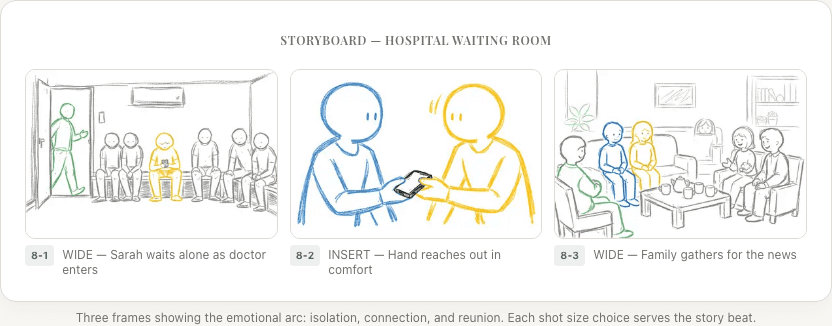
Stage 5: Review reveals that shots 14-6 through 14-8 need careful attention to the 180-degree rule in the dialogue coverage. The insert in 14-9 should be shot from the same side as 14-10 so the cut from hand to face feels natural.
Common Mistakes in the Screenplay-to-Storyboard Pipeline
Starting with storyboards instead of analysis. The most common mistake I see from newer directors. The workflow exists to prevent uninformed visual choices. Skip the analysis and you'll waste time drawing frames you'll throw away.
Not having a shot list between script and storyboard. The shot list is the bridge. Without it, storyboards become disconnected illustrations rather than a coherent visual plan.
Over-storyboarding. Not every shot needs three frames. A simple dialogue close-up needs one frame. Save multi-frame sequences for complex camera moves and action.
Ignoring transitions between scenes. Your storyboard for scene 14 should consider how scene 13 ends and scene 15 begins. If there's a jarring visual mismatch between scenes and it's not intentional, that's a sign each scene was storyboarded in isolation.
Never revising. Your first storyboard should be wrong. If it isn't, you're probably not pushing yourself hard enough. Expect 2-3 revision passes, especially for complex sequences.
How AI Is Changing the Workflow
The five-stage workflow remains the same, but AI tools are compressing the time each stage takes.
Screenplay analysis that once took hours of manual breakdown can now be automated. AI reads the script and extracts characters, locations, props, and potential continuity issues in minutes.
Shot list generation is emerging as an AI capability. Rather than building shot lists from scratch, directors can review and refine AI-generated suggestions, essentially reacting to proposals rather than creating from nothing.
Storyboard frame generation is the most visible change. AI image generation means directors who can't draw (which is most directors) can still produce visual storyboards that communicate their vision to the crew.
Handing the plan to a video model is the newest link in this chain, and the one where tools differ most. Some start from a prompt, some from a reference image, and some from the script itself, which decides how much of this workflow you still do by hand — compared here.
Summary
The screenplay-to-storyboard workflow has five stages:
- Screenplay analysis. Understand the material deeply (emotional beats, subtext, practical requirements)
- Visual strategy. Define how each scene should look and feel
- Shot list creation. Translate strategy into specific, numbered shots
- Frame composition. Create storyboard frames for each shot
- Review and iteration. Test for sequence, coverage, continuity, and budget
Each stage builds on the previous one. Skipping stages leads to storyboards that don't serve the film. Following the workflow produces storyboards that make every day on set more efficient and every scene more intentional.
The directors who walk onto set with confidence are the ones who did this work in pre-production. The screenplay-to-storyboard pipeline is where that confidence is built.
Ready to speed up your pre-production?
StoryBirdie turns your screenplay into a professional storyboard in minutes. See pricing or jump straight in.
About the author
Aayush is co-founder and director at StoryBirdie. He's a screenwriter, director, stand-up comedian, and full-stack developer — co-founder of Kathmandu's Comedy Tuk Tuk, with directing and writing credits on shorts, music videos, and comedy projects. He builds StoryBirdie on the conviction that storyboarding is expensive, time-consuming, and important — and that a tool for it should serve the filmmaker's vision, not replace it. StoryBirdie is currently in use on a Nepali feature, a Sri Lankan TV commercial, and at one of Nepal's largest production houses. Based in Kathmandu, Nepal.
Keep reading
- AI Screenplay Analysis: Catch Script Problems Before They Cost YouHow AI screenplay analysis tools catch continuity errors, blocking issues, and production problems that human reads miss. Save reshoot days.·8 min read
- Storyboard Software for Directors Who Can't DrawYou don't need drawing skills to storyboard your film. Here's how directors are using AI and template tools to create production-ready storyboards.·6 min read
- Storyboard vs Animatic: What's the Difference?Storyboards and animatics serve different purposes in pre-production. Learn when to use each and how they work together.·10 min read
- How Many Storyboard Panels Per Scene?A practical formula for deciding how many storyboard frames your scene needs. Covers dialogue, action, and VFX scenes with real numbers.·6 min read