This is one of the most common questions I hear from directors early in their career: do I need a shot list, a storyboard, or both? The short answer is both. The longer answer is worth understanding.
Two Tools, One Goal
Storyboards and shot lists both answer the same question: what is the camera going to do? But they answer it in different ways, serve different audiences, and are used at different stages of production.
Understanding the difference, and how the two work together, is essential for any director planning a shoot.
The Shot List: A Text-Based Plan
A shot list is a written document that describes every camera setup in your film. Each entry specifies:
- Shot number
- Shot type (wide, medium, close-up)
- Camera angle (eye-level, high, low)
- Camera movement (static, dolly, pan)
- Subject (who or what the camera is focused on)
- Action description
- Any special notes
What a shot list looks like:
| Shot | Type | Angle | Movement | Subject | Description |
|---|---|---|---|---|---|
| 7-1 | WS | Eye | Static | Bookshop | Maya browses alone, shelves fill the frame |
| 7-2 | MS | Eye | Static | MAYA | Pulling books, putting them back |
| 7-3 | MS | Eye | Static | Door | Alex enters, bell chimes |
| 7-4 | CU | Eye | Static | MAYA | Looks up from shelf |
| 7-5 | CU | Eye | Static | ALEX | Sees Maya, stops |
What a shot list tells you: What shots to capture and how they're technically specified.
What it doesn't tell you: What the shot actually looks like: the composition, the framing, the visual relationship between elements in the frame.
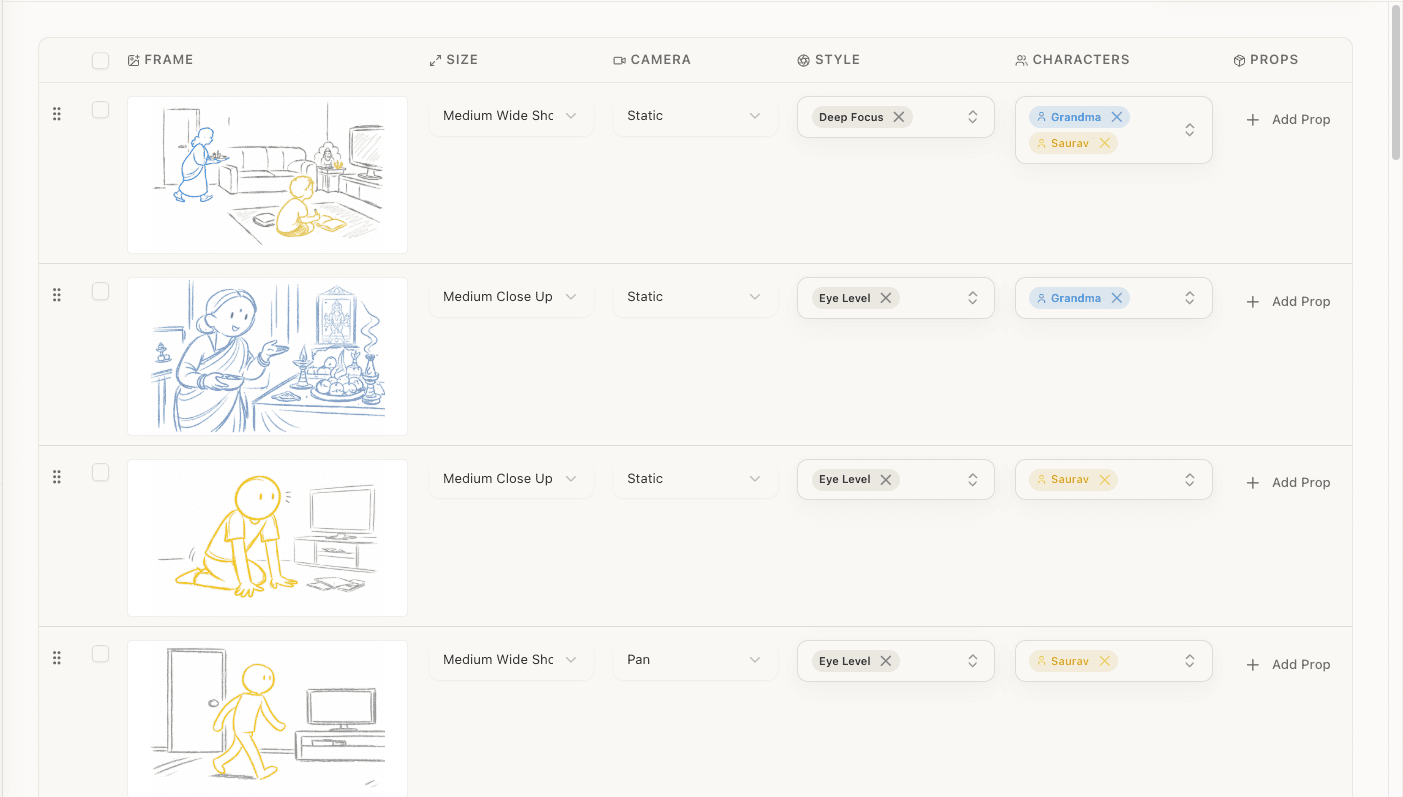
The Storyboard: A Visual Plan
A storyboard is a sequence of illustrated frames showing what the camera will see. Each frame is a picture (drawn, photographed, or AI-generated) that represents one shot.
What a storyboard tells you: What the shot looks like: the composition, character positions, lighting direction, depth, and spatial relationships within the frame.
What it doesn't tell you (without annotations): The technical specifications: exact lens, precise camera movement timing, equipment requirements.
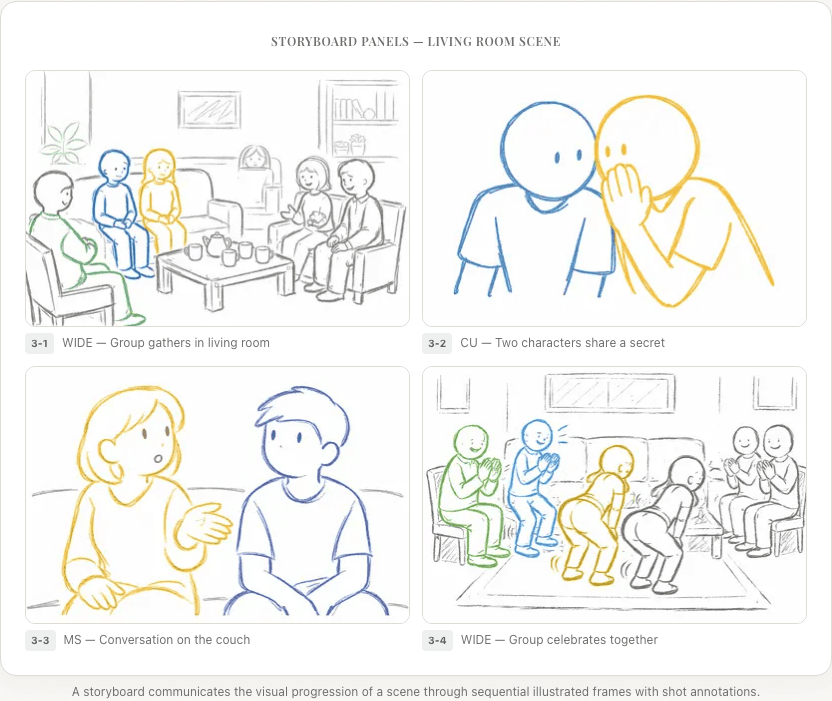
The Key Differences
| Aspect | Shot List | Storyboard |
|---|---|---|
| Format | Text/table | Visual/illustrated |
| Primary audience | AD, DP, production team | Director, DP, VFX, art department |
| Created when | After screenplay breakdown, before storyboard | After shot list |
| Level of detail | Technical specifications | Visual composition |
| Speed to create | Fast (hours) | Slower (days to weeks) |
| Speed to revise | Very fast (change a row) | Slower (redraw/regenerate frames) |
| Best for | Production planning, scheduling, coverage | Visual communication, composition, sequence testing |
| Communicates | What to shoot and how | What it should look like |
When to Use Each
Use a Shot List When...
You need to plan for every scene. Shot lists are fast to create and easy to revise. Even scenes that don't get storyboarded should have a shot list. It's the minimum viable pre-production document.
You're working with an experienced DP. An experienced cinematographer can take "CU, low angle, slow push-in on SARAH" and know exactly what you mean. They don't need a picture. They can visualize from the description.
You're scheduling the shoot. The AD uses the shot list (not the storyboard) to break down setups, estimate time per scene, and build the shooting schedule. The shot list is the production planning document.
The scene is straightforward. A simple dialogue scene in a single location with two characters? A shot list covers it efficiently. Standard coverage (master + singles + OTS) doesn't need elaborate visual planning.
You're tracking changes. Scripts change. When they do, updating a shot list (change a row, add a row, delete a row) is fast. Updating a storyboard means regenerating or redrawing frames.
Use a Storyboard When...
The scene is visually complex. Action sequences, stunts, chase scenes, and VFX-heavy scenes need frame-by-frame visual planning. Words alone can't communicate the spatial choreography of a fight scene or the exact composition of a VFX shot.
You're communicating with a large team. On bigger productions, the storyboard is shared with dozens of people: art department, VFX, stunts, camera, grips, lighting. A visual is worth a thousand shot-list entries when it comes to aligning everyone's understanding.
Composition matters specifically. If you have a precise vision for how a frame should look (the exact placement of a character within the frame, the relationship between foreground and background, a specific use of negative space), a storyboard communicates that in one glance.
You need to test the sequence. Storyboards can be read in sequence (or turned into an animatic) to test whether shots cut together, whether pacing works, and whether the visual story makes sense. Shot lists can't be "watched."
You're working with investors or clients. For pitches, commercials, and client presentations, a storyboard sells the vision far more effectively than a shot list. People respond to pictures.
Use Both When...
Almost always. The shot list and storyboard aren't alternatives; they're complements. The shot list is built first (from your screenplay breakdown and visual strategy). Then the storyboard is created from the shot list, and each shot becomes one or more storyboard frames.
The exception: very low-budget projects with tight timelines might skip storyboarding for simple scenes and rely on the shot list alone. And conversely, some directors (especially in animation) start with storyboards and derive the shot list from them.
How They Work Together
The ideal workflow:

At each stage, information flows forward:
Screenplay Breakdown
Tells you what's in each scene: characters, props, locations, requirements.
Visual Strategy
Tells you how each scene should feel: mood, camera relationship, rhythm.
Shot List
Turns that strategy into specific camera setups with technical specifications.
Storyboard
Visualizes each setup as a composed frame showing what the camera sees.
Animatic
Tests the sequence in time, adding duration, scratch audio, and pacing.
If you skip the shot list and go straight from breakdown to storyboard, you risk:
- Drawing frames without a clear plan (wasted effort)
- Inconsistent coverage across scenes
- Missing shots that you realize you need on set
- A storyboard that looks good frame-by-frame but doesn't cut together
If you skip the storyboard and go straight from shot list to shooting, you risk:
- Discovering composition problems on set (expensive)
- Crew members interpreting the same shot description differently
- Missing visual opportunities that would have been obvious in a drawn frame
- No way to test the sequence before committing to film
A Practical Example
The scene:
A detective arrives at a crime scene and discovers a crucial clue.
The shot list says:
| Shot | Type | Angle | Movement | Subject | Description |
|---|---|---|---|---|---|
| 15-1 | EWS | Eye | Static | Building | Exterior, police tape, night |
| 15-2 | MS | Eye | Steadicam follow | RIVERA | Walks through the front door |
| 15-3 | WS | Slightly high | Static | Room | Crime scene overview, forensic markers |
| 15-4 | CU | Eye | Static | RIVERA | Scanning the room, focused |
| 15-5 | POV (Rivera) | Eye | Pan R→L | Room | What Rivera sees, panning across evidence |
| 15-6 | Insert | Overhead | Static | Floor | The clue, a single earring on the floor |
| 15-7 | ECU | Eye | Push-in | RIVERA | Recognition. She knows whose earring it is. |
This tells the crew what to shoot. But consider shot 15-6, "a single earring on the floor." Where in the frame? Is it centered? Off to the side? Is there other evidence around it? What's the lighting? The shot list doesn't answer these questions.
The storyboard shows:
Frame 15-6: Overhead angle. A hardwood floor fills the frame, marked with forensic evidence numbers. In the lower-right third of the frame, a small pearl earring catches the light. A yellow evidence marker with the number "7" sits beside it. The rest of the frame is relatively empty, drawing the eye to the earring through negative space.
Now every department knows exactly what this shot looks like. The prop team knows they need a pearl earring and evidence markers. The lighting team knows the earring needs to catch light. The art department knows the floor should be hardwood. The DP knows it's overhead with the earring positioned in the lower-right third.
Frequently Asked Questions
Can I just do a storyboard without a shot list?
You can, but you'll probably regret it. Without a shot list forcing you to think systematically, storyboards tend to have coverage gaps. Many directors who "skip" the shot list actually build one in their head while storyboarding. The problem is that an unwritten plan is hard to track, hard to share, and easy to lose.
Can I just do a shot list without a storyboard?
Yes, and many directors do for straightforward scenes. A shot list is the minimum viable pre-production document. But for anything visually complex, a storyboard prevents expensive surprises on set.
Which one does the editor care about more?
The storyboard, without question. Editors think in visual sequences: how shots cut together, what compositions juxtapose, how rhythm flows. A storyboard (or animatic) gives them a clear picture of the intended sequence.
Which one does the AD care about more?
The shot list. ADs need shot count, setup count, and technical requirements to build the schedule. Storyboards are helpful context, but the shot list is their working document.
How long does each take to create?
For a feature film: a complete shot list typically takes 1-2 weeks of focused work. A complete storyboard can take 3-6 weeks for a storyboard artist (or significantly less with AI storyboard generators). This is why many directors storyboard selectively, covering key sequences only, while maintaining a complete shot list for everything.
Summary
| Shot List | Storyboard | |
|---|---|---|
| What it is | Text-based shot specifications | Visual frame illustrations |
| When to create | After breakdown, before storyboard | After shot list |
| Primary use | Production planning, coverage tracking | Visual communication, sequence testing |
| Essential for | Every scene | Complex/VFX/action scenes |
| Speed | Fast to create and revise | Slower, but AI tools are closing the gap |
They're not competing tools. They're complementary stages in the screenplay-to-storyboard pipeline. The shot list determines what you're shooting. The storyboard shows what it should look like. Together, they give you and your crew a complete plan for every frame of your film.
Ready to speed up your pre-production?
StoryBirdie turns your screenplay into a professional storyboard in minutes. See pricing or jump straight in.
About the author
Aayush is co-founder and director at StoryBirdie. He's a screenwriter, director, stand-up comedian, and full-stack developer — co-founder of Kathmandu's Comedy Tuk Tuk, with directing and writing credits on shorts, music videos, and comedy projects. He builds StoryBirdie on the conviction that storyboarding is expensive, time-consuming, and important — and that a tool for it should serve the filmmaker's vision, not replace it. StoryBirdie is currently in use on a Nepali feature, a Sri Lankan TV commercial, and at one of Nepal's largest production houses. Based in Kathmandu, Nepal.
Keep reading
- Storyboard vs Shot List: Which Comes First?Should you create a shot list or storyboard first? The answer depends on your project. Here's a practical framework for deciding.·7 min read
- What Is a Shot List? Everything Directors Need to KnowA complete guide to shot lists for directors. What they include, how to create one, and why every shoot needs one.·9 min read
- Storyboard vs Animatic: What's the Difference?Storyboards and animatics serve different purposes in pre-production. Learn when to use each and how they work together.·7 min read
- How to Create a Shot List: A Director's GuideLearn how to create a shot list step by step. Covers shot types, camera angles, movement notation, and scene organization.·14 min read