Choosing the Right Tool
Most "best storyboard software" articles are written by the companies selling the software. This one is too (we make StoryBirdie), but we're going to be genuinely honest about every tool on this list, including ours. We'll tell you where StoryBirdie falls short. If another tool is a better fit for your project, we'd rather you know that.
There's no single "best" storyboard software. The right choice depends on what you're making, how you work, and what stage of the filmmaking process you need the most help with.
Some tools are storyboard-first: they help you draw or generate frames. Others are production-management suites with storyboarding as one feature. And a newer category connects the entire pre-production pipeline, from screenplay to storyboard.
This guide covers the major options available in 2026, evaluated from a director's perspective.
What to Look for in Storyboard Software
Before comparing tools, know what matters for your workflow:
Storyboard creation method:
- Drawing tools (pen/tablet input)
- Drag-and-drop with pre-made assets
- AI image generation from text
- Photo import and arrangement
Workflow integration:
- Does it connect to your screenplay?
- Does it support shot lists?
- Can you organize by scene and sequence?
Collaboration:
- Can your DP, AD, and producer access the project?
- Real-time collaboration or file-sharing only?
- Comment and annotation tools
Export options:
- PDF storyboard sheets
- Presentation decks
- Animatic creation
- Individual frame export
AI capabilities (if any):
- Frame generation quality
- Character consistency across frames
- Screenplay analysis
- Shot list generation
- Free tier available?
- Per-user or per-project pricing?
- Affordable for indie/student filmmakers?
The Tools
Boords
What it is: A dedicated storyboard creation platform with drag-and-drop frame building, team collaboration, and animatic creation.
Best for: Teams that want a structured storyboarding workspace with collaboration features. Strong for agencies and commercial production.
Storyboard creation: Boords offers drawing tools, image upload, and AI image generation for frames. Their drag-and-drop interface makes it easy to arrange and rearrange frames. The frame editor includes character and prop assets you can position in the scene.
Strengths:
- Clean, intuitive interface specifically designed for storyboarding
- Built-in animatic creator (add timing and audio to your boards)
- Good collaboration features: share with team, get feedback, iterate
- Extensive template library (150+ storyboard templates)
- Strong export options (PDF, presentation, individual frames)
- AI image generation integrated into the frame editor
Limitations:
- No screenplay import or analysis, so the storyboard is disconnected from the script
- No automatic shot list generation; you build everything manually within Boords
- Pricing is per-user, which adds up for larger teams
- Best suited for storyboarding specifically, not the broader pre-production workflow
Pricing: Free tier (limited). Paid plans start at $15/user/month.
Director's take: If all you need is a place to build and share storyboards, Boords is probably your best option. It's polished, the collaboration features actually work, and the interface stays out of your way. The gap is everything that happens before the storyboard: screenplay analysis, shot list creation, continuity checking. Boords assumes you've already done that work somewhere else.
StudioBinder
What it is: A comprehensive production management platform covering scripts, shot lists, storyboards, call sheets, scheduling, and more.
Best for: Production teams that want an all-in-one production management suite. Strong for producers and ADs who need to manage the entire production workflow.
Storyboard creation: StudioBinder's storyboard feature lets you upload images or use their shot list tool to organize frames. The storyboard is connected to the shot list, which is a genuine workflow advantage.
Strengths:
- Shot list and storyboard are integrated: shots map to frames
- Comprehensive production management (call sheets, schedules, breakdowns)
- Massive educational content library (their blog is a filmmaking education resource)
- Good free tier with useful features
- Strong template library for shot lists and breakdown sheets
Limitations:
- Storyboard creation is secondary to production management, so the drawing/generation tools are basic
- No AI storyboard frame generation
- No screenplay analysis or continuity checking
- Can feel overwhelming for directors who just need storyboarding, not full production management
- Higher-tier pricing is steep ($340/month for enterprise)
Pricing: Free tier (solid). Paid plans from $35/month to $340/month.
Director's take: StudioBinder is the industry standard for production management, and their educational content alone makes it worth exploring. But as a storyboarding tool specifically? It's a side feature in a production suite. If you're a producer or AD, you probably already use it. If you're a director who mainly needs to get from script to visual storyboard, StudioBinder is more tool than you need, and its storyboarding features aren't where it shines.
Katalist
What it is: An AI-powered storyboard and video generation platform that creates visual content from text descriptions.
Best for: Creators who want fast AI-generated visual content: storyboards, concept art, and short video previews.
Storyboard creation: Katalist generates storyboard frames from text prompts using AI. You describe scenes and the AI produces frames. They've also added AI video generation for short animated previews of your storyboard.
Strengths:
- Fast AI frame generation
- AI video generation from storyboard frames (unique feature)
- Clean interface
- Good for rapid concept visualization
If the video generation is the point rather than a bonus, the tools in that space divide by where they expect you to start — a prompt, a reference image, or a finished screenplay — and that decides how much of the shot breakdown you do by hand.
Limitations:
- No screenplay import or analysis
- No shot list generation; you're writing prompts for individual frames
- Character consistency across frames can be inconsistent
- The video generation, while impressive, is more concept-preview than production-ready
- Content quality varies: best for quick concepts, less reliable for detailed production boards
Pricing: Freemium model with generation limits. Paid plans available.
Director's take: Katalist is the tool I'd reach for if I needed to quickly visualize a scene concept during a pitch meeting or an early creative discussion. It's fast and the AI video generation is genuinely interesting. But it's not a pre-production workflow tool. There's no screenplay connection, no shot list structure. For actual production storyboarding, you'll outgrow it quickly.
Filmustage
What it is: An AI-powered pre-production assistant focused on script breakdown, scheduling, and budgeting.
Best for: Producers and line producers who need fast, automated script breakdowns for budgeting and scheduling. Also useful for directors who want AI-powered script analysis.
Storyboard creation: Filmustage has added AI image generation and video generation (via Google's VEO 3) for storyboard-like visualization. However, storyboarding isn't their core product; it's an add-on to their script breakdown tools.
Strengths:
- Best-in-class AI script breakdown: fast, accurate element extraction
- Automatic scheduling and budgeting from script analysis
- Integration with Movie Magic Scheduling and Budgeting
- AI image generation for visual reference
- Strong for the production management side of pre-production
Limitations:
- Storyboarding is a secondary feature, not the core product
- No shot list generation from screenplay analysis
- Positioned as a production management tool, not a director's creative tool
- AI image generation is for reference, not structured storyboard creation
- No storyboard-specific workflow (frame arrangement, annotation, animatic)
Pricing: Free tier. Paid plans from $19/month to $59/month.
Director's take: Filmustage is our closest competitor in terms of AI screenplay analysis, but we're solving different problems for different people. Filmustage answers "how much will this cost and how long will it take?", a producer's question. StoryBirdie answers "how should this look and how should I shoot it?", a director's question. If you're a line producer, Filmustage is excellent. If you're a director who needs visual pre-production, the storyboarding features are an afterthought.
StoryBirdie
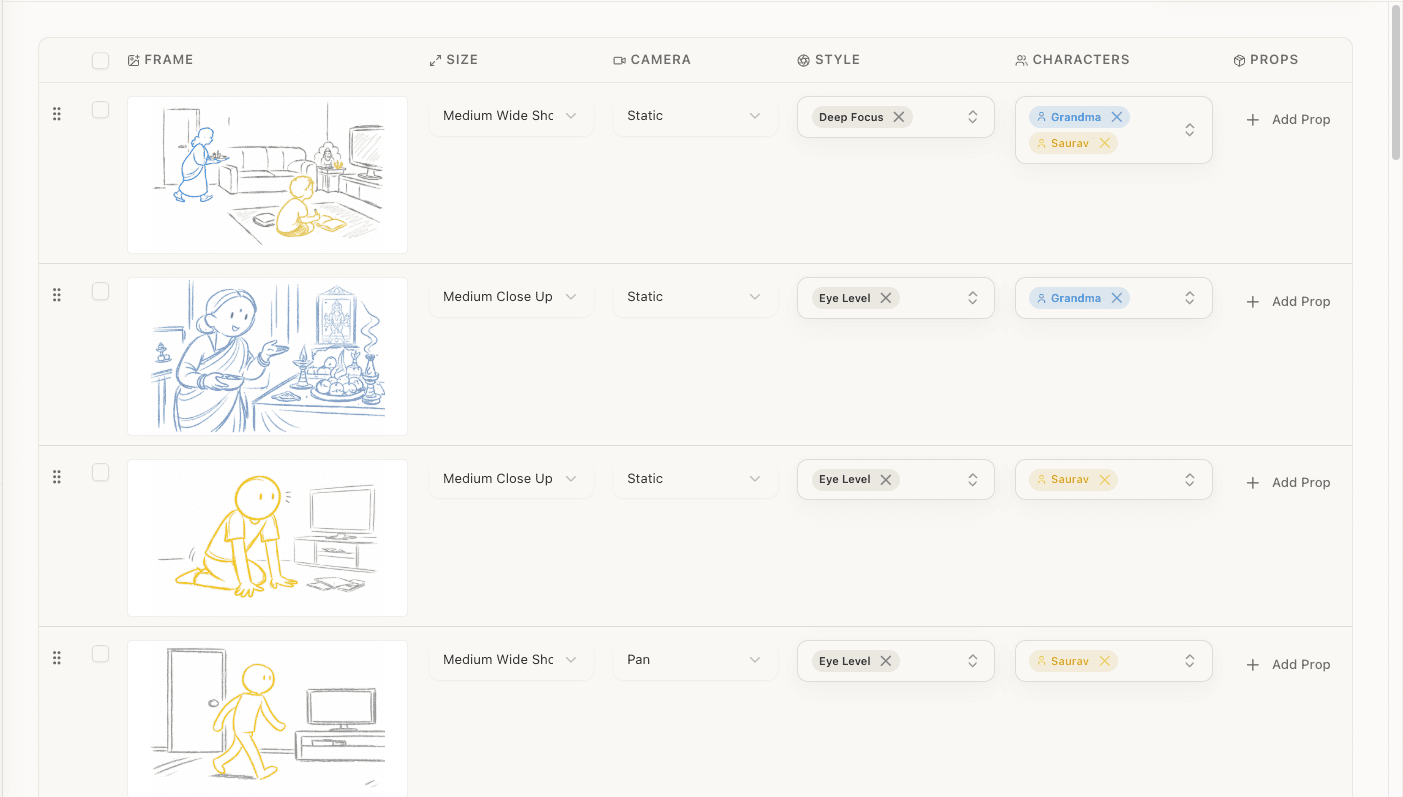
What it is: An AI-powered screenplay-to-storyboard pipeline designed for directors. Upload a screenplay, get AI analysis with continuity checking, generate and refine a shot list, then create storyboard frames.
Best for: Directors who want to go from screenplay to storyboard in an integrated workflow, with AI handling the mechanical work while the director retains creative control.
Storyboard creation: StoryBirdie generates storyboard frames from your refined shot list descriptions. Because the AI has context from the screenplay analysis (characters, locations, props, mood), the generated frames are informed by the full scene context.
Strengths:
- Fully integrated pipeline: screenplay → analysis → shot list → storyboard
- AI screenplay analysis with continuity error detection
- AI shot list generation from screenplay analysis
- Supports PDF, DOCX, and Fountain screenplay formats
- Director-focused, designed for creative shot decisions, not production logistics
- Each stage is editable: the AI proposes, you refine
Limitations:
- Newer product, less mature than established tools like Boords or StudioBinder
- No production management features (scheduling, call sheets, budgeting)
- Collaboration features are more limited than Boords' team workspace
- Template library is smaller than competitors with years of content
- AI frame generation quality is good but improving
Pricing: Currently in early access. See storybirdie.com for current pricing.
Director's take: Obviously we're biased here, so take this accordingly. We built StoryBirdie because the existing options frustrated us. Boords is great at storyboarding but disconnected from the script. StudioBinder is great at production management but light on storyboarding. Filmustage is focused on producers, not directors. We wanted one tool that follows the director's actual workflow: screenplay in, storyboard out, with AI doing the mechanical work at each step. Our honest weakness is maturity. We're newer, and established tools have had years to build features we're still developing.
Other Tools Worth Knowing
Storyboarder (by Wonder Unit): A free, open-source storyboard drawing tool. Simple and effective for hand-drawn boards. No AI features, limited workflow integration, but the price is right.
Canva: Not a storyboard tool, but its free storyboard templates are popular with students and beginners. Good for quick mockups, not for production workflow.
PowerPoint/Keynote/Google Slides: The DIY approach. Import images into a slide deck, add annotations. No filmmaking-specific features, but universally accessible and familiar.
Procreate/Photoshop: For directors who draw. Full creative control over every frame. No storyboard-specific workflow (numbering, annotation, export), but the drawing tools are unmatched.
Comparison Matrix
| Feature | Boords | StudioBinder | Katalist | Filmustage | StoryBirdie |
|---|---|---|---|---|---|
| Core focus | Storyboarding | Production mgmt | AI visuals | Script breakdown | Screenplay→storyboard |
| AI frame generation | Yes | No | Yes | Yes (secondary) | Yes |
| Screenplay import | No | Yes (limited) | No | Yes | Yes |
| AI screenplay analysis | No | No | No | Yes | Yes |
| Continuity checking | No | No | No | No | Yes |
| Shot list generation | No | Manual | No | No | AI-generated |
| Shot list ↔ storyboard | No | Yes | No | No | Yes |
| Animatic creation | Yes | No | Yes (video) | No | Planned |
| Collaboration | Strong | Strong | Basic | Basic | Basic |
| Production mgmt | No | Comprehensive | No | Strong | No |
| Free tier | Limited | Solid | Limited | Limited | Early access |
| Best for | Storyboard teams | Full production | Quick concepts | Producers | Directors |
How to Choose
Skip the feature comparison paralysis. Start from what you actually need.
Choose Boords if you already have a shot list and need a clean workspace to build, collaborate on, and share visual storyboards. It does that one job very well. Budget for per-user pricing.
Choose StudioBinder if you're managing an entire production and storyboarding is one of many things on your plate. Especially strong for producers and ADs. Start with the free tier; it's genuinely useful.
Choose Katalist if you need quick concept visuals for pitches or early creative discussions. Speed matters more than workflow integration. Don't expect it to scale to full production storyboarding.
Choose Filmustage if you're a producer or line producer and your primary need is automated script breakdown for budgeting and scheduling. Their screenplay analysis for production logistics is best-in-class.
Choose StoryBirdie if you're a director who thinks about pre-production as a pipeline (screenplay to analysis to shot list to storyboard) and wants AI handling the mechanical steps while you make the creative decisions. That connected workflow is what we built, and nothing else on this list does it the same way.

The Trend: Integrated Pipelines
The clear industry trend is away from disconnected point tools and toward integrated pipelines. In 2024, directors used separate tools for script analysis, shot lists, storyboards, and production management, manually transferring information between them.
In 2026, the best tools connect these steps. When your shot list is generated from your screenplay analysis, and your storyboard frames are generated from your shot list, changes propagate through the pipeline. A script revision triggers updated analysis, which updates the shot list, which updates the storyboard. No manual re-entry, no version drift.
This integration is what we're building at StoryBirdie, and what we believe the industry is moving toward. The storyboard isn't an isolated deliverable. It's the visual output of a connected pre-production process that starts with the screenplay.

Summary
The storyboard software landscape in 2026 has clear categories:
- Storyboard-first tools (Boords). Best for frame creation and collaboration.
- Production management suites (StudioBinder). Best for full production workflow.
- AI visual generators (Katalist). Best for rapid concept visualization.
- Script analysis tools (Filmustage). Best for production logistics.
- Screenplay-to-storyboard pipelines (StoryBirdie). Best for the director's creative workflow.
No single tool does everything. The best choice depends on your role, your project, and which part of the pre-production process needs the most help.
Ready to speed up your pre-production?
StoryBirdie turns your screenplay into a professional storyboard in minutes. See pricing or jump straight in.
About the author
Aayush is co-founder and director at StoryBirdie. He's a screenwriter, director, stand-up comedian, and full-stack developer — co-founder of Kathmandu's Comedy Tuk Tuk, with directing and writing credits on shorts, music videos, and comedy projects. He builds StoryBirdie on the conviction that storyboarding is expensive, time-consuming, and important — and that a tool for it should serve the filmmaker's vision, not replace it. StoryBirdie is currently in use on a Nepali feature, a Sri Lankan TV commercial, and at one of Nepal's largest production houses. Based in Kathmandu, Nepal.
Keep reading
- Free Storyboard Generator: No Drawing RequiredCreate professional storyboards from your screenplay without drawing skills. Compare free storyboard generators and learn which one fits your workflow.·9 min read
- Storyboard Software for Directors Who Can't DrawYou don't need drawing skills to storyboard your film. Here's how directors are using AI and template tools to create production-ready storyboards.·6 min read
- How AI Storyboard Generators Actually Work in 2026How AI storyboard generators turn text and screenplays into shot frames in 2026. Director's guide to the tech, its limits, and which tools to pick.·19 min read
- Planning a Shoot With AI Video Tools: Where Each One StartsHiggsfield, LTX Studio, Katalist and StoryBirdie compared by where you start — an idea, an image, or a finished script. Which tool fits which beginning.·10 min read