The Drawing Problem
I can see shots in my head all day long. I know exactly where the camera should be, how the light should fall, what the composition should feel like. But put a pencil in my hand and ask me to draw it? You'll get something between a stick figure and a crime scene sketch.
This is the reality for most directors. We're visual thinkers with non-visual hands. And for decades, that gap between imagination and paper meant one of three things: learn to draw (years), hire a storyboard artist (expensive), or skip storyboards entirely (risky).
None of those options work for indie directors on tight budgets and timelines. So let's talk about what actually does.
Why You Still Need Storyboards (Even If You Can't Draw Them)
Before we get into tools, let's be clear about why this matters.
Storyboards aren't about impressing anyone with artwork. They're about communicating your vision to your crew before you're on set burning money.
Without storyboards, here's what happens on set:
- You describe a shot verbally to your DP. They interpret it differently than you meant.
- You lose 20 minutes discussing framing that a single image would have settled in 5 seconds.
- Your AD can't accurately schedule because they don't know how many setups each scene requires.
- Your editor gets footage that doesn't cut together because nobody planned the coverage.
A rough storyboard — even an ugly one — prevents all of this. The question isn't whether to storyboard. It's how to storyboard when drawing isn't your skill.
The Options (Ranked by Drawing Skill Required)
Zero Drawing: AI Image Generation
How it works: You describe the shot in text (or upload your screenplay), and AI generates a visual frame.
What you get: Custom images showing your specific scene — characters in the right positions, camera at the right angle, the right mood and lighting. Not stock photos. Not clip art. Frames generated from your script.
Best for: Directors who want the fastest path from screenplay to visual storyboard. No artistic skill needed at all.
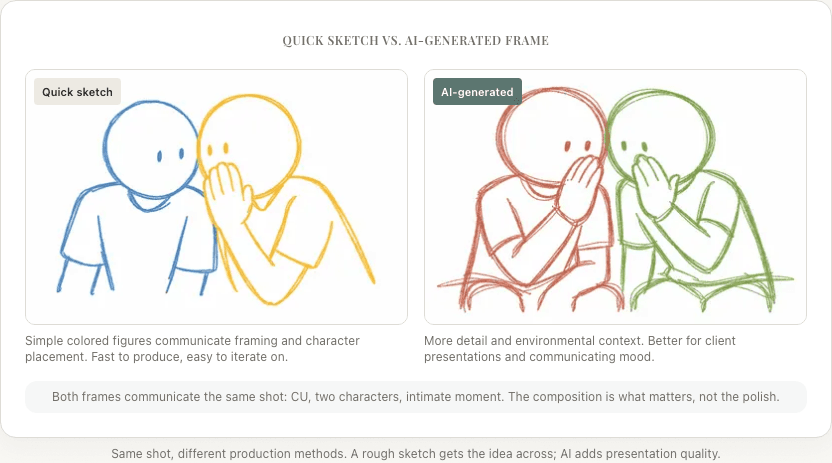
Limitations: AI-generated frames are pre-visualization quality, not production art. Character consistency across frames isn't perfect. Very specific stylistic requests (exact lighting ratios, precise lens distortion) may not translate.
For a detailed comparison of specific AI tools (StoryBirdie, Boords, Katalist), see the honest comparison post.
Minimal Drawing: Template & Drag-and-Drop Tools
Pre-made elements you arrange into compositions — Boords, Canva, Storyboard That. Good for teams and client presentations, but limited character variety and a generic look.
Some Drawing: Sketch Tools
If you can draw even roughly, tools like Storyboarder (free, open source) provide guides and perspective grids that improve your output. Procreate and Photoshop also work with storyboard templates.
The Practical Workflow (No Drawing Version)
Here's how I storyboard my projects when I can't (or don't want to) draw:
1. Start with the screenplay. Your script already contains everything the AI needs — scene headings, action lines, dialogue, character blocking. Upload it directly rather than re-describing every shot.

2. Let AI generate the shot list first. Before worrying about visuals, get the structural breakdown right. How many shots per scene? What sizes? What coverage pattern? Adjust the shot list until the editorial logic works — how each shot cuts to the next, where the emphasis falls, whether the pacing matches the scene's emotional arc.
3. Generate visual frames. Once the shot list is locked, generate storyboard frames. Review them for composition and blocking accuracy, not artistic quality. Does the frame communicate the shot to your DP? That's the bar.
4. Edit selectively. Don't try to perfect every frame. Focus on the hero shots — the frames that define your visual language. For standard coverage (establishing wides, over-the-shoulder dialogue), good enough is good enough.
5. Export and share. A PDF storyboard with shot metadata (camera angle, movement, action, dialogue) gives your crew everything they need. Print it for the wall on set. Share it digitally for pre-production planning.
What Makes a Good Storyboard (Drawing Optional)
Whether hand-drawn or AI-generated, a storyboard is effective when it communicates:
Framing. What's in the shot and what's excluded. The audience should understand the composition at a glance.
Character positions. Where each character is in the space relative to the camera and each other. This is blocking information your AD and actors need.
Camera angle and movement. Low angle? High angle? Is the camera tracking, panning, or static? Arrows or notes can supplement what the image doesn't show.
Continuity across shots. The sequence should read as a coherent scene, not isolated images. Eyelines should match. Screen direction should be consistent (or intentionally broken).
Emotional tone. Lighting, composition, and framing choices should suggest the mood. A tight close-up in shadow feels different from a wide shot in daylight, even in rough pre-viz.
None of this requires artistic talent. It requires directorial talent — knowing what the camera should see and why. That's your skill. The drawing (or lack thereof) is just the delivery mechanism.
The Directors Who Skipped Drawing
Ridley Scott storyboards his films personally — but his early boards were rough sketches, not art. The detail was in the framing and composition choices, not the rendering quality.
Martin Scorsese uses simple overhead diagrams and shot descriptions. His storyboards for Taxi Driver were text-heavy with minimal visuals.
Steven Spielberg's early boards were stick figures. The boards for Raiders of the Lost Ark are famously rough — but they communicate every shot with clarity.
The pattern is clear: great directors communicate their vision through storyboards. The quality of the drawing has never been the point. The quality of the thinking has.
Today, AI tools remove even the stick-figure barrier. If you can describe a shot — or better yet, write a screenplay — you can produce a visual storyboard in minutes. No excuses left.
Ready to speed up your pre-production?
StoryBirdie turns your screenplay into a professional storyboard in minutes. See pricing or jump straight in.
About the author
Aayush is co-founder and director at StoryBirdie. He's a screenwriter, director, stand-up comedian, and full-stack developer — co-founder of Kathmandu's Comedy Tuk Tuk, with directing and writing credits on shorts, music videos, and comedy projects. He builds StoryBirdie on the conviction that storyboarding is expensive, time-consuming, and important — and that a tool for it should serve the filmmaker's vision, not replace it. StoryBirdie is currently in use on a Nepali feature, a Sri Lankan TV commercial, and at one of Nepal's largest production houses. Based in Kathmandu, Nepal.
Keep reading
- Best Storyboard Software in 2026: Honest ComparisonHonest comparison of the best storyboard software in 2026. Pricing, features, and which tool fits your directing workflow.·13 min read
- Screenplay to Storyboard: A Director's WorkflowA director's guide to turning a screenplay into a storyboard. Covers script analysis, shot lists, frame planning, and AI tools.·14 min read
- How AI Storyboard Generators Actually Work in 2026How AI storyboard generators turn text and screenplays into shot frames in 2026. Director's guide to the tech, its limits, and which tools to pick.·19 min read
- Storyboard vs Animatic: What's the Difference?Storyboards and animatics serve different purposes in pre-production. Learn when to use each and how they work together.·10 min read