The Problem Every Director Knows
You've finished the screenplay. The story works. The dialogue is sharp. Now you need to turn those words into a visual plan your crew can execute.
Traditionally, that means one of three things: draw the storyboards yourself (if you can draw), hire a storyboard artist ($500-2,000 per scene, plus revision cycles), or skip storyboarding entirely and wing it on set.
None of these are great options for indie directors working on tight budgets and tighter timelines. The first requires a skill most directors don't have. The second requires money most indie productions don't have. The third results in missed coverage, confused crew, and a reshoot day nobody budgeted for.
AI storyboarding tools change this equation. They don't replace the director's creative vision — they handle the mechanical work of translating a script into visual frames, so you can focus on the decisions that actually matter: framing, pacing, composition, and visual storytelling.
Here's how the process works, step by step.

Step 1: Prepare Your Screenplay
AI tools work best with structured screenplays. Before you upload, make sure your script follows standard formatting:
- Scene headings (INT./EXT., location, time of day) help the AI understand scene boundaries
- Action lines that describe blocking, movement, and key visual elements give the AI more to work with
- Character names above dialogue blocks help the AI track who's in each shot
You don't need perfect formatting, but the more structured your script is, the better the AI's output will be. If your script is in Final Draft, WriterSolo, or any standard screenwriting app, the formatting is already handled.
Supported formats typically include: PDF, DOCX, and Fountain (.fountain). Fountain is the most reliable for AI parsing because it's plain text with consistent markup — no rendering ambiguity.
Step 2: AI Script Analysis
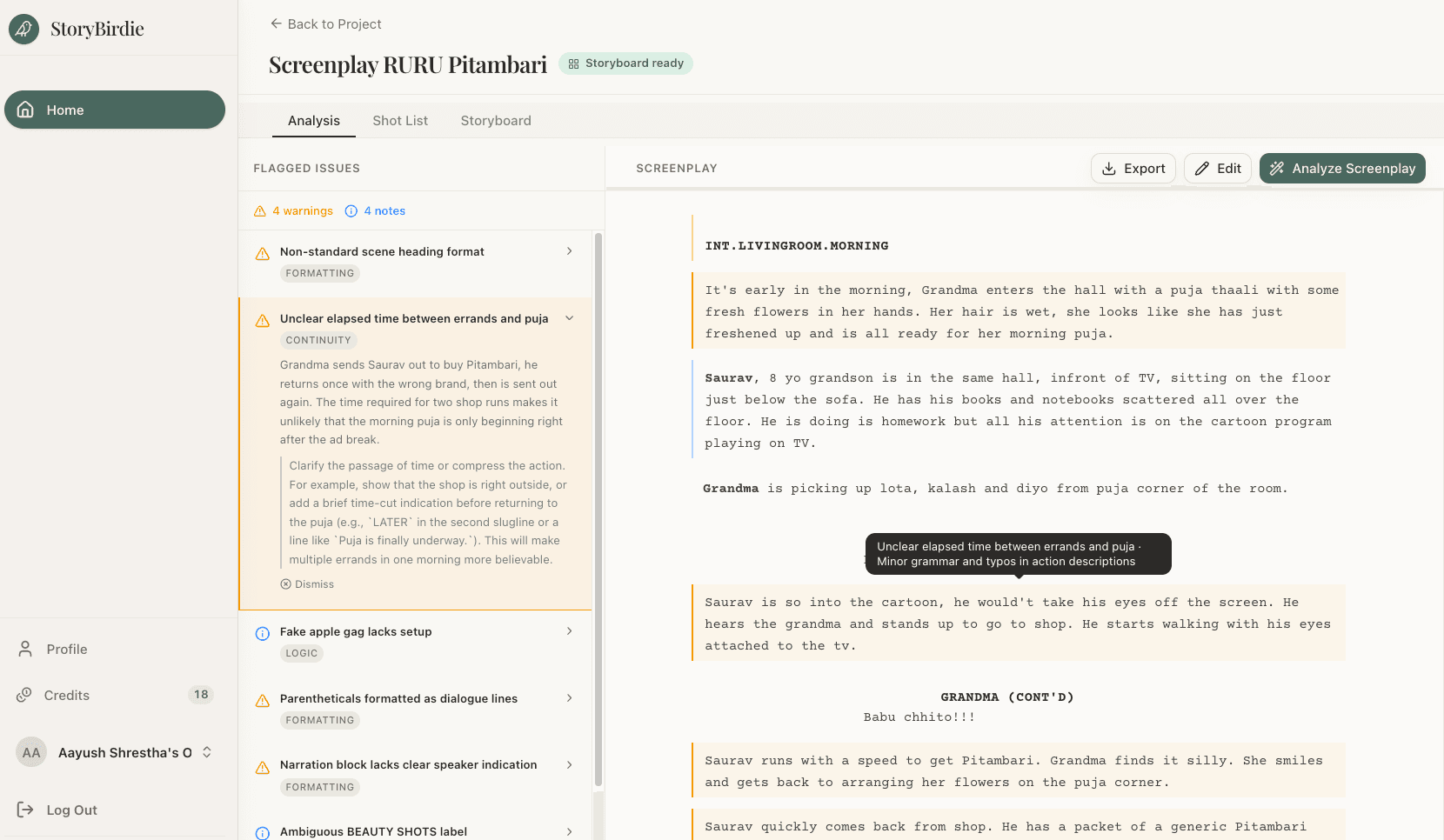
This is where AI storyboarding diverges from traditional storyboarding — and where it adds the most value.
Before generating any visuals, a good AI tool will analyze your screenplay for:
- Continuity issues — a character holding a coffee cup in one action line and empty-handed in the next, a door that's locked in scene 3 but open without explanation in scene 5
- Characters present in each scene, their emotional states, and their positions
- Props, wardrobe, and set elements mentioned in action lines
- Blocking implied by stage directions — who moves where, when
- Potential production issues — scenes requiring complex setups, VFX, or large cast coordination
This analysis catches things that human reads miss, especially in longer scripts. A continuity error buried on page 47 is easy to overlook during a readthrough. An AI reads every line with equal attention.
You should review the analysis and make corrections. The AI flags issues — the director decides what to do about them. Some flagged "errors" might be intentional creative choices. Dismiss those. Fix the real ones.
Step 3: Shot List Generation
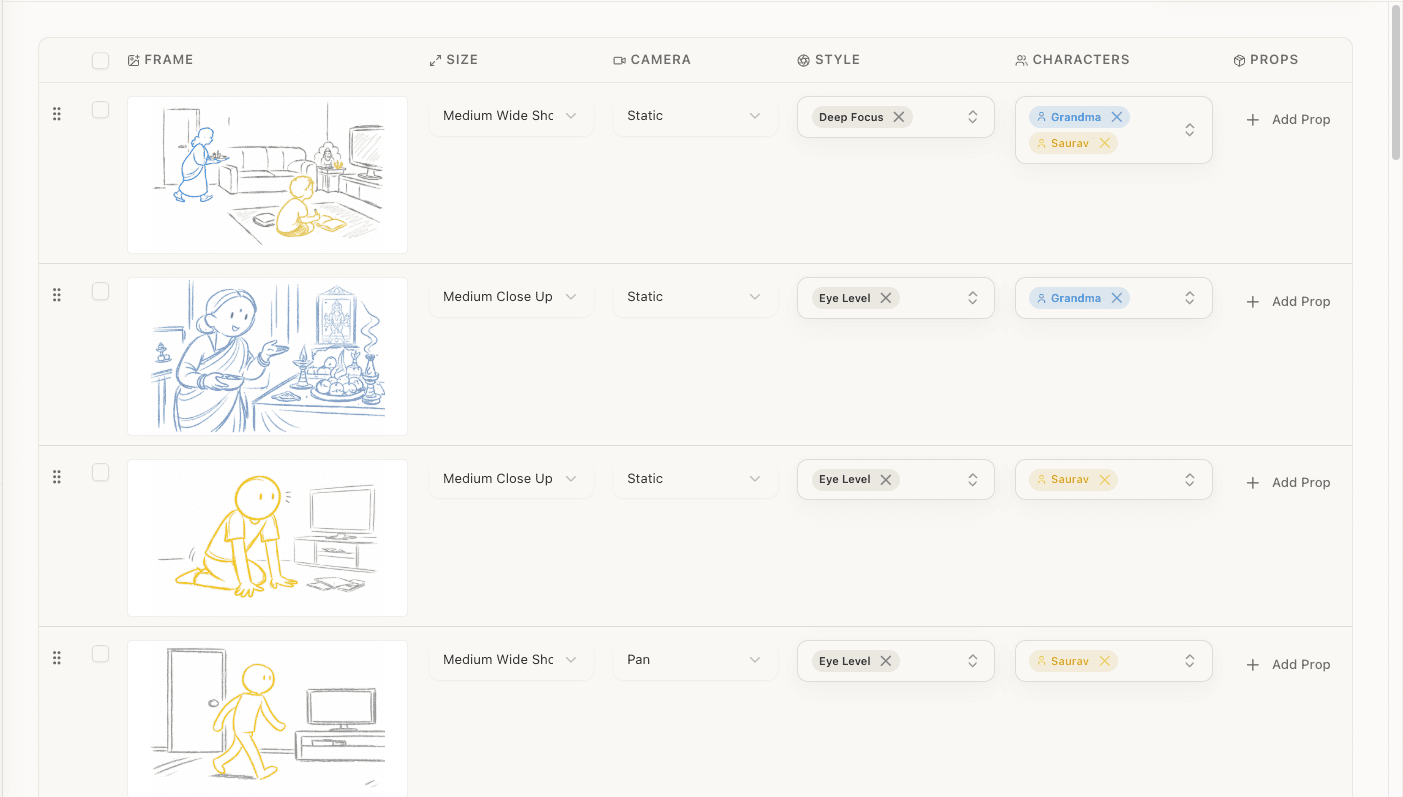
With the analysis complete, the AI generates a shot list for each scene. This is the structural backbone of your storyboard.
A well-generated shot list includes:
| Element | What It Covers |
|---|---|
| Shot size | Wide, medium, close-up, extreme close-up, etc. (camera angles reference) |
| Camera movement | Static, handheld, Steadicam, pan, whip pan, tilt, truck, push, dolly, zoom, jib |
| Shot type | Eye level, low/high angle, overhead, dutch, single, two-shot, three-shot, over-the-shoulder, point of view |
| Blocking | Where characters are positioned and how they move |
| Characters in frame | Who's visible in this specific shot |
| Action | What happens during the shot |
| Dialogue | Any dialogue covered by this shot |
The AI makes these decisions based on filmmaking conventions — dialogue scenes get shot/reverse-shot coverage, action sequences get wider shots with faster cutting, emotional moments get closer framing. But these are starting points, not mandates.
This is where your creative control matters most. Review every shot. Change the camera angle on shot 4 because you want a dutch angle for unease. Swap the medium shot for a close-up because the actor's performance needs to carry the moment. Add an insert shot of a prop that's important to the subplot.
The AI gives you a foundation. You sculpt it into your vision.
Step 4: Storyboard Frame Generation
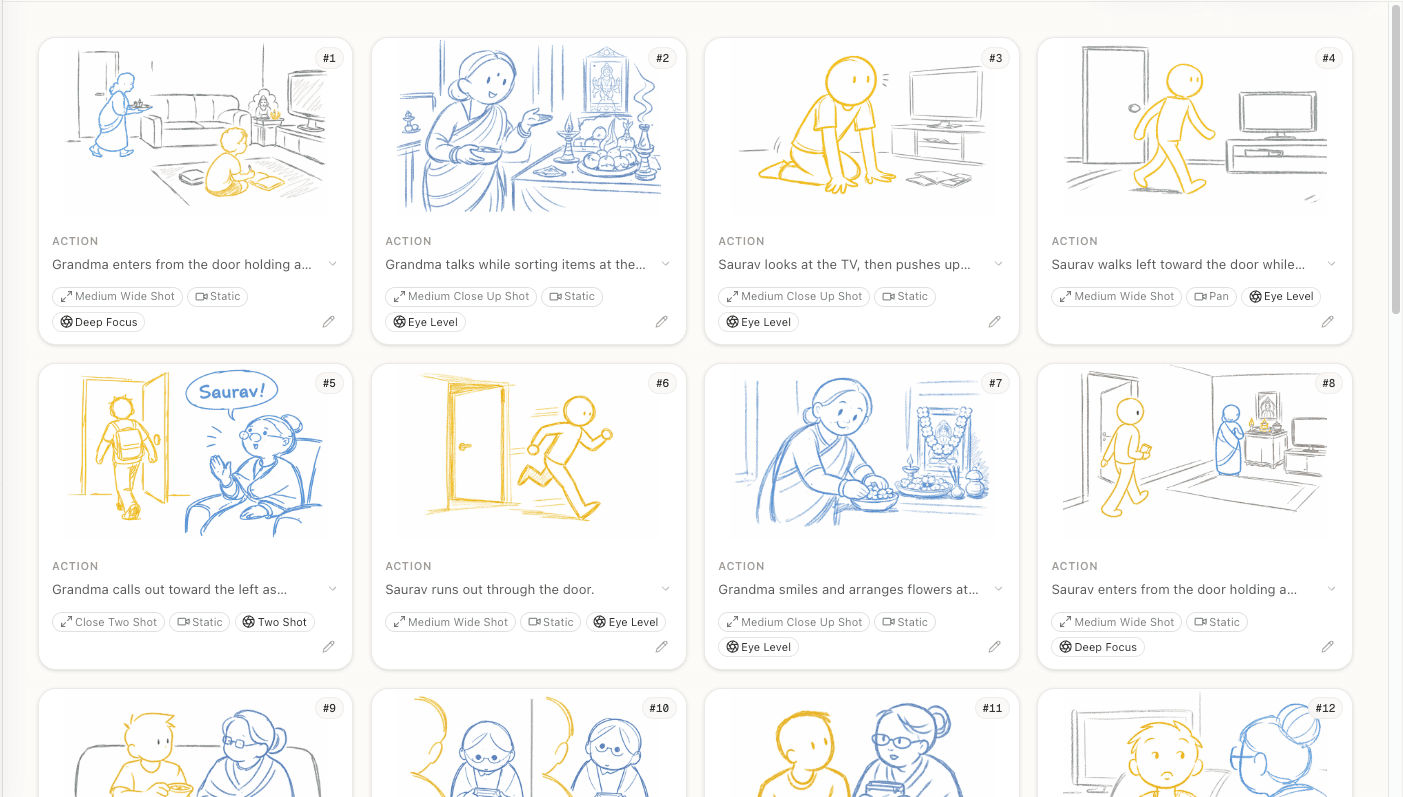
Once your shot list is locked, the AI generates a visual frame for each shot. These frames show:
- The approximate composition (what's in frame, where)
- Character positions and blocking
- Camera angle and framing
- Key visual elements from the scene
A few things to set expectations: AI-generated storyboard frames are pre-visualization tools, not production art. They communicate the shot to your crew. They're not concept art and they're not the final look of your film.
That said, they're significantly more useful than no storyboard at all. A DP who sees a rough frame showing a low-angle two-shot with the character screen-left understands the shot immediately. The same information described in words ("low angle, wide, character on the left side of frame") takes longer to parse and leaves more room for interpretation.
Step 5: Review, Edit, Export
With all frames generated, you now have a complete storyboard. But it's a first draft.
Review the sequence as a whole. Individual shots might look fine but not cut together well. Watch for:
- Eyeline consistency — does the character's gaze direction match across cuts?
- Screen direction — if a character walks left-to-right in shot 1, do they continue in the same direction in shot 2? (Or is there an intentional reversal?)
- Pacing — is the cutting rhythm right for the scene's emotional arc?
- Coverage gaps — is every beat of the scene accounted for? Would the editor have what they need?
Make your edits. Adjust shots, reorder them, add or remove frames. Then export.
The standard output is a PDF storyboard — a document with frames arranged in sequence, annotated with shot metadata (size, movement, action, dialogue). This is what you hand to your DP, AD, and key crew members.
Some directors also export the shot list as a separate document for the AD's scheduling breakdown. (For more on the relationship between these two documents, see storyboard vs shot list.) Having both the visual storyboard and the tabular shot list gives your crew everything they need.
How Long Does This Actually Take?
Here's a realistic timeline for a single scene (1-3 pages of screenplay):
| Stage | Time |
|---|---|
| Upload and analysis | 30-60 seconds |
| Review analysis, fix issues | 5-10 minutes |
| Generate shot list | 15-30 seconds |
| Review and edit shot list | 10-15 minutes |
| Generate storyboard frames | 1-3 minutes |
| Review and refine | 10-15 minutes |
| Total | 25-45 minutes |
Compare that to traditional storyboarding: 4-8 hours per scene drawing by hand, or 2-3 days turnaround with a storyboard artist (plus revision cycles).
The time savings are real, but the bigger value is iteration speed. Want to try a completely different visual approach for a scene? Generate a new set of frames in minutes, not days. That freedom to experiment changes how you direct.
When AI Storyboarding Works Best (And When It Doesn't)
Works well for:
- Dialogue-heavy scenes with standard coverage patterns
- Pre-visualization for crew communication
- Exploring different visual approaches quickly
- Indie productions without storyboard artist budgets
- Film school projects and student films
- Commercial and music video pre-production
Has limitations for:
- Complex VFX sequences requiring precise technical specification
- Highly stylized or abstract visual languages
- Action choreography that needs frame-by-frame precision
- Storyboards intended as production art or client deliverables
For most indie directors working on narrative shorts, features, commercials, or music videos, AI storyboarding covers 80-90% of the pre-visualization need. The remaining 10-20% — the shots that require hand-drawn precision — are also the shots that justify hiring a specialist artist for those specific frames.
The Director Stays in Control
The most important thing to understand about AI storyboarding: the AI is a tool, not a collaborator. It doesn't have taste. It doesn't understand your vision. It executes based on filmmaking conventions and the information you give it.
Every creative decision — what to emphasize, what to cut, how to frame the emotional core of a scene — is yours. The AI handles the mechanical translation. You handle the art.
That division of labor is what makes AI storyboarding genuinely useful rather than just novel. It's not replacing the director's job. It's removing the parts of storyboarding that aren't actually directing.
Ready to speed up your pre-production?
StoryBirdie turns your screenplay into a professional storyboard in minutes. See pricing or jump straight in.
About the author
Amit is co-founder and engineering lead at StoryBirdie. He owns the screenplay analysis pipeline, AI shot-list generator, and storyboard image stack — frontend, backend, AI, and DevOps. Alongside StoryBirdie he leads product, research, and engineering at Noumenal AI (AI research lab) and previously built Blintic AI solo and worked as ML Engineer and team lead at Docsumo. A 21-year-old engineer based in Kathmandu, Nepal — he met Aayush at an AI conference, became gym buddies, and shipped the first version of StoryBirdie in two weeks. Writes about ML and engineering at selftaughtamit.medium.com.
Keep reading
- Screenplay to Storyboard: A Director's WorkflowA director's guide to turning a screenplay into a storyboard. Covers script analysis, shot lists, frame planning, and AI tools.·14 min read
- How AI Storyboard Generators Actually Work in 2026How AI storyboard generators turn text and screenplays into shot frames in 2026. Director's guide to the tech, its limits, and which tools to pick.·19 min read
- AI Screenplay Analysis: Catch Script Problems Before They Cost YouHow AI screenplay analysis tools catch continuity errors, blocking issues, and production problems that human reads miss. Save reshoot days.·8 min read
- How Many Storyboard Panels Per Scene?A practical formula for deciding how many storyboard frames your scene needs. Covers dialogue, action, and VFX scenes with real numbers.·6 min read