VFX Storyboards Aren't Optional
For dialogue scenes, you can sometimes get away without storyboards. Your DP knows how to cover a conversation. Your editor knows how to cut it.
VFX scenes are different. Every visual effects shot requires exact specifications before production begins: camera angle, lens, plate photography requirements, element photography, tracking markers, green screen dimensions, and compositing layers. Miss one detail and you're either reshooting (expensive) or compromising the shot (visible).
A VFX storyboard isn't just a visual reference — it's a technical specification document that your VFX supervisor, compositor, and on-set VFX team work from. It determines budget, schedule, and final quality.
Productions that storyboard VFX sequences before shooting tend to spend significantly less on post-production VFX revision cycles. The storyboard catches composition issues, impossible camera angles, and plate photography gaps when fixing them costs nothing.
What VFX Storyboards Need (That Regular Storyboards Don't)
| Element | Regular Storyboard | VFX Storyboard |
|---|---|---|
| Composition | Yes | Yes |
| Camera angle/movement | Yes | Yes |
| Character positions | Yes | Yes |
| Layers breakdown | No | Required |
| Green screen boundaries | No | Required |
| Tracking marker placement | No | Required |
| Element photography list | No | Required |
| Lens/FOV specification | Optional | Required |
| Motion blur/frame rate notes | Rare | Required |
| Pre-comp vs. post-comp notes | No | Required |
The fundamental difference: a regular storyboard shows what the audience sees. A VFX storyboard shows what the camera captures and what gets added in post — two different things.
Layer Breakdown: The Most Important VFX Storyboard Element
Every VFX shot is built from layers. Your storyboard needs to identify each layer:
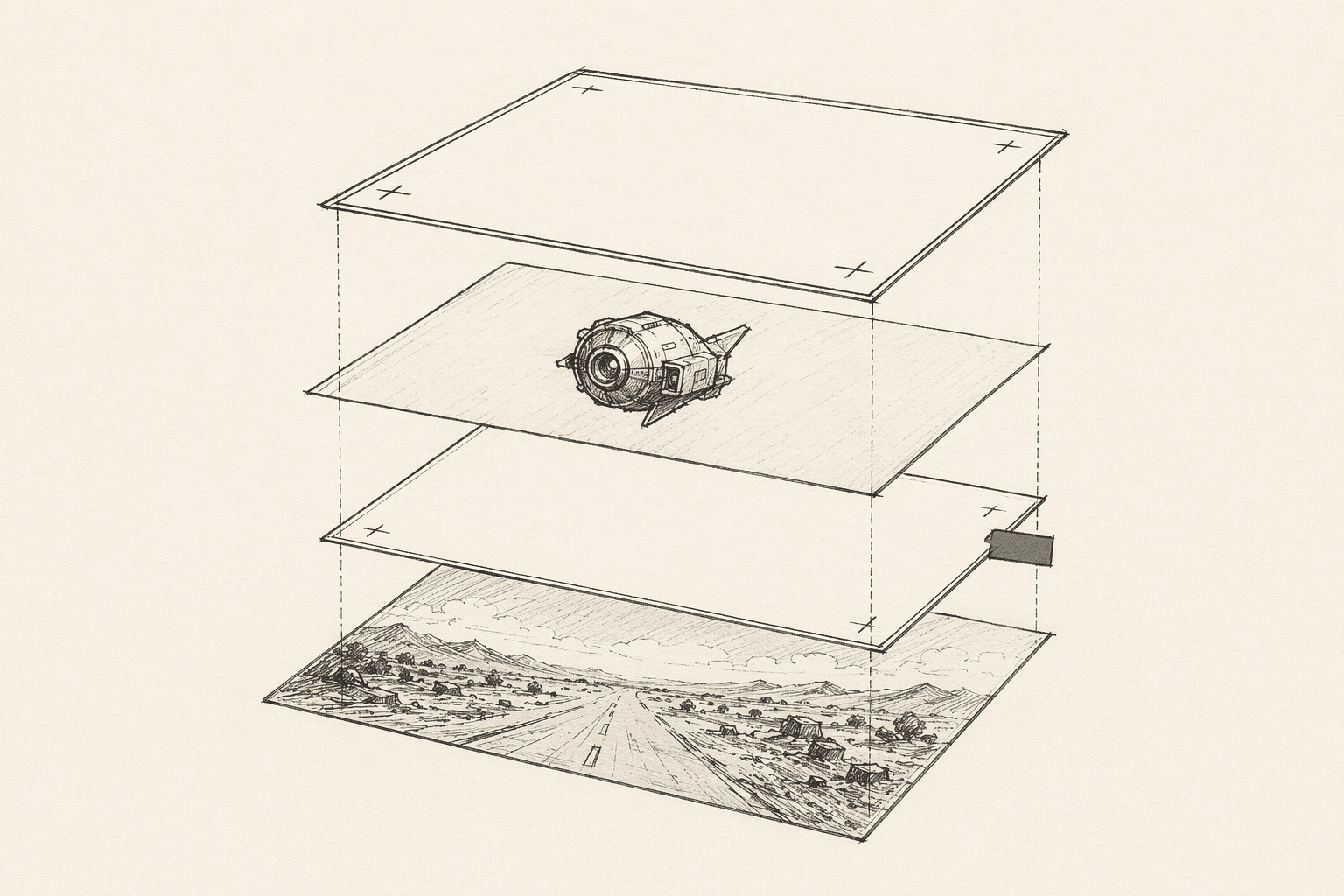
Plate layer. What the camera actually captures on set. This includes practical set pieces, actors, practical lighting, and any in-camera effects.
CG layer. What gets modeled, textured, lit, and rendered in 3D software. This could be creatures, environments, vehicles, or set extensions.
Matte painting. Static or slowly-moving background or environment art. Sky replacements, distant landscapes, city extensions.
Particle/simulation layer. Smoke, fire, water, dust, debris, magic effects — anything that requires fluid or particle simulation.
Compositing effects. Color grading zones, lens flares, depth of field adjustments, atmospheric haze.
Board each layer. Draw or describe the plate composition, then annotate which elements are CG, which are matte, and which are practical. Use different colors or hatching to distinguish layers in your storyboard frame.
Green Screen Planning
Green screen shots fail when the screen isn't big enough, the lighting doesn't match the intended environment, or the camera angle doesn't match the background plate.
Your storyboard should specify:
Screen coverage. How much of the frame needs green screen? Mark the exact boundaries in your storyboard. A common mistake: boarding a wide shot where the actor moves to the edge of the screen, only to discover on set that the green screen doesn't extend far enough.
Camera distance and lens. Wider lenses see more green screen area. If you're shooting at 24mm from 10 feet, the screen needs to cover a much larger angle than at 85mm from 20 feet. Note the intended lens in your storyboard.
Lighting direction. Your storyboard should indicate where the "virtual" light source is — the light that exists in the final composite, not just the set. The DP needs to match this direction practically to avoid impossible compositing scenarios (an actor lit from the left composited into an environment lit from the right).
Floor/ground plane. Does the actor interact with the ground? If so, the floor needs to be tracked or green as well. Mark in your storyboard whether the actor is on a practical floor or a virtual one.
Camera Specifications for VFX Shots
VFX compositing requires camera data that regular storyboards don't capture:
Focal length. The lens determines perspective, depth of field, and how CG elements are rendered to match. (Different focal lengths change the effect of camera angles dramatically.) Note the exact focal length on every VFX storyboard frame.
Camera height and distance. These affect perspective matching between plate photography and CG elements. An incorrect camera height creates a subtle but visible mismatch that audiences feel without understanding why.
Frame rate. Standard 24fps for most work, but slow-motion VFX shots need higher capture rates. If you're planning a 120fps capture for 20% speed playback, note it — it affects motion blur calculations and CG rendering.
Camera movement speed and path. CG elements need to track with the camera. Specify the speed, direction, and smoothness of any camera movement. A handheld shake requires different tracking than a smooth dolly.
Storyboarding Common VFX Scenarios
Set Extension
The most common VFX shot: a practical set that's extended digitally. Half the environment is real, half is CG or matte painting.
Board this as two panels:
- What the camera actually sees (practical set with green screen or bluescreen beyond the set boundary)
- The final composite (full environment as the audience sees it)
Mark the boundary line between practical and digital clearly. This line determines where tracking markers go and where the set build ends.
Screen Replacement
A character interacts with a screen — phone, monitor, TV — that shows content added in post.
Board the composition showing the screen's position, angle, and relative size in frame. Note whether the screen is:
- Green/blue screen (screen-shaped insert on set)
- Tracking markers (dots on a practical screen for post-tracking)
- Practical playback (actual content on screen, adjusted in post for color/brightness)
The storyboard determines the screen's angle relative to camera, which affects reflection handling and perspective matching.
Wire Removal
Stunt work, flying, or any action that uses wires or rigs that need removal in post.
Board the action as the audience should see it (without wires). Annotate with:
- Wire attachment points
- Wire colors (green wires against non-green backgrounds, or vice versa)
- Rig positions that need painting out
- Any background that will be partially obscured by the rig
Day-for-Night
Shooting in daylight but grading to look like night in post.
Board the intended night look — where the moonlight comes from, which areas are in shadow, which practical lights (streetlamps, car headlights, windows) are visible. The DP lights the day shoot to enable the night grade, and they need to know the intended final look to do this correctly.
Working With Your VFX Supervisor
The VFX supervisor is your storyboard's most important reader. They translate your visual intent into technical requirements.
Share storyboards early. Before shooting, the VFX sup needs to review every VFX storyboard frame and identify:
- What's technically achievable within budget
- What requires additional plate photography
- Where tracking markers need to be placed
- What practical effects can replace expensive CG
Mark "director notes" vs "VFX requirements" separately. Your creative intent ("I want this to feel overwhelming, like the character is dwarfed by the environment") is different from the technical specification ("CG set extension above the practical set line, matte painting beyond 200 feet"). Both belong on the storyboard, clearly distinguished.
Be honest about budget. A storyboard that calls for a full CG creature in every frame of a 30-second sequence might cost $50,000+. If your VFX budget is $5,000 (common for indie film productions), the storyboard needs to reflect creative solutions that achieve the effect within budget: POV shots (no creature visible), shadow and sound (suggesting without showing), practical effects with CG enhancement.
The VFX Storyboard Checklist
Before your VFX storyboard is ready for the team, verify each frame has:
- Final composite composition (what the audience sees)
- Layer breakdown (what's plate, CG, matte, particles)
- Green/blue screen boundaries marked
- Camera specs (focal length, height, distance)
- Camera movement notes (speed, path, smoothness)
- Lighting direction (practical vs. virtual sources)
- Frame rate notation (if not standard 24fps)
- Tracking marker placement notes
- VFX budget impact assessment (is this a $500 shot or a $5,000 shot?)
Frequently Asked Questions
Ready to speed up your pre-production?
StoryBirdie turns your screenplay into a professional storyboard in minutes. See pricing or jump straight in.
About the author
Amit is co-founder and engineering lead at StoryBirdie. He owns the screenplay analysis pipeline, AI shot-list generator, and storyboard image stack — frontend, backend, AI, and DevOps. Alongside StoryBirdie he leads product, research, and engineering at Noumenal AI (AI research lab) and previously built Blintic AI solo and worked as ML Engineer and team lead at Docsumo. A 21-year-old engineer based in Kathmandu, Nepal — he met Aayush at an AI conference, became gym buddies, and shipped the first version of StoryBirdie in two weeks. Writes about ML and engineering at selftaughtamit.medium.com.
Keep reading
- How to Storyboard a Film: The Complete GuideLearn how to storyboard a film from start to finish. Covers frame composition, shot notation, formats, and modern workflows.·15 min read
- How Many Storyboard Panels Per Scene?A practical formula for deciding how many storyboard frames your scene needs. Covers dialogue, action, and VFX scenes with real numbers.·6 min read
- How to Create a Shot List: A Director's GuideLearn how to create a shot list step by step. Covers shot types, camera angles, movement notation, and scene organization.·14 min read
- How to Storyboard for Animation: A Step-by-Step GuideStoryboarding for animation, step by step: timing, staging, acting through drawing, and the animatic pipeline. With real examples directors use.·8 min read