The Shot List Bottleneck
You've analyzed your screenplay. You know the beats, the blocking, the emotional arc. Now you need to translate all of that into a shot list — the tactical document that tells your DP and AD exactly what you need to capture on set.
For a 5-page scene, a thorough shot list might have 20-40 shots. Each one needs: shot size, camera movement, framing, characters in frame, action description, and dialogue covered. Building that manually takes an hour or more per scene. For a 10-scene short film, that's a full day of administrative work before you've made a single creative decision about visuals.
AI shot list generators change that equation. They read your screenplay and produce a structured shot list in seconds, giving you a foundation to refine rather than a blank spreadsheet to fill.
What an AI Shot List Generator Actually Produces
A good AI shot list generator doesn't just spit out "wide shot, medium shot, close-up" on repeat. It reads the screenplay and makes context-aware decisions:
Scene structure analysis. The AI identifies beats within each scene — moments where the dramatic energy shifts. Each beat typically needs its own coverage. A dialogue scene with three emotional shifts needs different framing for each shift.
Camera decisions. Based on the scene type and content:
| Scene Context | AI Decision | Why |
|---|---|---|
| Two characters in dialogue | Shot/reverse-shot with establishing wide | Standard coverage pattern that gives the editor options |
| Character enters a new location | Wide establishing shot → medium as they move | Orients the audience in the space |
| Emotional revelation | Push from medium to close-up | Draws the audience into the character's internal state |
| Physical action | Wider framing with tracking movement | Keeps the action readable within the frame |
| Key prop or detail | Insert shot | Ensures the audience registers plot-critical information |
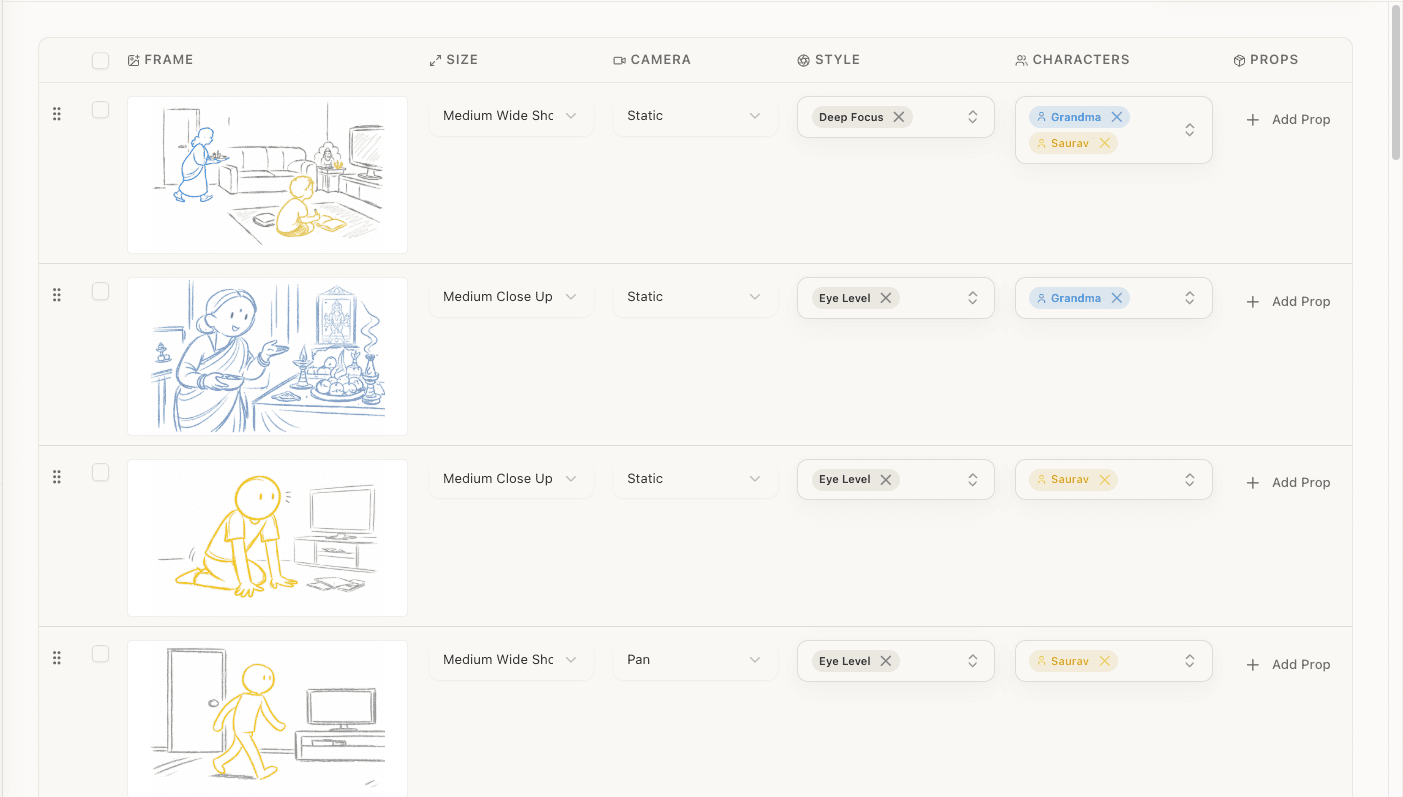
Shot metadata. Each shot entry includes:
- Shot number and scene reference
- Shot size (wide, medium, close-up, etc.)
- Camera movement (static, pan, tilt, dolly, tracking, handheld)
- Shot type (over-the-shoulder, POV, two-shot, insert, reaction)
- Characters in frame
- Blocking notes (where characters are positioned)
- Action (what happens during the shot)
- Dialogue covered (which lines this shot captures)
This is substantially more than "shot 1: wide, shot 2: medium." It's a working document an AD can use for scheduling and a DP can use for equipment planning.
The Workflow: Screenplay to Shot List

Step 1: Feed the AI Your Screenplay
Upload your screenplay in standard format (PDF, DOCX, or Fountain). The AI parses scene headings, action lines, character names, and dialogue. (For the full screenplay-to-storyboard workflow, see how to turn a screenplay into a storyboard with AI.) Fountain format tends to give the cleanest results because the formatting is unambiguous — there's no rendering interpretation layer.
Step 2: Review the Analysis
Before generating shots, the AI should analyze the screenplay for elements that affect shot planning:
- Characters present in each scene (and their emotional states)
- Location details and spatial relationships
- Props and wardrobe mentioned
- Implied blocking from action lines
- Continuity issues (a character sitting in one line and standing in the next without a transition)
This analysis step is critical. A shot list generated without understanding the scene's spatial layout will suggest camera positions that don't make physical sense. An AI that catches "character is behind the desk" in the action lines can frame shots accordingly.
Step 3: Generate and Refine
The AI generates the shot list. Now your job begins.
Review for creative intent. The AI generates technically sound coverage. But it doesn't know that you want this scene to feel claustrophobic (so you'd tighten all the framings). It doesn't know you're building to a reveal in the final shot (so you'd hold wider longer to delay the audience's focus). Override the AI's defaults with your creative vision.
Adjust for budget reality. The AI might suggest a tracking shot that requires a dolly you don't have. Swap it for a handheld push-in. It might suggest three coverage angles when you only have time for two setups. Cut the least essential one.
Check for editing logic. The shots need to cut together. Watch for:
- 180-degree rule consistency
- Appropriate size jumps between consecutive shots (don't cut from a medium to a slightly tighter medium — the jump will feel jarring)
- Matching eyelines across shot/reverse-shot pairs
- Coverage gaps (every line of dialogue should be covered by at least one shot)
When AI Shot Lists Work Best
Dialogue-heavy scenes. Coverage patterns for dialogue are well-established. The AI reliably produces workable shot/reverse-shot setups with appropriate establishing shots.
Standard narrative scenes. Characters entering locations, having conversations, performing actions — the bread and butter of most short films and features.
Pre-production speed. When you need a working shot list today, not next week. AI generates in seconds what takes hours manually.
Iteration. Want to try covering a scene with longer takes instead of rapid cutting? Regenerate with different parameters. The speed of AI lets you explore multiple approaches.
When to Override the AI
Stylized visual language. If you're going for Wes Anderson symmetry or Wong Kar-wai handheld intimacy, the AI will default to conventional coverage. You'll need to override most shots with your specific style.
Complex choreography. Fight scenes, dance sequences, and elaborate blocking need frame-by-frame precision that AI can't currently handle. Use the AI-generated list as a starting skeleton, then manually add the detailed choreography shots.
Thematic framing. If your story uses visual motifs (caging characters in doorframes when they're trapped, opening into wide shots when they find freedom), you'll need to impose that visual logic on the AI's output. The AI doesn't understand your thematic intent.
The Shot List Is a Starting Point
The best way to think about AI-generated shot lists: they handle the 70% of decisions that are craft — the standard coverage patterns, the establishing shots, the insert shots you'd forget until you were editing. (For a deeper dive on creating shot lists manually, see the director's guide to shot lists.) That frees you to spend your creative energy on the 30% that makes your project distinctive — the unusual angles, the held shots, the visual surprises that make audiences lean in.
No AI replaces the director's eye. But a lot of what goes into a shot list isn't the director's eye — it's the director's administrative labor. Let the AI handle the labor.
Ready to speed up your pre-production?
StoryBirdie turns your screenplay into a professional storyboard in minutes. See pricing or jump straight in.
About the author
Amit is co-founder and engineering lead at StoryBirdie. He owns the screenplay analysis pipeline, AI shot-list generator, and storyboard image stack — frontend, backend, AI, and DevOps. Alongside StoryBirdie he leads product, research, and engineering at Noumenal AI (AI research lab) and previously built Blintic AI solo and worked as ML Engineer and team lead at Docsumo. A 21-year-old engineer based in Kathmandu, Nepal — he met Aayush at an AI conference, became gym buddies, and shipped the first version of StoryBirdie in two weeks. Writes about ML and engineering at selftaughtamit.medium.com.
Keep reading
- What Is a Shot List? Everything Directors Need to KnowA complete guide to shot lists for directors. What they include, how to create one, and why every shoot needs one.·9 min read
- AI Shot List Generation: From Script to ShotsLearn how AI shot list generation turns screenplays into detailed shot lists in minutes, saving directors hours of pre-production work.·12 min read
- How to Create a Shot List: A Director's GuideLearn how to create a shot list step by step. Covers shot types, camera angles, movement notation, and scene organization.·14 min read
- Storyboard vs Shot List: Which Comes First?Should you create a shot list or storyboard first? The answer depends on your project. Here's a practical framework for deciding.·7 min read