Not Every Shot Needs a Storyboard
I see first-time directors try to storyboard their entire 15-minute short film — every shot, every angle, every cutaway. They burn two weeks on boards, then throw half of them out on set because the location didn't match what they imagined.
Here's what experienced directors know: storyboard the shots that need visual planning. Shot-list the rest.
A dialogue scene in a living room with two characters? Your DP can cover that with a shot list and a 30-second conversation about framing. A chase sequence through a market? That needs storyboards because the blocking, camera movement, and editing rhythm are too complex to hold in your head.
This guide focuses on the shots that deserve storyboarding and the practical steps to create boards that help on set, not boards that look good on Instagram.
Step 1: Identify Your Storyboard-Worthy Scenes
Read through your screenplay and flag scenes that have:
Complex blocking. More than two characters moving through a space. Any scene where the physical staging affects the emotional read of the moment.
Camera movement. Tracking shots, dollies, crane moves, Steadicam sequences. If the camera has to move in coordination with actors, you need to plan it visually.
Visual effects or compositing. Even simple VFX (a screen replacement, a sky swap) benefit from a storyboard frame showing the intended composition. (For complex VFX, see our VFX storyboarding guide.)
Action or choreography. Fight scenes, stunts, dance sequences. The editing rhythm is set in pre-production, not in the edit bay.
Hero shots. The moments that define your film visually. The wide that establishes the world. The close-up that reveals the emotional turn. The final image.
Everything else gets a shot list. A well-written shot list with camera angles and framing notes is sufficient for standard dialogue coverage, establishing shots, and simple action beats.
For a typical 15-minute short with 8-10 scenes, you'll probably storyboard 3-4 scenes in detail. That's manageable.
Step 2: Break Each Scene Into Beats
Before you think about shots, think about story beats. A beat is a moment where something shifts — emotionally, informationally, or physically.
Take a two-person argument scene:
| Beat | What Happens | Emotional Shift |
|---|---|---|
| 1 | Characters enter, tension is low | Neutral |
| 2 | The accusation | Temperature rises |
| 3 | The denial | Frustration builds |
| 4 | The evidence | Shock, vulnerability |
| 5 | The decision | Resolution or rupture |
Each beat is a unit of coverage. You need at least one shot per beat, usually two or three. The emotional shift within each beat drives your framing choices:
- Beat 1 (neutral) → wider framing, both characters in frame
- Beat 2 (accusation) → tighter on the accuser, over-the-shoulder
- Beat 3 (denial) → reverse, tight on the accused
- Beat 4 (evidence) → possible insert shot of the evidence, then close-up reaction
- Beat 5 (decision) → pull back to two-shot for the resolution, or stay tight for intimacy
This beat-first approach means your storyboard serves the story, not just the camera.
Step 3: Plan Your Shots
For each beat, decide:
What shot size? This is your most important creative decision. Shot size controls emotional distance. (See our camera angles guide for how each angle and size affects the audience.) Wide shots give context and create distance. Close-ups create intimacy and emphasize performance. There's no formula — but there are conventions you should know before you break them.
Where is the camera? Eye level is neutral. Low angle adds power or menace. High angle diminishes or creates vulnerability. Dutch angle creates unease. Choose based on what the story needs, not what looks "cinematic."
Does the camera move? Static shots feel observational. Dolly moves feel intentional and guided. Handheld feels immediate and urgent. Match the camera movement to the scene's energy.
How does this shot connect to the next? This is what separates storyboards that help on set from storyboards that don't. Each frame should imply the cut that follows. If you're planning a match cut, both frames need to show the matching compositions.
Step 4: Create Your Frames
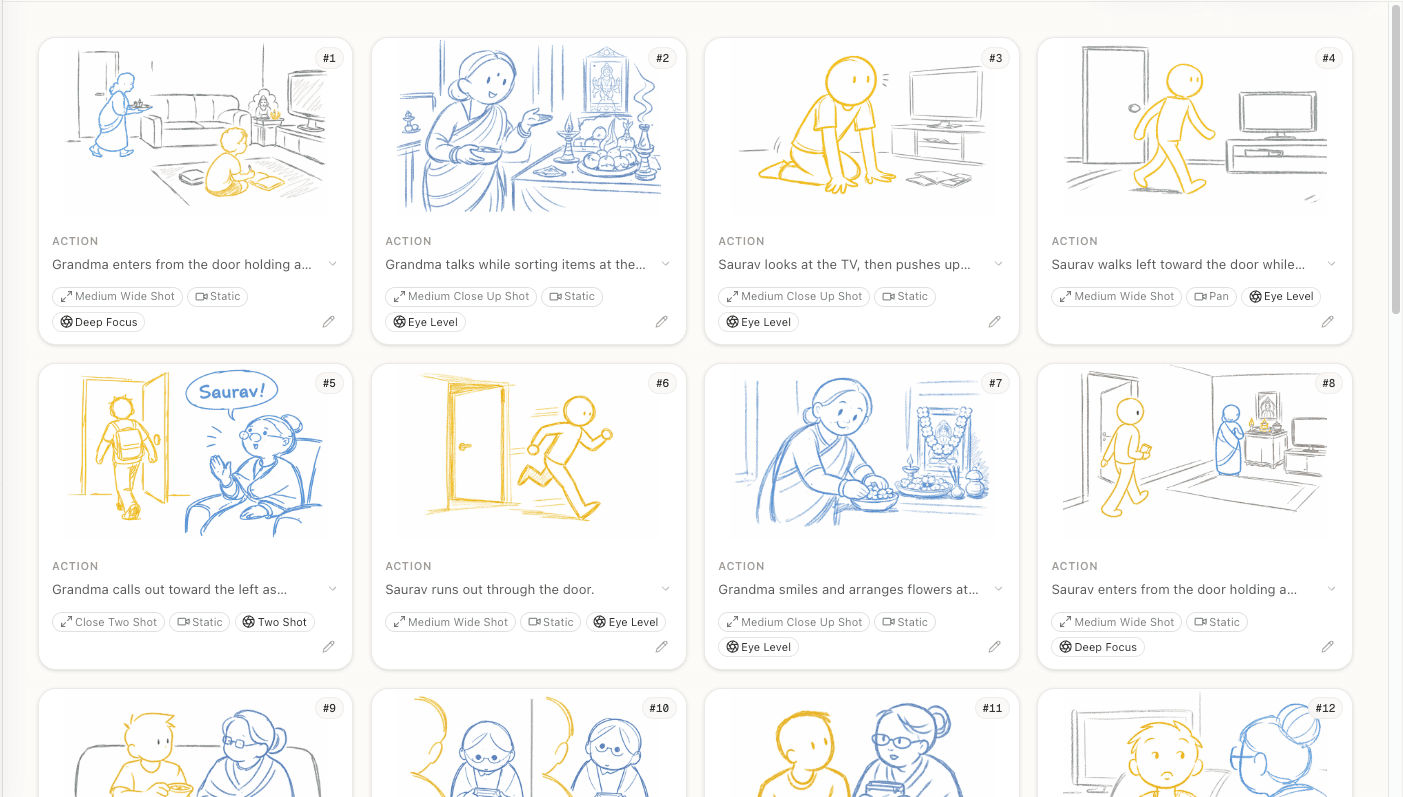
Now you actually produce the storyboard. Your options:
Quick sketches. Stick figures work. Seriously. Spielberg's boards for Jaws were stick figures. The only information your crew needs is: what's in frame, where's the camera, and what's the composition. If you can draw a rectangle with a circle for a head and lines for a body, you can communicate a shot.
Photo reference. Visit your location with your phone. Stand where the camera would be. Take a photo. Annotate it with framing lines and shot notes. This is fast, free, and gives you real spatial reference.
AI generation. Upload your screenplay to a tool that generates frames from your script. The AI handles the drawing — you handle the directing decisions. Fastest option if you've already written the scene.
Hybrid. Use AI-generated frames as a base, then annotate with notes, arrows, and corrections. This gives you the speed of AI with the specificity of your vision.
Step 5: Arrange the Sequence
With individual frames created, arrange them in sequence and check:
Does the sequence cut? Step through the frames quickly, imagining each cut. Do they feel like a coherent scene, or a random collection of images? If a cut feels jarring, you might need an intermediary shot.
Is the 180-degree line consistent? If Character A is frame-left in shot 1, they should stay frame-left throughout the scene (unless you intentionally cross the line with a specific shot). Inconsistent screen direction confuses audiences.
Do the eyelines match? In shot/reverse-shot, the characters should appear to look at each other. If A looks screen-right in their close-up, B should look screen-left in theirs.
Is there enough coverage? For every moment in the scene, would an editor have at least one usable shot? Think about what the editor needs to construct the scene, not just what you want to shoot.
Step 6: Add Notes and Metadata
Bare frames aren't enough for your crew. Each frame needs:
- Shot number and scene reference
- Shot size (wide, medium, CU, etc.)
- Camera movement (static, dolly left, tilt up, etc.)
- Audio notes (dialogue covered, sound effects, music cues)
- Duration estimate (how long the shot runs — helps your AD schedule)
These notes turn a visual board into a production document. Your AD uses the shot count and duration to estimate how many setups per day. Your DP uses the movement notes to plan equipment. Your sound team uses the audio notes to plan location recording.
Step 7: Export and Share
Your storyboard needs to reach three people in usable form:
Your DP. They need the visual frames plus camera notes. A PDF with frames and metadata works. If possible, walk through the boards together before shooting — no document replaces a conversation.
Your AD. They need the shot count per scene, estimated durations, and complexity level. This drives the shooting schedule. A scene with 25 storyboarded shots takes longer than a scene with 8.
Yourself. Print the boards and tape them up near the monitor on set. When the day goes sideways and you're losing light, the boards remind you what shots are essential versus nice-to-have.
Common Mistakes to Avoid
Over-storyboarding. Not every shot needs a detailed board. Standard dialogue coverage can live on a shot list. Save your storyboarding energy for shots that need visual planning.
Under-storyboarding. But don't skip the complex shots. If a shot involves coordinated camera and actor movement, storyboard it. The cost of miscommunication on set is always higher than the cost of pre-planning.
Pretty boards with no information. A beautiful frame that doesn't communicate shot size, camera position, or blocking is wall art, not a production tool. Function first.
Ignoring the edit. Your storyboard is a pre-edit. If the frames don't cut together as a sequence, the footage won't either. Think like an editor while you board.
Planning shots you can't execute. A crane shot looks great in a storyboard but requires equipment you might not have. Stay aware of your budget and equipment list while planning shots.
Ready to speed up your pre-production?
StoryBirdie turns your screenplay into a professional storyboard in minutes. See pricing or jump straight in.
About the author
Aayush is co-founder and director at StoryBirdie. He's a screenwriter, director, stand-up comedian, and full-stack developer — co-founder of Kathmandu's Comedy Tuk Tuk, with directing and writing credits on shorts, music videos, and comedy projects. He builds StoryBirdie on the conviction that storyboarding is expensive, time-consuming, and important — and that a tool for it should serve the filmmaker's vision, not replace it. StoryBirdie is currently in use on a Nepali feature, a Sri Lankan TV commercial, and at one of Nepal's largest production houses. Based in Kathmandu, Nepal.
Keep reading
- How to Storyboard a Commercial: A Director's WorkflowStoryboarding a commercial: timing, product shots, client-approval drafts, and the agency workflow that keeps clients and crew aligned.·8 min read
- How to Storyboard a Dialogue SceneCamera angles, shot sizes, and pacing strategies for storyboarding dialogue. Practical coverage patterns every director should know.·8 min read
- How to Storyboard a Fight SceneStoryboard fight scenes that are clear, impactful, and editable. Covers choreography beats, camera placement, and cutting rhythm for action.·8 min read
- How to Storyboard a Music VideoA practical guide to storyboarding music videos. Covers beat mapping, visual rhythm, performance vs narrative, and tools for MV directors.·8 min read