You Shouldn't Need to Draw to Direct
The biggest barrier to storyboarding has never been creative vision. It's been drawing ability.
Directors see the shots in their head. They know what the frame should look like, where the camera should be, how the scene should cut. But translating that vision into a visual document — a storyboard their DP and crew can reference on set — traditionally requires one of two things: drawing skills or a budget for a storyboard artist.
Most indie directors have neither.
So they skip storyboarding. They show up on set with a shot list and a prayer, try to explain the shots verbally to their DP, and lose hours to miscommunication and missed coverage.
Free storyboard generators exist now. Some are template-based (you drag and drop pre-made elements). Some use AI to generate frames from text descriptions. The quality varies wildly. Here's an honest look at what's available and what actually works.
What "Free Storyboard Generator" Actually Means
Before comparing tools, let's be clear about what "free" looks like in this space:
- Free with limitations — most tools offer a free tier with restricted features (watermarked exports, limited projects, fewer frames)
- Free trial — full access for a limited time (7-14 days), then paid
- Free forever with paid upgrade — core functionality is free, premium features cost money
- Open source — truly free, but requires technical setup
None of the serious tools are completely free with no limitations. Running AI image generation costs real money per frame. Any tool that generates custom storyboard images is absorbing those costs on the free tier and capping usage to stay viable.
That's fine. The question isn't "is it free forever" — it's "can I get meaningful value on the free tier before deciding to pay?"
The Tools: An Honest Comparison

Template-Based Generators (No AI)
These tools give you pre-made character poses, backgrounds, and props that you arrange to create storyboard frames. Think paper dolls on a stage.
Storyboarder (free, open source)
- Desktop app, works offline
- Draw your own frames or use shot generator for basic compositions
- Very bare-bones — the interface feels like it hasn't been updated in years
- No AI generation, no text-to-image
- Best for: directors who can draw and want a free canvas
Canva (free tier available)
- Not a storyboard tool, but has storyboard templates (free printable storyboard templates are also available without a Canva account)
- Drag and drop elements onto frames
- Results look generic — stock illustration style
- No understanding of filmmaking concepts (shot sizes, camera angles)
- Best for: pitch decks where visual quality matters more than shot accuracy
Boords (free trial, then $36/mo)
- Purpose-built for storyboarding
- Frame editor with drawing tools and image import
- Script-to-board workflow with text panels
- Collaborative features for teams
- AI image generation available (paid add-on)
- Best for: agencies and production companies with budget for a monthly tool
AI-Powered Generators
These tools use AI to generate storyboard frames from text descriptions or screenplays.
Katalist (free trial)
- Text-to-storyboard with AI-generated frames
- Style customization (realistic, sketch, anime)
- Character consistency features
- No screenplay analysis or shot list generation — you describe each shot manually
- Best for: directors who want visual frames from text prompts
Krock.io (free tier, limited)
- AI storyboard generation from text
- Review and approval workflow built in
- More focused on client-facing creative review than director pre-viz
- Best for: agencies managing client feedback on creative work
StoryBirdie (free tier, 50 credits)
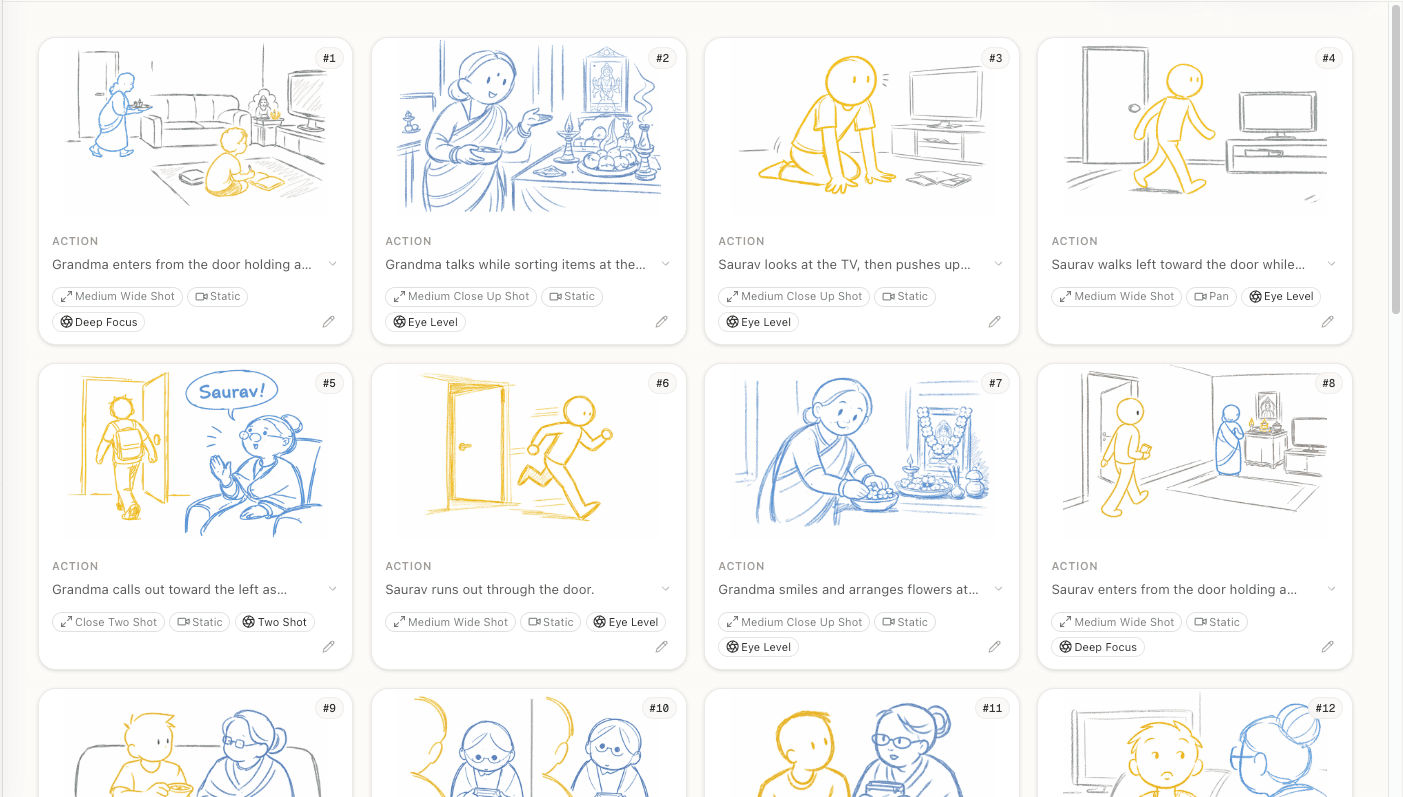
- Full pipeline: screenplay upload, AI analysis, shot list generation, storyboard frames
- Understands screenplay format — parses your script automatically
- Flags continuity issues before you storyboard
- Generates shot metadata (camera angles, blocking, movement) not just images
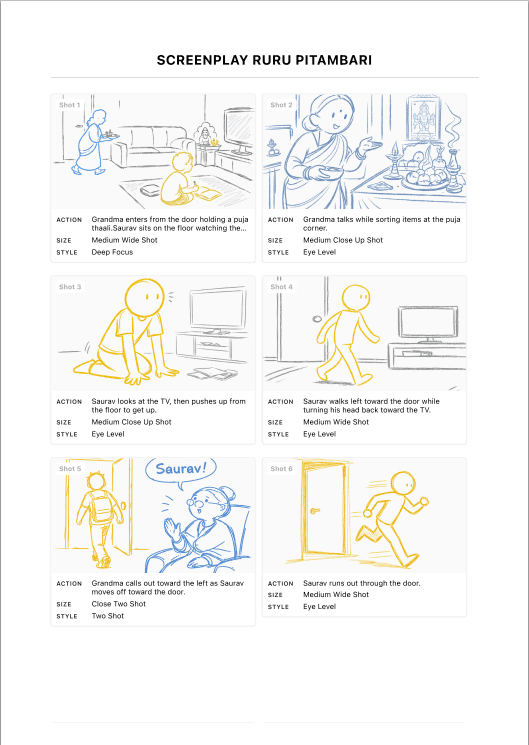
- Export as PDF storyboard
- Free tier: 50 credits (enough for 1 complete scene including analysis, shot list, and frames)
- Best for: indie directors who want the complete screenplay-to-storyboard workflow
What to Look For in a Free Storyboard Generator
Not all free tiers are created equal. Here's what separates useful from frustrating:
1. Can You Complete a Full Scene on the Free Tier?
Some tools let you create 2-3 frames for free — enough to see the interface, not enough to evaluate whether the tool actually helps your workflow. You need to storyboard at least one complete scene to know if a tool works for you.
The test: take a 1-2 page scene from your current project. Can you storyboard it completely on the free tier? If the tool cuts you off mid-scene, it's a demo, not a free tier.
2. Does It Understand Filmmaking?
A general-purpose AI image generator (Midjourney, DALL-E) can create pretty images. But it doesn't know what a "medium close-up with a slight low angle" means in the context of a two-character dialogue scene. It doesn't understand eyeline matching, the 180-degree rule, or how shot sizes affect emotional distance.
A good storyboard generator should output frames that reflect filmmaking knowledge — appropriate framing for the scene type, consistent character positioning across shots, and compositions that would actually work as cuts in a sequence.
3. How Good Are the Exports?
Your storyboard needs to be shared with your crew. That means a clean PDF with frames, shot numbers, and metadata (camera angle, movement, action, dialogue). If the tool can only export individual images, you'll spend an hour arranging them in a document — which defeats the purpose.
4. Can You Edit After Generation?
AI gets it wrong sometimes. The camera angle is off, the framing doesn't match your vision, or a character is positioned incorrectly. You need to be able to edit the shot description and regenerate individual frames without starting over.
The Workflow That Actually Saves Time
Regardless of which tool you choose, the workflow that saves the most time follows this sequence:
1. Start with your screenplay, not individual shot descriptions. (Here's a step-by-step tutorial.)
Typing "medium shot of John entering the room from the left, warm lighting, anxious expression" for 30 shots is tedious. A tool that can read your screenplay and generate shots automatically gives you a starting point to refine, not a blank canvas to fill from scratch.
2. Review the shot list before generating frames.
Frames take longer to generate than text. Adjust your shot sizes, camera angles, and coverage in the shot list stage — where changes are free and instant — before committing to image generation.
3. Edit selectively, not comprehensively.
You don't need every frame to be perfect. Storyboards are communication tools, not art. If 80% of the frames communicate the shot clearly, focus your editing time on the 20% that don't.
4. Export and move on.
Pre-production has a deadline. A good-enough storyboard that exists beats a perfect storyboard that doesn't. Get the storyboard to your crew and start prep conversations. You can always revise specific shots later.
A Note on AI Image Quality
AI-generated storyboard frames in 2026 are good for pre-visualization. They clearly communicate framing, composition, and blocking. They're not photorealistic, and they're not meant to be.
If you need production-quality concept art — frames that show the exact look of your film for investor decks or VFX pre-viz — AI generators aren't there yet for most use cases. Hire an artist for those specific frames.
For everything else — communicating shots to your DP, planning coverage with your AD, discussing pacing with your editor — AI-generated frames do the job. And they do it in minutes instead of days.
Frequently Asked Questions
Ready to speed up your pre-production?
StoryBirdie turns your screenplay into a professional storyboard in minutes. See pricing or jump straight in.
About the author
Amit is co-founder and engineering lead at StoryBirdie. He owns the screenplay analysis pipeline, AI shot-list generator, and storyboard image stack — frontend, backend, AI, and DevOps. Alongside StoryBirdie he leads product, research, and engineering at Noumenal AI (AI research lab) and previously built Blintic AI solo and worked as ML Engineer and team lead at Docsumo. A 21-year-old engineer based in Kathmandu, Nepal — he met Aayush at an AI conference, became gym buddies, and shipped the first version of StoryBirdie in two weeks. Writes about ML and engineering at selftaughtamit.medium.com.
Keep reading
- Best Storyboard Software in 2026: Honest ComparisonHonest comparison of the best storyboard software in 2026. Pricing, features, and which tool fits your directing workflow.·13 min read
- How AI Storyboard Generators Actually Work in 2026How AI storyboard generators turn text and screenplays into shot frames in 2026. Director's guide to the tech, its limits, and which tools to pick.·19 min read
- Storyboard Software for Directors Who Can't DrawYou don't need drawing skills to storyboard your film. Here's how directors are using AI and template tools to create production-ready storyboards.·6 min read
- Planning a Shoot With AI Video Tools: Where Each One StartsHiggsfield, LTX Studio, Katalist and StoryBirdie compared by where you start — an idea, an image, or a finished script. Which tool fits which beginning.·10 min read