Most comparisons of AI video tools rank them by output quality. That is the wrong axis, because the models underneath change every quarter and the rankings change with them.
The axis that actually decides which tool fits you is where you start. Some tools begin with an idea you type. Some begin with an image you upload. One begins with a finished screenplay. That starting point determines how much of the planning you do by hand, and the planning is the part that takes the afternoon.
The comparison
Checked against each product's own documentation on 13 September 2026. This field revises quarterly, so verify anything that matters to you before committing.
| Starts from | Scale per run | Shot list with metadata | Exports to | |
|---|---|---|---|---|
| Higgsfield Popcorn | text prompt + reference image | up to 8 images per sequence | no | Sora 2 |
| LTX Studio | text prompt or script outline | scene-level sequences | partial | its own renderer |
| Katalist | text prompt + characters | scene-level sequences | partial | Runway, Veo, Kling |
| StoryBirdie | uploaded screenplay (PDF, DOCX, Fountain) | whole script | yes | XLSX, CSV, Markdown, and a brief with frames for Veo, Sora, Runway, Kling |
Three of the four begin with something you type. That is not a criticism. If your project starts as an idea, a prompt-first tool is genuinely the fastest path from nothing to a frame, and Popcorn in particular is very good at keeping a character consistent across a short sequence.
The difference shows up when the project starts as a finished script.
The step the prompt-first tools ask you to do yourself
Higgsfield publishes a guide called How to Turn a Script into an AI Storyboard and Shot List. It is a good guide. Here is how it tells you to begin:
"Break it into scenes and pull out the visual beats worth showing. Set a shot size and camera move for each one. Then generate a reference frame for every beat."
Read that as a task list. You segment the script. You decide which beats deserve a shot. You assign a shot size and a camera move to each one. Only then does the tool start working.
That is the shot breakdown, and it is the hour of the afternoon. For a five-page scene it means making somewhere around twenty decisions about coverage before you generate anything — and then holding those decisions consistent while you feed them in eight images at a time.
None of this is a flaw in Popcorn. It is a consequence of starting from a prompt: the tool cannot break down a script it never received.
What starting from the script changes
The breakdown happens once, automatically
Upload the screenplay and the shot list comes back as a table: shot size, angle, camera movement, blocking, action, characters in frame, and props, one row per shot. You edit what you disagree with instead of authoring all of it.
Every shot stays tied to its lines
Each row points back at the lines of script it came from, so when a scene gets rewritten you can see which shots are affected rather than rebuilding the list.
The character description is written once and reused
Characters are described once for the whole script and applied to every shot they appear in, rather than re-specified per sequence.
Scale stops being a problem
A 90-page feature and a one-page scene go through the same path. There is no chaining of eight-image batches.
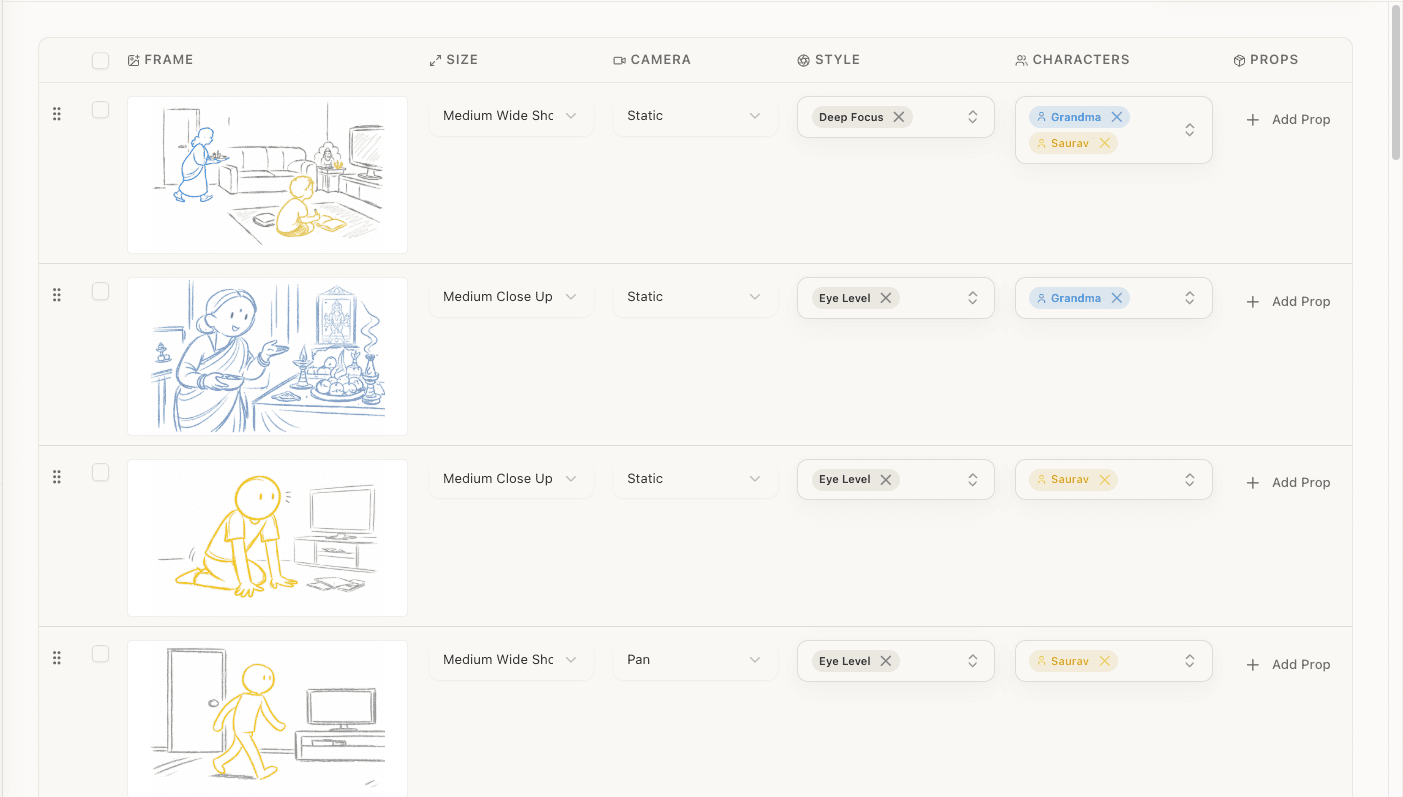
That is the artifact the comparison is really about. Every row is editable, the columns are the ones an assistant director expects, and the same table exports to a spreadsheet or feeds the frames beside it.
Getting the plan out of the tool
A plan you cannot move is not much of a plan. The shot list exports as a spreadsheet for the people on your crew who live in one, and there is a second export for the case this page is about: handing the whole thing to a video model.
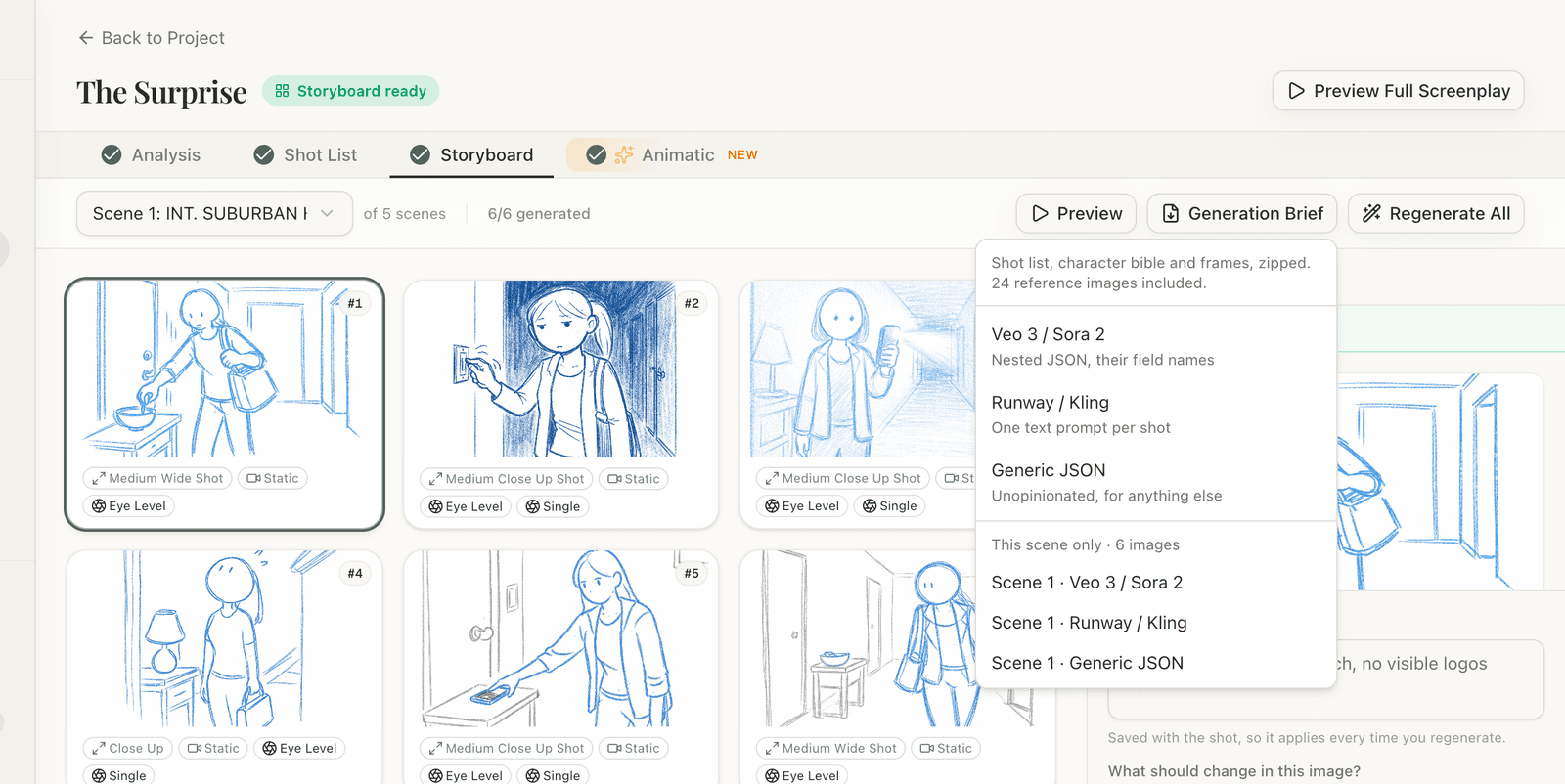
It produces a zip holding three things:
The shots, in the field names your model expects
Composition, camera motion, subject and action, location, time of day, lighting, dialogue, and what must not appear — laid out in the convention that model documents. Pick "Veo 3 / Sora 2" for nested JSON, "Runway / Kling" for one flat prompt per shot, since those two do better with a single camera move stated in prose.
The character bible as its own file
Written once for the whole script and applied to every shot the character appears in. This is the file people currently assemble by hand in a chat window, and it is the one that decides whether your protagonist survives the cut from shot one to shot two.
One reference frame per shot
Named by scene and shot, ready to attach. Sora 2 and Kling take one to two reference images per generation and Veo 3.1 takes images alongside clips, so these are inputs rather than decoration.
Every shot also carries the lines of screenplay it came from, which is how you trace a finished clip back to the page it was meant to serve.
Two honest notes. First, this is a handoff, not an integration: we do not call anyone's generation API, and you paste or upload the brief yourself. That is deliberate. The tools that integrate have to pick your model for you, and the model worth picking has changed roughly every quarter for two years. A brief works with whatever you choose this month and whatever launches next, and the format carries a version number so a consumer knows which revision it is holding.
Second, it is free. The frames already cost credits to render, so charging again to get your own work out of the building would be a strange way to behave.
Which one to pick
Pick a prompt-first tool — Popcorn, LTX, Katalist — if your project starts as a concept, a mood, or a single reference image; if the sequence is short; or if you want generated video out of the same tool that made the boards. All three do that and we do not.
Pick a script-first tool if you already have a screenplay, if the scene is long enough that breaking it down by hand is real work, if you need a shot list your crew or your client can read, or if the project will be revised and you need the plan to survive the revision.
Plenty of people will use both, and that is a sensible workflow: plan from the script, then take the plan to whichever model is best this month.
If you want to see what the script-first path produces before deciding, the shot list generator takes a scene and returns the table, and there is a blank shot list template if you would rather fill one in yourself. For the difference between the board and the timed version of it, see storyboard vs animatic, and for how the frame generation itself works, how AI storyboard generators actually work.
If your shortlist is storyboard tools rather than video models, the comparisons that cover those are Boords alternatives and the 2026 storyboard software roundup.
A note on cost, because it is not obvious
Prompt-first storyboarding is often free or close to it on the generation platforms. That is not generosity, it is packaging: the board is the on-ramp to the generation credits, which is where those platforms earn. If your goal is finished AI video, you are likely to get the boards bundled with credits you were buying anyway.
Where you pay separately is for planning that is not an on-ramp to anything — a breakdown you can hand to a crew, a shot list that survives a rewrite, coverage you can argue about with a director. Worth knowing which of those two things you actually need before you compare prices.
Frequently Asked Questions
Ready to speed up your pre-production?
StoryBirdie turns your screenplay into a professional storyboard in minutes. See pricing or jump straight in.
About the author
Amit is co-founder and engineering lead at StoryBirdie. He owns the screenplay analysis pipeline, AI shot-list generator, and storyboard image stack — frontend, backend, AI, and DevOps. Alongside StoryBirdie he leads product, research, and engineering at Noumenal AI (AI research lab) and previously built Blintic AI solo and worked as ML Engineer and team lead at Docsumo. A 21-year-old engineer based in Kathmandu, Nepal — he met Aayush at an AI conference, became gym buddies, and shipped the first version of StoryBirdie in two weeks. Writes about ML and engineering at selftaughtamit.medium.com.
Keep reading
- Free Storyboard Generator: No Drawing RequiredCreate professional storyboards from your screenplay without drawing skills. Compare free storyboard generators and learn which one fits your workflow.·9 min read
- Best Storyboard Software in 2026: Honest ComparisonHonest comparison of the best storyboard software in 2026. Pricing, features, and which tool fits your directing workflow.·13 min read
- How AI Storyboard Generators Actually Work in 2026How AI storyboard generators turn text and screenplays into shot frames in 2026. Director's guide to the tech, its limits, and which tools to pick.·19 min read
- AI Screenplay Analysis: Catch Script Problems Before They Cost YouHow AI screenplay analysis tools catch continuity errors, blocking issues, and production problems that human reads miss. Save reshoot days.·8 min read